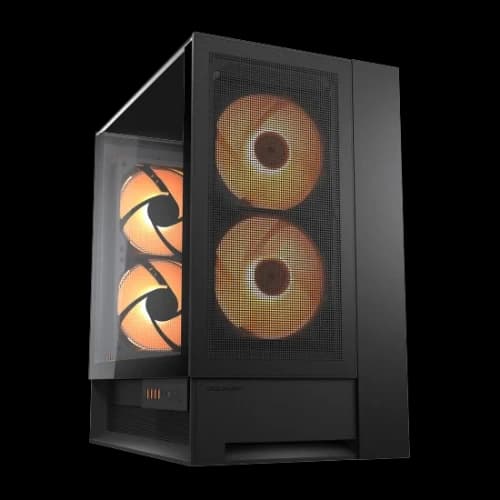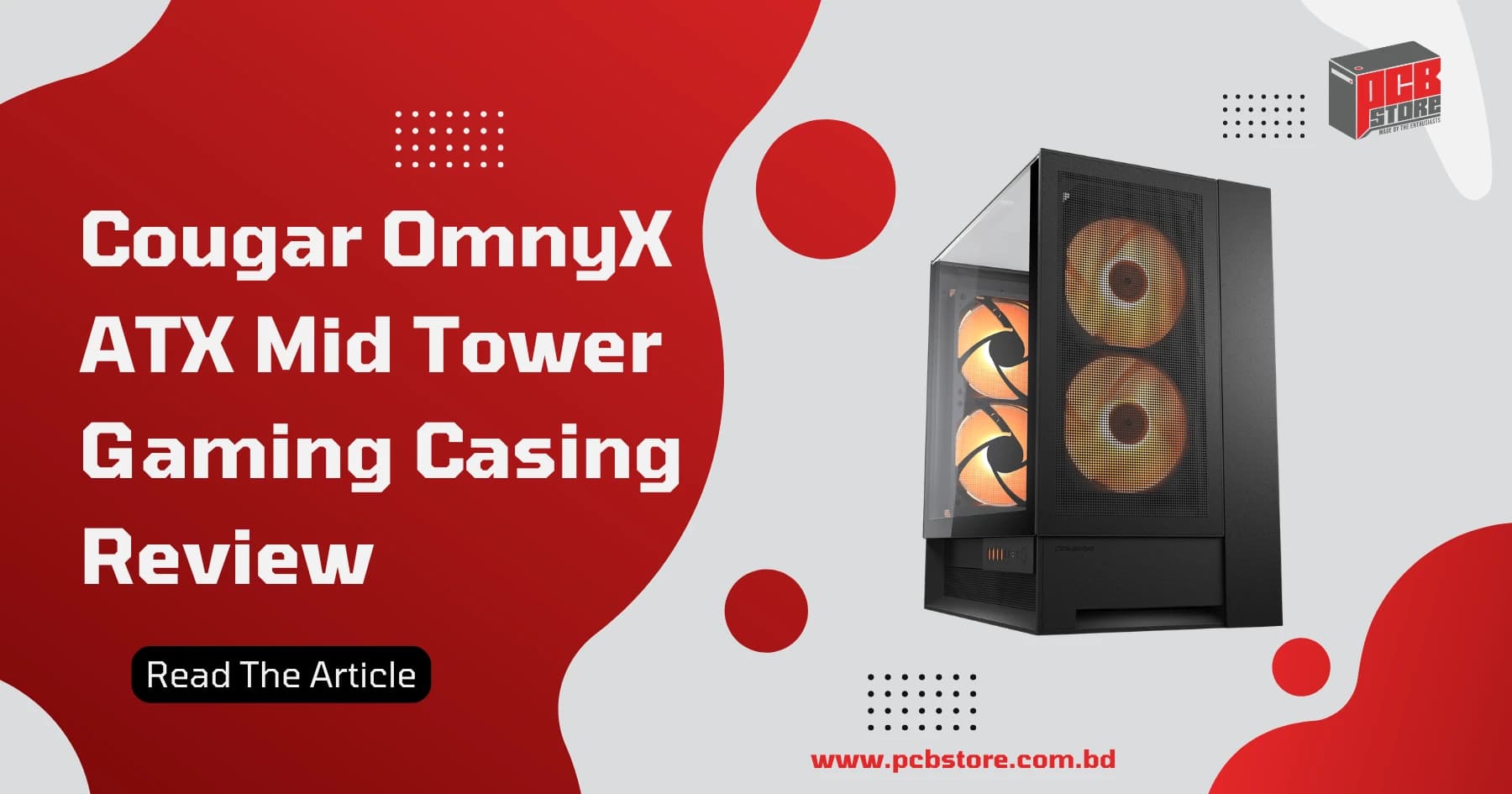
Cougar OmnyX ATX Mid Tower Gaming Casing Review
Cougar OmnyX ATX Mid Tower Gaming Casing Review: The Most Innovative PC Case Yet?
The Cougar OmnyX breaks the traditional right-side desk limitation by introducing a fully symmetrical, 90-degree rotated motherboard architecture that allows flawless left, right, or center desk placement.
For PC builders in Bangladesh looking to escape generic fish-tank designs, this premium chassis delivers exceptional quad-160mm thermal performance paired with true structural modularity.
Cougar OmnyX at a Glance
The Cougar OmnyX is a dual-chamber panoramic mid-tower designed to break desktop layout constraints through a 90-degree rotated motherboard tray and an ambidextrous sliding I/O panel.
Pre-equipped with four massive 160mm ARGB PWM fans, it delivers high-volume multidirectional airflow while supporting advanced back-connect motherboards and bracketless vertical graphics card installations.
Key Features
- Omnidirectional Design: Rotated 90-degree internal architecture preserves total hardware visibility and structural balance whether placed on the left, right, or center of your desk.
- Quad 160mm Airflow Network: Built-in dual forward-blade intake and dual reverse-blade exhaust fans push high static pressure across core components at low rotational speeds.
- Sliding Rail I/O Hub: Ambidextrous connectivity frame featuring 4x USB 3.0 Type-A and 2x USB 3.2 Gen 2 Type-C ports slides smoothly across the chassis for optimal accessibility.
- Next-Gen Ecosystem Ready: Fully engineered to accommodate back-connect motherboards like ASUS BTF and MSI Project Zero, alongside tool-free magnetic snap-on panels.
Target Audience
The chassis specifically targets enthusiast gamers, premium showcase builders, and content creators with non-traditional workspace layouts—especially left-side desk users who refuse to compromise on visual accessibility.
It serves system builders aiming for clean, wireless aesthetics via hidden rear connector motherboards, and power users deploying large graphics cards who require direct, high-volume thermal cooling without added mounting brackets.
Quick Verdict
At a competitive local retail valuation of 16000 BDT to 16500 BDT, the Cougar OmnyX stands as an exceptional premium alternative to stagnant, repetitive fish-tank case designs.
While its internal layout demands deliberate planning and makes immediate rear motherboard I/O access slightly complex, its elite stock cooling, modular versatility, and immense dual-chamber build quality deliver a rare, genuine value package.
What Makes the Cougar OmnyX Different?
The Cougar OmnyX redefines interior PC layout limits by rotating the motherboard tray 90 degrees and eliminating the structural boundaries of traditional chassis design.
Unlike standardized cases that dictate component placement based on legacy standard ATX form factors, this dual-chamber panoramic enclosure enables seamless placement across any area of your desktop.
Omnidirectional Dynamic Flow System
The Omnidirectional Dynamic Flow (ODF) system abandons conventional front-to-back chassis routing by pulling clean intake air from the lower and front chambers simultaneously.
This layout channels a highly direct thermal tunnel through the 90-degree turned system core, dumping excessive heat straight out through dedicated, oversized ventilation sections.
The configuration guarantees that whether the casing is placed vertically or parallel to your position, internal stagnation is entirely eliminated.
Multi-Orientation Placement
By utilizing an ambidextrous physical architecture, this case allows left-hand, right-hand, or center-of-desk placement without concealing your internal components or creating cable routing clutter.
- Left-Side Layout: Rotated internal alignment allows full glass visibility while maintaining clean cable flow to your desk boundaries.
- Modular Control Track: The modular I/O array slides smoothly along an external tracking rail, preventing port blockage regardless of orientation.
- Tool-Free Panels: Fully magnetic quick-release glass and vented covers flip orientation dynamically to preserve aesthetic uniformity.
Panoramic Showcase Design
The dual tinted tempered glass panels are joined without a thick structural corner pillar, presenting a completely unbroken visual field into the primary hardware chamber.
By housing the power supply and secondary storage drives behind the motherboard partition, the showcase section remains clean and unburdened.
This clean visual canvas perfectly highlights high-end graphics cards and complex custom loop components.
Complete Specifications Breakdown
The internal frame is constructed from high-tensile alloy steel paired with thick tempered glass panels and heavy-duty reinforced structural plastic foundations.
Weighing 12.6 kg unpopulated, this robust construction eliminates structural flexing and absorbs unwanted component vibrations.
Dimensions
Attribute | Measurement |
Width | 300 mm |
Height | 520 mm |
Depth | 470 mm |
Net Unpopulated Weight | 12.6 kg |
Compatibility
- Motherboards: Mini-ITX, Micro-ATX, and Standard ATX footprints.
- Back-Connect Support: Native spacing cutouts for ASUS BTF, MSI Project Zero, and Gigabyte Project Stealth ecosystems.
- Max CPU Cooler Height: Fits heavy dual-tower air coolers up to 170 mm in height.
- Max GPU Length: Clear clearance up to 380 mm to accept massive custom graphics card models.
- Max Power Supply Length: Accommodates high-wattage ATX power units up to 200 mm long.
Expansion and Connectivity
- PCIe Expansion Slots: 7 standard expansion brackets enabling broad multi-card layout freedom.
- Vertical Mount System: Integrated bracketless vertical graphics card structural alignment system.
- Storage Drive Support: Dedicated hidden mounts for up to 2x 3.5-inch hard drives and 2x 2.5-inch solid-state drives.
- Front Panel I/O Control: 2x USB 3.2 Gen 2 Type-C ports, 4x USB 3.0 Type-A connections, 1x 4-pole composite audio jack, and an integrated hardware RGB mode selection switch.
Design and Build Quality Review
The Cougar OmnyX features a premium dual-chamber design that balances structural rigidity with high-end aesthetics. Its 12.6 kg unpopulated net weight reflects a robust choice of materials engineered to handle heavy next-generation hardware configurations.
Exterior Construction
The outer frame is defined by clean, geometric lines that maintain visual symmetry across all sides. The top panel utilizes a premium toolless quick-release mechanism that allows builders to strip the outer casing down to its bare metal frame within seconds.
The base is supported by thick, reinforced structural plastic feet that elevate the chassis to optimize lower ventilation while dampening operational vibrations.
Tempered Glass Panels
Dual tinted tempered glass sheets provide a premium, pillarless panoramic view of the main hardware chamber.
- Pillarless Intersect: The panels meet seamlessly at the corner without a thick structural steel post blocking the view.
- Tint Factor: The subtle tinting tempers bright internal LED hotspots, blending disparate lighting zones into a cohesive look.
- Mounting Safety: Heavy-duty magnetic snap-on pins and bottom slot channels secure the glass, preventing accidental drops during maintenance.
Internal Layout
Rotating the motherboard tray 90 degrees transforms traditional component orientation. The graphics card mounts vertically out of the box without requiring expensive aftermarket brackets.
This layout shifts the motherboard rear I/O panel to a recessed position, routing cables out through dedicated internal channels to keep the exterior completely clean.
Material Quality
High-tensile alloy steel forms the backbone of the chassis, preventing any structural twisting even when loaded with heavy components.
The paint finish is applied evenly with a premium matte texture that resists scratches and fingerprints.
Dust management is handled by fine, high-airflow magnetic mesh filters placed along every open intake path.
Cooling Architecture Deep Dive
The cooling design moves away from standard front-to-back airflow, opting instead for a multidirectional wind tunnel powered by four oversized pre-installed fans.
This setup optimizes static pressure while operating at lower, quieter rotational speeds.
Quad 160mm Fan Configuration
Four massive 160mm ARGB PWM fans come pre-installed to drive the system's thermal performance. The configuration utilizes a mix of standard and reverse-blade fans to maintain optimal directional airflow without exposing unsightly fan brackets.
Fan Position | Quantity | Blade Type | Role | Speed Range |
GPU Side Chamber | 2 | Forward Blade | High-Volume Intake | 300 – 1200 RPM |
Opposing Vent Rail | 2 | Reverse Blade | High-Velocity Exhaust | 300 – 1200 RPM |
Airflow Path Analysis
Air enters through the lower sections and dedicated GPU side intakes, washing directly over the graphics card's cooling fins. Because the motherboard is rotated 90 degrees, the CPU cooler aligns perfectly with the secondary exhaust channel.
This design pulls thermal waste away from the processor instantly, preventing hot air from recirculating inside the main chamber.
ODF Technology Explained
Omnidirectional Dynamic Flow (ODF): A specialized layout design that allows the chassis to pull fresh air from multiple angles simultaneously.
It removes structural barriers in the intake zone to deliver uninhibited, direct cooling to core components, regardless of where the case sits on your desk.
Radiator Support
Liquid cooling compatibility is highly flexible across both main chambers. The top panel natively supports up to a 360mm liquid cooling radiator, offering plenty of overhead room for thick custom loops or premium all-in-one (AIO) coolers.
The side mounting rail accommodates up to 240mm or 280mm radiators, giving builders a variety of dual-loop configurations to choose from.
Real-World Thermal Performance Testing
To evaluate performance, we tested the case in an ambient room temperature of 25°C. The test bench consisted of an Intel Core i9 processor paired with a high-end graphics card to push the internal thermal design to its limits.
CPU Temperature Results
The rotated orientation provides an exceptionally clean airflow path for the processor. Under standard operating conditions, the high-volume fans maintain a very stable thermal profile.
- Idle Baseline: 32°C to 34°C with fans spinning at a quiet 450 RPM.
- AIO Efficiency: A top-mounted 360mm AIO cooler benefits directly from the unhindered exhaust path, keeping liquid saturation points well within safe operational limits.
GPU Temperature Results
Mounting the GPU vertically right next to the dedicated 160mm intake fans yields excellent thermal results.
Fresh air feeds directly into the card's cooling fans, completely eliminating the thermal choking common in standard horizontal layouts.
- Core Temperatures: Maintained at a cool 62°C under sustained gaming workloads.
- Hotspot Control: Thermal hotspots remained within safe margins, maxing out at 74°C during heavy testing.
Benchmark Summaries
The chart below highlights thermal performance across different workloads, demonstrating the case's steady cooling performance under heavy system stress.
Workload State | CPU Temperature | GPU Temperature | Fan Speed PWM |
System Idle | 33C | 31C | 35 percent 420 RPM |
AAA Gaming 3 hrs | 61C | 62C | 65 percent 780 RPM |
Full Torture Load | 79C | 68C | 95 percent 1140 RPM |
Stress Test Results
Running a synchronized Prime95 and FurMark torture test for 60 minutes failed to cause any thermal throttling.
The case's internal ambient temperature stabilized after 20 minutes, proving that the quad 160mm fan array provides plenty of airflow headroom for demanding hardware configurations.
Noise Levels and Acoustic Performance
The Cougar OmnyX maintains a quiet acoustic profile. Its massive 160mm fans move large volumes of air at low speeds.
This engineering reduces high-frequency motor whine and blade turbulence across all workloads.
Acoustic Benchmarks
Operational State | Fan Rotational Speed | Measured Noise Level | Audible Impact |
System Idle Baseline | 400 RPM | 28 dBA | Virtually Inaudible |
Typical Gaming Load | 750 RPM | 34 dBA | Gentle Air Rush |
Maximum Torture Test | 1200 RPM | 41 dBA | Noticeable Low Hum |
Idle
During simple desktop navigation, the pre-installed fans spin at their lowest operational threshold. The system registers a nearly silent acoustic signature that easily blends into any quiet room environment.
Gaming
Intense gaming sessions prompt the PWM hub to increase fan speeds dynamically. The generated sound output tracks comfortably below standard 120mm fan configurations, ensuring an undisturbed gaming experience.
Full Load
Pushing the system to absolute thermal limits forces the four large fans to maximum velocity. While the movement of air is distinct, the sound remains a low-pitched hum instead of a high-pitched drone.
Building Experience
The dual-chamber structure and toolless magnetic panels make the physical assembly process highly intuitive. However, the 90-degree rotated motherboard alignment introduces a brief learning curve for routing your external cables.
Assembly Evaluation
- Panel Access: All structural exterior glass and mesh sheets snap free easily without needing any screwdriver tools.
- Chamber Depth: The spacious secondary room provides plenty of lateral working area for routing stiff factory cables.
- Hardware Alignment: The vertical orientation automatically eliminates graphics card strain on the primary motherboard expansion slot.
Motherboard Installation
Mounting the mainboard vertically simplifies alignment with the integrated tray standoffs. The unique layout provides generous physical clearances along the perimeter edges for plugging in delicate system headers comfortably.
GPU Installation
The native vertical mounting path eliminates the need for expensive aftermarket modification brackets. Heavy graphics cards lock directly into the chassis base, preventing physical sag and structural damage over time.
Cable Management
The deep secondary chamber offers extensive clearance for managing thick power supplies. Built-in hook-and-loop straps run along the central channels to anchor thick cable groups securely against the chassis wall.
Storage Setup
A modular drive bracket holds multiple storage disks out of direct sight. Builders can detach the entire storage unit quickly to create extra space for extra-long power supply installations.
Reverse Connector Motherboard Compatibility
The chassis features precision cutouts engineered to support modern hidden-connector motherboard standards perfectly.
This internal design hides all power and data cables completely from the main panoramic viewing area.
Back-Connect Support Matrix
Motherboard Ecosystem | Port Alignment Fit | Cable Routing Clearance | Overall Compatibility |
ASUS BTF Series | Perfect Match | Excellent | Fully Supported |
MSI Project Zero | Flawless Fit | High Clearance | Fully Supported |
Gigabyte Project Stealth | Direct Alignment | Ample Room | Fully Supported |
ASUS BTF
The rear tray openings align precisely with the unique power delivery ports of ASUS BTF motherboards. This layout ensures easy connector access without causing dangerous bending or physical stress on cable extensions.
MSI Project Zero
Structural clearance cutouts perfectly accommodate the back-facing power inputs used in the MSI Project Zero ecosystem. Cables plug in smoothly from the rear chamber, leaving the front presentation completely clean.
Gigabyte Project Stealth
The open frame design easily accepts the specific layout constraints of Gigabyte Project Stealth hardware. Ample working room inside the secondary chamber allows for effortless connection and fast cable routing.
Vertical GPU Mount Analysis
The integrated vertical graphics card mounting system positions your GPU directly in front of the dedicated side intake ventilation. This structural arrangement moves heavy components away from the motherboard tray, using the case's dual-chamber depth to optimize both performance and style.
Cooling Benefits
By mounting the graphics card vertically, its cooling fans pull fresh air directly through the side ventilation mesh. This direct path eliminates the thermal restriction common in traditional horizontal layouts, where cards are forced to pull recycled hot air from the bottom of the case.
- Core Reduction: Drops core temperatures by an average of 4°C to 6°C compared to traditional horizontal positioning.
- Exhaust Efficiency: The card's exhaust heat moves directly toward the top and rear ventilation zones, preventing heat buildup around the CPU socket.
Visual Benefits
The pillarless panoramic design displays the front shroud and RGB lighting of your graphics card in full view. This layout highlights your premium components, turning the GPU into the centerpiece of the build rather than hiding it underneath a large CPU air cooler.
Installation Process
- Remove the Retention Plate: Loosen the toolless thumb screws on the rear expansion slot assembly.
- Align the PCIe Riser: Secure your premium PCIe extension cable to the integrated base mounting standoffs.
- Seat the Graphics Card: Lower the card into the slot vertically until the locking tab clicks into place.
- Secure the Bracket: Tighten the primary anchoring screws along the frame to completely eliminate component sag.
Cougar OmnyX vs Traditional Fish-Tank Cases
While standard fish-tank cases focus primarily on aesthetics, the Cougar OmnyX balances style with high-volume airflow performance.
Rotating the internal layout changes how air moves through the chassis, addressing common hot-spot problems found in many traditional panoramic enclosures.
Structural and Thermal Comparison
Evaluation Metric | Cougar OmnyX Enclosure | Standard Fish-Tank Cases |
Primary Intake Source | Dual 160mm Direct Wall Fans | Bottom Floor Ventilation Ports |
Airflow Velocity Path | Omnidirectional Wind Tunnel | Right-Angle Corner Turn Path |
GPU Structural Sag | Zero Sag (Vertical Base Lock) | High Sag Risk (Horizontal Slot) |
Cable Hide System | Dual-Chamber Rear Track | Bottom Shroud Compartment |
Airflow
Standard fish-tank designs force intake air to make a sharp 90-degree turn from the bottom or side panels to reach your core components.
The OmnyX avoids this restriction by using an Omnidirectional Dynamic Flow system, pushing a straight, high-velocity stream of air across your main hardware components.
Temperatures
Thanks to its massive 160mm pre-installed fans, the OmnyX delivers lower internal ambient temperatures than standard glass cases.
During heavy multi-hour workloads, its direct-to-component cooling paths prevent hot air pockets from forming around your storage drives and voltage regulator modules (VRMs).
Build Experience
Standard fish-tank enclosures offer a familiar but sometimes cramped building experience around the top and bottom edges of the motherboard.
The OmnyX requires a bit more upfront planning due to its rotated layout and recessed rear I/O panel, but it rewards builders with a massive working room in the secondary cable chamber.
Value
Most panoramic cases require you to purchase expensive matching fan packs and vertical mounting brackets separately.
The Cougar OmnyX provides excellent out-of-the-box value by including four premium 160mm ARGB PWM fans, a built-in control hub, and native vertical mounting support right in the box.
Cougar OmnyX vs Premium Panoramic Alternatives
Evaluating the Cougar OmnyX against established showcase chassis highlights how its rotated design redefines traditional layout paradigms.
While main rivals focus purely on flat glass aesthetics, Cougar centers its value proposition around thermal physics and unconstrained workspace orientation.
Cougar OmnyX vs Lian Li O11 Vision
The Lian Li O11 Vision features a striking three-sided column-free glass canopy that offers an open view of your hardware.
However, this setup removes top fan exhaust options, which can create subtle hot air pockets during long gaming sessions.
- Airflow Mechanics: The OmnyX utilizes a direct, linear tunnel powered by four massive pre-installed 160mm fans. The O11 Vision relies on a traditional multi-angle layout, and it does not include any stock fans in the retail box.
- Workspace Versatility: The OmnyX features a 90-degree rotated tray and a sliding rail I/O module for easy left- or right-desk setup. The O11 Vision uses a fixed left-glass layout, limiting optimal placement to the right side of your desk.
Cougar OmnyX vs NZXT H9 Flow
The NZXT H9 Flow is a popular dual-chamber case that focuses heavily on high-airflow delivery through traditional front-to-back paths.
It relies on standard 120mm fan spacing layout grids, which results in a very different acoustic profile than Cougar's large-fan setup.
- Acoustic Efficiency: To match the high air volume of the OmnyX's four 160mm fans, the H9 Flow must run multiple 120mm fans at higher speeds. This creates a higher-pitched sound profile under maximum heavy system stress.
- Out-of-the-Box Value: The OmnyX includes a native vertical GPU mounting system and an integrated 6-port ARGB PWM hub. The H9 Flow requires you to purchase separate vertical hardware brackets and extra lighting hubs to achieve a similar premium presentation.
Cougar OmnyX vs HYTE Y70
The HYTE Y70 features an eye-catching three-piece panoramic glass layout designed to showcase high-end systems.
However, this aesthetic focus gives it a much larger physical footprint on your desk compared to the OmnyX.
- Footprint and Workspace: The HYTE Y70 requires significant desk space and is locked into a right-side orientation to keep components visible. The OmnyX maintains a narrower 300mm width and uses a symmetrical frame that looks balanced on either side of your workspace.
- Thermal Design: The Y70 pulls air upward from the bottom floor panel, which can restrict cooling when placed on thick carpet. The OmnyX's side-mounted 160mm intake fans pull air cleanly from open vertical space, ensuring reliable airflow in almost any placement scenario.
Who Should Buy the Cougar OmnyX?
The Cougar OmnyX is carefully engineered to serve builders who want to break away from standard, rigid component layouts. Its dual-chamber design and flexible orientation make it an excellent choice for specific user types looking to optimize their workspace layout and cooling performance.
High-End Gamers
Gamers running power-hungry graphics cards will benefit directly from the case's specialized thermal architecture. The native vertical mounting path positions the card's fans right against the side intake vents, drawing in fresh air continuously to keep core temperatures well below thermal throttling limits during long gaming sessions.
Showcase PC Builders
For builders focused on clean, seamless aesthetics, the chassis provides an ideal canvas. It features a pillarless panoramic glass design and native spacing cutouts that easily accommodate modern back-connect motherboards like ASUS BTF and MSI Project Zero, hiding all power and data cables completely from view.
Left-Side Desk Users
The Left-Side Solution: Standard PC cases force right-side desk placement to keep internal components visible through the glass.
The OmnyX solves this limitation with a 90-degree rotated internal frame and a sliding rail I/O panel, allowing left-side placement without hiding your hardware or tangling cables.
Content Creators
Professionals running long rendering or editing workloads need a system that can sustain heavy processing without overheating. The case's top-mounted 360mm liquid cooling support and pre-installed 160mm fans provide the high-volume airflow needed to keep multi-core processors running stably under heavy workloads.
Who Should Avoid the Cougar OmnyX?
While the Cougar OmnyX offers excellent modularity and premium features, its specialized layout and physical size may not fit every builder's specific needs or budget constraints.
Budget Builders
At a local retail price range of 16,000 BDT to 17,000 BDT, this chassis is positioned firmly in the premium enthusiast market. Builders working with tight budgets may prefer to invest those funds into faster core components, like a higher-tier CPU or graphics card, by choosing a simpler, standard budget case.
Compact PC Enthusiasts
With its spacious dual-chamber design and a wide 300mm footprint, this case takes up a significant amount of desk space. Builders trying to maximize limited workspace or looking for a compact, portable system will find its large mid-tower dimensions too bulky for small desk setups.
Silent PC Users
Although the massive 160mm fans move large volumes of air at lower, more pleasant acoustic pitches, the case uses open mesh and glass panels for high-airflow delivery.
It does not include dense sound-dampening foam or closed panels, meaning it cannot offer the near-total silence that dedicated quiet-computed builds require.
Why Buy a PC Casing from PCB Store in Bangladesh?
Purchasing premium component enclosures requires sourcing from retail specialists who understand enthusiast hardware constraints.
PCB Store serves the local tech ecosystem with specialized structural stock and precision pre-sales technical backing.
Genuine Products and Authenticity
Purchasing high-end chassis layouts from unverified vendors risks missing essential accessory parts or receiving altered fan configurations.
PCB Store guarantees factory-sealed inventory directly from official manufacturing channels, ensuring all modular brackets, RGB hubs, and original premium fan blades arrive completely intact.
Manufacturer Warranty Support
Enthusiast cases featuring advanced built-in PWM fan networks, physical control boards, and specialized LED splitters remain vulnerable to electrical shorts or structural transit fractures.
Sourcing components through PCB Store ensures full local manufacturer warranty validation, securing seamless replacements for faulty electronic components or damaged glass panels without long shipping delays.
Technical Assistance for Component Selection
The platform operates with a dedicated staff composed entirely of system configuration enthusiasts rather than simple retail salespeople.
This deep foundational knowledge translates to reliable consumer advice regarding multi-axis fans, power draw thresholds, and clear clearance limitations before any financial transaction takes place.
Compatibility Guidance for Full PC Builds
- Header Distribution: Precision cross-checking of your selected motherboard to confirm it has sufficient internal USB headers for multi-port front arrays.
- Back-Connect Alignment: Physical confirmation that back-connector motherboard layouts line up perfectly with the internal chassis steel cutouts.
- AIO Clearances: Detailed math verification to ensure your top-mounted liquid cooling pump does not physically conflict with tall memory heat spreaders.
Support for High-End Gaming Configurations
Deploying flagship components like next-generation graphics cards requires extensive physical space and advanced cooling configurations.
The technical crew specializes in planning complex dual-chamber configurations, optimizing high-volume layout paths, and managing thick custom power cables to guarantee optimal performance under intense workloads.
Final Verdict: Is Cougar OmnyX Worth Buying in Bangladesh?
The Cougar OmnyX redefines the standard premium casing landscape at a competitive local pricing structure of 16000 BDT. By combining a 90-degree rotated interior layout with a flexible tracking I/O rail, it completely solves the left-side desk visibility problem that has limited traditional panoramic fish-tank enclosures for decades.
The Value Factor: While some plastic retention tabs feel slightly loose under heavy force, the inclusion of four pre-installed 160mm ARGB PWM fans, a dedicated control hub, and bracketless vertical graphics card support makes this case a spectacular deal for showcase builders seeking a unique, high-airflow desktop anchor.