Samsung Ssd Price in Bangladesh
Samsung Ssd
5
/5
Filter
Filter
Description
Samsung SSD Price in Bangladesh Best Deals at PCB Store
Looking for the best Samsung SSD price in Bangladesh? You are in the right place. At PCB Store, we stock every major Samsung model — from budget SATA drives to blazing-fast NVMe options. Whether you are a gamer, a content creator, or upgrading your laptop, this page covers everything you need. Get the right drive at the right price, backed by official warranty support across Bangladesh.
All Samsung SSD Models Available at PCB Store
We carry the full Samsung SSD lineup. Each series targets a different type of user. Here is a complete model guide to help you pick the right one.
Samsung SATA SSD Series
SATA SSDs use the SATA III interface. They are perfect for laptop upgrades and desktop builds. Speed reaches up to 560 MB/s read. That is nearly five times faster than a standard hard drive.
Samsung 860 EVO — Reliable Everyday SATA SSD
The 860 EVO is a trusted workhorse. It uses Samsung's V-NAND technology with MLC cells. It offers strong endurance with up to 1.5 million hours MTBF. Available in 250GB, 500GB, and 1TB capacities. Great choice for office PCs, budget laptops, and general computing.
Samsung 870 EVO — Upgraded SATA Performance
The 870 EVO is the latest SATA SSD from Samsung. It pushes SATA speeds to their limit — up to 560 MB/s sequential read and 530 MB/s write. It uses 128-layer V-NAND for better endurance. This is the go-to SATA upgrade for most users in Bangladesh.
Samsung 870 QVO — High Capacity at Lower Cost
The 870 QVO uses QLC NAND flash. This allows for larger storage at a more accessible price. Available in 1TB, 2TB, and 4TB. Ideal for secondary storage, media libraries, and bulk file storage. Not recommended as a primary OS drive for heavy workloads.
Samsung NVMe SSD Series
NVMe SSDs use the PCIe interface. They are significantly faster than SATA drives. They connect through the M.2 slot on modern motherboards and laptops. This is where Samsung truly leads the market.
Samsung 970 EVO — The Classic NVMe Performer
The 970 EVO was a game-changer when it launched. It delivers sequential read speeds up to 3,500 MB/s over PCIe Gen 3.0 x4. It is still a strong performer for gaming and productivity tasks. A solid pick if you want proven NVMe performance.
Samsung 970 EVO Plus — Best Mid-Range NVMe in Bangladesh
This is our most popular NVMe model in Bangladesh. The 970 EVO Plus improves on the standard 970 EVO with faster sequential write speeds — up to 3,300 MB/s. It uses Samsung's optimized V-NAND and controller. Available in 250GB, 500GB, 1TB, and 2TB. Perfect for gamers, PC builders, and everyday power users.
Samsung 980 PRO — PCIe Gen 4 Speed for Serious Users
The 980 PRO is built for PCIe Gen 4.0 platforms. Sequential read hits 7,000 MB/s. Sequential write reaches 5,000 MB/s. It is the fastest consumer NVMe Samsung produces in this category. Designed for Amd Processor and Intel Processor or newer platforms. Ideal for 4K video editing, 3D rendering, and high-end gaming rigs.
Samsung 990 PRO — Latest Generation Performance
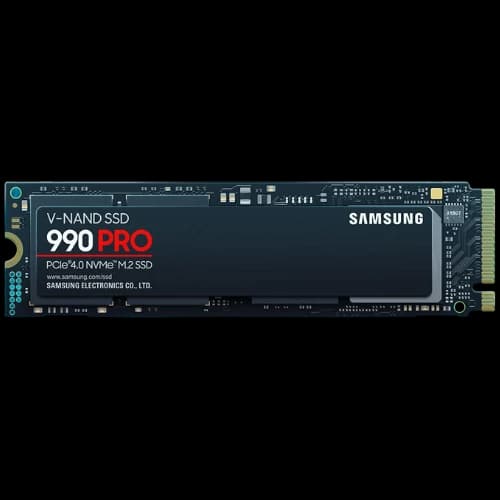
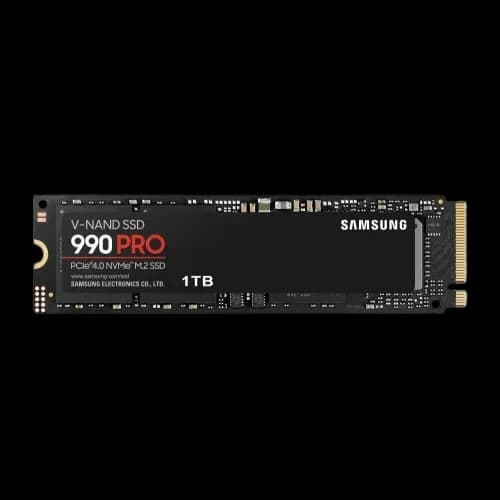
The 990 PRO is Samsung's newest flagship NVMe SSD. It improves on the 980 PRO with better thermal management and sustained performance. Read speeds top out at 7,450 MB/s. Write speeds reach 6,900 MB/s. If you are building a top-tier PC in Bangladesh right now, this is the drive to consider.
Samsung Portable SSD Series
Portable SSDs are external drives. They connect via USB-C. You can use them with laptops, smartphones, gaming consoles, and PCs. Samsung's portable lineup is one of the strongest in the market.
Samsung T5 — Compact and Reliable
The T5 is slim, lightweight, and delivers solid USB 3.1 speeds. Good for everyday backups, document transfers, and light media work. Easy to carry in any pocket or bag.
Samsung T7 — Fast and Tough External Storage
The T7 pushes USB 3.2 Gen 2 speeds up to 1,050 MB/s read. It includes AES 256-bit hardware encryption. A big step up from the T5 for users handling large files regularly.
Samsung T7 Shield — Rugged Build for Field Work
The T7 Shield carries IP65 water and dust resistance. Same USB 3.2 Gen 2 speeds as the T7. Built for creators and professionals working in tough environments. Available at PCB Store Bangladesh.
Samsung T9 — Flagship Portable Performance
The T9 is Samsung's top portable SSD right now. It uses USB 3.2 Gen 2x2 for speeds up to 2,000 MB/s. Built for video editors and photographers who need sustained high-speed transfers. The strongest portable drive Samsung makes today.
Samsung SSD Types Explained — SATA vs NVMe vs Portable
Not sure which type fits your needs? Here is a clear breakdown.
SATA SSD vs NVMe SSD — What Is the Real Difference?
SATA SSDs connect through the SATA III port. Maximum real-world speed is around 550 MB/s. NVMe SSDs connect through the M.2 PCIe slot. They can reach 7,000+ MB/s on Gen 4 drives. That is nearly 13 times faster.
For everyday computing, SATA is still a massive upgrade from HDD. For gaming, video editing, or fast data work, NVMe is the clear winner.
Internal SSD vs Portable SSD — Which Fits Your Need?
Internal SSDs sit inside your computer. They are the primary storage. Portable SSD are external. You plug them in when needed. If you need speed inside your PC, go internal. If you move large files between devices often, go portable.
M.2 Form Factor vs 2.5-Inch — Know Your Slot
M.2 SSDs are small, stick-shaped drives. They plug directly into the motherboard. Most modern laptops and desktops have M.2 slots. The 2.5-inch form factor fits into a standard drive bay — common in older laptops and desktop cases.
Before buying, check your device specifications. PCB Store's support team can also help you verify compatibility before placing your order.
Samsung SSD User Buying Guide
Buying an SSD is not just about picking the fastest or cheapest option. You need the right drive for your specific use case. We have put together this guide based on the real needs of Bangladeshi PC users, so you can choose the right SSD and other PC Components with confidence.
How to Choose the Right Capacity
Storage capacity is the first decision. Here is how to think about it simply.
250GB–512GB — For Basic Use and OS Drives
This range is perfect for budget builds and laptop upgrades. A 250GB or 512GB Samsung SSD handles your operating system, key apps, and daily files easily. Boot times drop dramatically compared to any HDD. If you are on a tight budget, this is your starting point.
1TB — The Sweet Spot for Most Users
The 1TB Samsung SSD is our top-selling category at PCB Store Bangladesh. It covers your OS, all your apps, games, and a large media library. The 970 EVO Plus 1TB NVMe is the most balanced option in terms of speed, endurance, and price. Most gamers and general users will be fully satisfied here.
2TB and Above — For Professionals and Heavy Workloads
Video editors, photographers, and 3D designers need more headroom. A 2TB Samsung SSD gives you room to store large project files, RAW footage, and render outputs without compromise. The 870 QVO 2TB is a great SATA option for secondary storage. The 970 EVO Plus 2TB NVMe serves high-demand primary storage needs.
Best Samsung SSD for Gaming in Bangladesh
Gaming performance depends heavily on storage speed. Faster SSDs mean shorter load times, quicker asset streaming, and smoother gameplay.
Our top gaming picks at PCB Store:
- Samsung 970 EVO Plus 1TB NVMe — Best price-to-performance for most gamers
- Samsung 980 PRO 1TB PCIe Gen 4 — For AMD Ryzen 5000 and Intel 12th Gen+ platforms
- Samsung 990 PRO 1TB — Top-tier performance for serious competitive setups
For gaming, always go NVMe over SATA. PCIe Gen 4 drives like the 980 PRO and 990 PRO cut game load times to near zero. Titles like Warzone, Battlefield, and open-world games benefit most from high IOPS and fast sequential reads.
Best Samsung SSD for Video Editing and Content Creation
Content creation demands fast read and write speeds under sustained loads. A regular SATA drive will bottleneck your workflow. NVMe is non-negotiable for professional work.
Our top picks for creators at PCB Store:
- Samsung 980 PRO 2TB — Handles 4K and 8K footage with ease
- Samsung 990 PRO 2TB — Best thermal management for sustained workloads
- Samsung T9 Portable 2TB — For editing on the go or between devices
Sequential write speed matters most during video export and render. The 980 PRO and 990 PRO maintain speeds even during long sustained write sessions. That means faster export times and less waiting.
Best Samsung SSD for Laptop Upgrade in Bangladesh
Most laptops in Bangladesh ship with either a slow HDD or a low-end SSD. Upgrading to a Samsung SSD is one of the most impactful changes you can make.
Check your laptop's interface first:
- M.2 NVMe slot available — Go with the 970 EVO Plus or 980 PRO
- M.2 SATA only — The 870 EVO is your best option
- 2.5-inch SATA bay — The 870 EVO 2.5-inch fits perfectly
Not sure what slot your laptop has? Our PCB Store support team can help you identify the right drive before you buy.
Best Budget Samsung SSD in Bangladesh
You do not need to spend big to get a real performance boost. These models give strong value:
- Samsung 870 EVO 500GB — Reliable SATA performance at an accessible price
- Samsung 860 EVO 250GB — Proven endurance for everyday tasks
- Samsung 970 EVO Plus 500GB — Entry-level NVMe speed without a huge premium
Even our budget Samsung SSD options outperform most generic local brands. V-NAND technology and Samsung's proprietary controller make a clear difference in real-world speed and longevity.
Samsung SSD vs Others Competitors
We stock multiple SSD brands at PCB Store. Here is our honest take on how Samsung compares.
Samsung SSD vs Kingston SSD
Kingston offers competitive budget SATA options. For basic computing, Kingston A400 and KC600 are valid choices. But Samsung's V-NAND architecture gives it a clear edge in endurance and sustained performance. For NVMe, Samsung's controller and NAND combination consistently outperforms Kingston's NVMe lineup in benchmarks and real-world use.
Samsung SSD vs Western Digital SSD
WD is Samsung's closest competitor in the NVMe space. Western Digital SSD options like the WD Black SN850X directly compete with the Samsung 990 PRO. Performance is neck-and-neck at the top end. Where Samsung pulls ahead is software support via Magician and the brand's manufacturing consistency. WD's budget SN770 is a strong alternative to the 970 EVO Plus for price-sensitive builds.
Samsung SSD vs Corsair Ssd
Corsair NVMe SSD (like MP600 series) offer strong speed and can be cheaper on deals. But model-to-model consistency can vary. Samsung SSDs are more consistent for long-term use, with better firmware maturity and Magician software support.
Why PCB Store is the Right Choice
PCB Store is your trusted source for genuine Samsung SSDs in Bangladesh. We do not sell grey market products or unverified imports.
Why Buy a Samsung SSD From PCB Store?
- 100% Original Products — Every drive comes with verified authenticity
- Official Warranty Support — Full manufacturer warranty honored in Bangladesh
- Stock Accuracy — Live inventory updated daily on our website
- Expert Advice — Our tech team helps you pick the right drive for your build