Dell Hdd Price in Bangladesh
Description
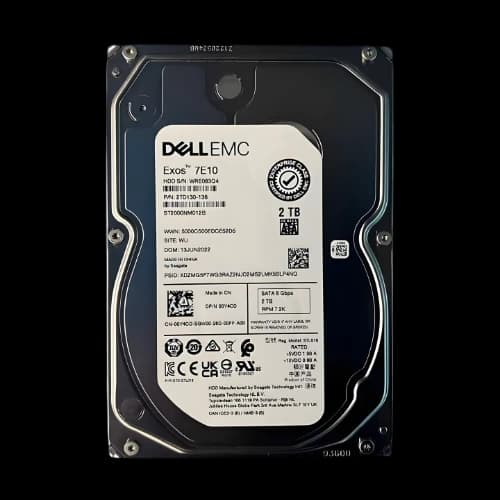
Are you searching for a genuine Dell HDD price in Bangladesh but unsure which model fits your server or PC? You are not alone. Thousands of PC builders, IT admins, and content creators ask the same question every day. At PCB Store, we stock original Dell hard disk drives — from 1TB drives used in desktop component setups to 8TB enterprise server HDDs. This guide covers everything: types, specs, capacities, and how to pick the right Dell hard drive for your build or server rack.
Why Choose Dell HDD for Your PC?
Dell HDDs are built for enterprise workloads. They deliver consistent performance under heavy usage, making them ideal for servers, data centers, and professional workstations.
Reliability & Enterprise-Grade Performance
Dell HDDs are engineered for 24/7 operation. Unlike consumer drives, they handle continuous workloads without overheating or slowing down. This makes them perfect for businesses that rely on uninterrupted performance.
Compatibility with Dell PowerEdge Servers
Dell HDDs are designed to fit seamlessly into Dell PowerEdge systems. Whether you need SAS or SATA, hot-plug or fixed drives, compatibility is guaranteed. This reduces downtime and ensures smooth upgrades.
Dell HDD Types Available in Bangladesh
Not all Dell hard drives are the same. They differ by interface, form factor, and use case. Here is a clear breakdown of what we carry.
Dell SATA HDD — Affordable and Widely Compatible
SATA (Serial ATA) is the most common interface for Dell HDDs. It works with most desktops, laptops, and entry-level servers.
Dell SATA HDDs are best for:
- General-purpose Dell PowerEdge servers
- Desktop PC storage upgrades
- Laptop hard drive replacements (Dell Inspiron, Latitude, Vostro)
- Budget-friendly high-capacity storage
SATA Dell HDDs run at 7200 RPM. They offer good transfer speeds for everyday tasks. If you want a hard disk price in Bangladesh that fits a tight budget, SATA is the right choice.
Dell SAS HDD — High-Speed Enterprise Performance
SAS (Serial Attached SCSI) drives are for serious workloads. These are not consumer drives. They are built for enterprise servers that handle thousands of data requests per second.
Dell SAS HDDs come in two speed classes:
- 10K RPM — Fast access, ideal for databases and virtual machines
- 15K RPM — Maximum speed, for the most demanding enterprise tasks
SAS drives also support dual-port connectivity. This means higher fault tolerance and better data protection in RAID setups.
If you manage a business server or data center in Bangladesh, SAS is what you need.
Dell Near-Line SAS (NL-SAS) HDD — High Capacity at Lower Cost
NL-SAS combines the best of both worlds. It uses the SAS interface but runs at 7200 RPM like a SATA drive. This makes it ideal for:
- Large-capacity backup storage
- Archiving and secondary storage on Dell servers
- NAS (Network Attached Storage) setups
- Cost-effective bulk storage in RAID arrays
NL-SAS drives are available in 4TB, 6TB, and 8TB capacities. They are a smart pick for growing businesses that need terabytes of storage without spending on full SAS pricing.
Dell HDD Form Factor — 2.5-Inch vs 3.5-Inch
Form factor matters when you buy a Dell hard drive. Choose the wrong size, and it simply will not fit.
2.5-inch Dell HDD is used in:
- Laptops (Inspiron, Latitude, Vostro, XPS)
- Compact desktops and mini PCs
- Dell PowerEdge rack servers (SFF — Small Form Factor bays)
3.5-inch Dell HDD is used in:
- Full-size desktop PCs (OptiPlex, Precision Tower)
- Dell PowerEdge tower servers
- Large form factor rack servers (LFF — Large Form Factor bays)
Always check your system's bay size before ordering. At PCB Store, our team helps you confirm compatibility before your purchase.
How to Check Dell HDD Compatibility With Your System
Buying the wrong Dell HDD is a costly mistake. Here is how to avoid it.
Find Your Dell Server or PC Model Number
Check the service tag sticker on your Dell Brand system. It is usually on the back or bottom panel. Go to Dell's official support page and enter your service tag. This shows your exact compatible storage options.
Identify the Required Form Factor
Check whether your system uses 2.5-inch or 3.5-inch drive bays. Server specifications list this as SFF (Small Form Factor) or LFF (Large Form Factor).
Check the Required Interface
Your system supports either SATA or SAS. These are not interchangeable. A SAS-only backplane will not accept a SATA drive. Confirm this in your server's technical manual.
Confirm Hot-Plug Requirement
Check if your server bay supports hot-plug drives. Hot-plug drives use a specific caddy. Non-hot-plug drives do not. Mixing them causes fitting issues.
Contact PCB Store Before Ordering
Not sure after all these steps? Contact our team directly. We help you identify the exact Dell HDD model number for your system. This saves you time, money, and the frustration of returns.
Why Buy Dell HDD From PCB Store?
PCB Store is a trusted name for desktop component buyers across Bangladesh. Here is what makes us the right choice:
- Genuine products only
- warranty support
- Updated pricing
- Multiple payment options
- Nationwide delivery
Whether you need the latest portable hard disk for backup, a server drive for your business, or a desktop upgrade for your gaming rig, PCB Store has you covered with genuine stock and transparent pricing.