Adata Portable Ssd Price in Bangladesh
Adata Portable Ssd
1
/1
Filter
Filter
Description
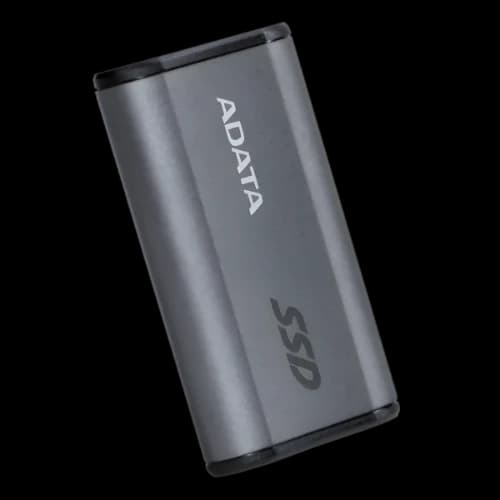
Are you tired of slow file transfers and losing important data? The right Adata portable SSD price in Bangladesh can completely change how you work, game, and create. At PCB Store, we stock every major Adata external SSD model — genuine, warranted, and ready to ship across Bangladesh. Whether you are a PC gamer, content creator, or Computer Components builder, this guide helps you pick the right drive at the right price.
Why Adata Portable SSD popular in Bangladesh?
Speed matters. A portable SSD is not just storage. It is a performance tool.
Adata is a globally trusted Taiwanese brand. Founded in 2001, it builds fast, reliable flash storage. Millions of users trust it worldwide — including many in Bangladesh.
Here is why Adata stands out:
- Transfer speeds up to 2000 MB/s on premium models
- Compact designs that fit in any pocket
- Compatible with Windows, Mac, Android, PS4, and Xbox
- 3 to 5-year official brand warranty in Bangladesh
At PCB Store, we carry the full affordable Portable Ssd lineup. You get genuine products with full warranty support — no compromise.
Adata Portable SSD Models Available at PCB Store
We offer every major model to suit every budget and need. From budget-friendly slim drives to ultra-fast premium SSDs, our collection covers it all.
ADATA SE880 — Ultra-Fast and Ultra-Compact
The SE880 is our most popular model. It uses USB 3.2 Gen2x2 technology. That means read and write speeds of up to 2000 MB/s. Its body is just 28cc in volume — smaller than an AirPods case.
This drive is ideal for:
- Video editors working with 4K footage
- Gamers needing fast external game storage
- Professionals backing up large files on the go
It comes with a 5-year brand warranty. Available in 500GB, 1TB, and 2TB capacities at PCB Store.
ADATA SE760 — Metal Body, High Speed, Great Value
The SE760 uses USB 3.2 Gen2. Speeds reach up to 1000 MB/s. It features a premium brushed aluminum body. This drive looks and performs like a pro tool.
Best for:
- Students carrying large project files daily
- Tech enthusiasts who want style and speed together
Available in 512GB, 1TB, and 2TB. It carries a 3-year warranty.
ADATA SC685 — The Slim Budget Pick
Need something affordable? The SC685 is only 9.5mm thin and weighs 35 grams. It offers speeds up to 530 MB/s via USB 3.2 Gen2. It is as thin as a credit card stack.
This is the perfect portable SSD if:
- You need a lightweight everyday storage drive
- You want something cheaper than a premium model
The SC685 works plug-and-play on Windows, Mac, and Android. No software install needed.
ADATA SD810 — Built for the Field
The SD810 is a rugged powerhouse. It meets MIL-STD-810H drop resistance standards. It is also IP68 rated — waterproof and dustproof. Speed reaches up to 2000 MB/s.
This model suits:
- Outdoor photographers and field videographers
- Engineers and surveyors carrying data on-site
- Anyone working in rough environments
Available in 1TB, 2TB, and 4TB at PCB Store.
Adata Portable SSD vs Pen Drive and Portable Hard Disk
Many buyers in Bangladesh still use a pen drive or portable hdd. Let us be direct — both are outdated for serious work.
Pen Drive: Slow transfer speeds. Fragile. Limited capacity. Fine for small files, but not for professionals.
Portable Hard Disk: Has moving parts. Drops can destroy your data. Average speed is 100–120 MB/s. Heavy and bulky.
Adata Portable SSD: No moving parts. Shock resistant. Up to 20x faster than a hard disk. Lighter than most phones.
If you are a PC gamer, content creator, or PC builder, the upgrade from a portable hard disk to a portable SSD pays for itself in saved time alone.
At PCB Store, we help you make that upgrade easily — with the right model at the right price.
Adata Portable SSD Buying Guide
Picking the wrong drive wastes money. Here is what actually matters before you buy an Adata portable SSD in Bangladesh.
Interface and Speed
This is the most important factor. Check the USB interface first.
- USB 3.2 Gen2x2 = up to 2000 MB/s (SE880, SD810)
- USB 3.2 Gen2 = up to 1000 MB/s (SE760)
- USB 3.2 Gen2 = up to 530 MB/s (SC685)
Your computer must support the matching port. Otherwise, speed is limited. Most modern laptops in Bangladesh support at least USB 3.2 Gen2.
Capacity
Pick the capacity based on your actual use:
- 500GB — Light use, daily backup, documents, and photos
- 1TB — Gaming library, video projects, mixed professional use
- 2TB+ — Heavy content creation, large 4K footage, full system backups
Do not underbuy. Storage fills up faster than expected.
Durability
If you carry your drive daily, durability matters. The SD810 offers IP68 waterproofing and MIL-STD drop resistance. The SE880 and SE760 are shock-resistant. The SC685 is slim but built for light daily use.
Warranty
Always check the warranty before buying. At PCB Store, every Adata portable SSD comes with an official brand warranty — 5 years on SE880 and SD810, 3 years on SE760.
Who Should Buy Which Adata Portable SSD?
Different users need different drives. Here is a quick breakdown for buyers in Bangladesh.
PC Gamers
Gamers need fast load times and large storage. The SE880 1TB or SE760 1TB are both excellent choices. Both work with PS4 and Xbox consoles too. Install games externally and load them fast.
Custom PC Builders
Custom PC builders often need fast temporary storage during builds and OS installations. The SE760 512GB or SE880 500GB works perfectly here. They also pair well with internal SSD setups for overflow storage.
Content Creators
Video editors and photographers need speed and space. The SE880 2TB or SD810 2TB gives you the best of both. Edit 4K footage directly from the drive without lag.
Outdoor Professionals
Field engineers, photographers, and surveyors need the SD810. It survives drops, dust, and water. It is the toughest Adata portable SSD we stock at PCB Store.
How to Use Your Adata Portable SSD for Maximum Performance
Getting the most from your drive is easy. Follow these simple steps.
Connect to the Right Port
Always use a USB 3.2 Gen2 or Gen2x2 port. Older USB 2.0 ports limit speed heavily. Check your laptop or desktop specs before connecting.
Format for Your Platform
- Windows users: NTFS format works best
- Mac users: exFAT or APFS format recommended
- Cross-platform users: exFAT works on all devices
Keep Firmware Updated
Adata releases firmware updates occasionally. Check the official Adata website for updates. Updated firmware improves stability and sometimes speed.
Avoid Sudden Disconnects
Always safely eject your drive before unplugging. This protects your data and extends drive life. One bad disconnect can corrupt files.
Store Safely
Even though Adata portable SSDs are shock-resistant, avoid unnecessary drops. The SD810 is the only fully rugged option in the lineup. Keep other models in a protective pouch when travelling.
Why Choose PCB Store for Your Adata Portable Ssd?
At PCB Store, we don’t just sell SSDs. We provide everything you need to build a PC. From the best motherboards to cases, we help gamers, students, and professionals create systems that fit their needs.
- Motherboards: Affordable options for budget builds.
- Cases: Stylish and functional designs for airflow and cable management.
- Storage: Portable SSDs, NVMe SSDs, and HDDs.
- Other PC Components: Graphics cards, cooling solutions, and accessories.
When checking pc components, PCB Store offers updated listings and genuine products. This makes us a trusted choice for tech-savvy buyers.