Pc Power Casing Fan Price in Bangladesh
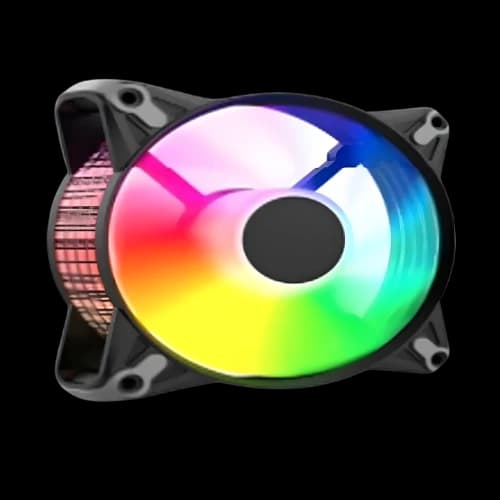
Description
Are you building a gaming PC and struggling to pick the right PC building components, like a cooling fan? The PC Power casing fan price in Bangladesh fits every budget, from basic office builds to full RGB gaming rigs. At PCB Store, we stock every PC Power model with genuine warranty support and fast nationwide delivery. This guide covers models, specs, and tips so you can pick a fan the first time.
Why PC Power Fans Are a Top Choice in Bangladesh?
PC builders in Bangladesh need value. They need looks, cooling, and a price that does not break the build budget.
PC Power delivers three. It sits between no-name RGB casing fan models and expensive premium brands. That makes it perfect for anyone doing a special build on a tight budget today.
The brand is also widely available. You will find it in Dhaka, Chattogram, Sylhet, and online at PCB Store with same-day dispatch options.
Why builders choose PC Power:
- ARGB lighting at a budget-friendly price point
- Compatible with major motherboards (ASUS, MSI, Gigabyte, ASRock)
- Available as single fans and full kits with a controller hub
- Anti-vibration pads for quieter operation
- Works well in mid-tower cases, popular in the BD market
No other brand at this price gives you an infinity mirror effect or a full 4-in-1 ARGB kit with a hub. That is the PC Power advantage.
PC Power Casing Fan Model List at PCB Store
We carry every active PC Power fan model. Each one serves a different type of builder. Below is a clear breakdown so you can match the fan to your build.
PC Power CFX 120MM ARGB Fan
This is the entry point. It is the best-selling PC Power fan in Bangladesh.
It runs at 1200 RPM with a 3-pin 5V ARGB connector. The single-fan design suits office PCs and entry-level gaming builds where one or two extra fans are needed.
Key specs:
- Size: 120mm
- Speed: 1200 RPM
- Connector: 3-pin 5V ARGB
- Color options: Black, White
- Best for: budget builds, office PCs, single fan replacement
If you are doing a basic PC components upgrade without heavy RGB, this is your fan. Clean, simple, reliable.
PC Power CFX White ARGB (Ring + Blade)
The Ring + Blade variant adds a dual-zone lighting effect. Both the ring and the blade illuminate independently.
This makes a big visual difference inside a windowed case. The white colorway also fits modern white PC builds well.
Key specs:
- Size: 120mm
- Lighting: ARGB ring and ARGB blade
- Connector: 3-pin 5V ARGB
- Best for: white builds, aesthetic-focused mid-towers
Pairs well with a white gaming motherboard and white RAM for a clean, all-white best gaming PC build aesthetic.
PC Power Irish Spectrum F20 Kit
The Spectrum F20 is a step up. You get three 120mm ARGB fans plus a dedicated hub controller in one box.
The hub controller makes cable management much easier. One cable runs to your motherboard header. All three fans sync together instantly.
What is included:
- 3x 120mm ARGB fans
- 1x RGB controller hub
- All mounting hardware
This kit targets the mid-range builder. Three fans in front as intake plus one extra at the rear covers most mid-tower cases sold in Bangladesh.
PC Power Irish Infinity F40 Kit
The Infinity F40 is the flagship. Four fans, full hub, and the signature infinity mirror center panel.
The mirror creates an optical illusion of depth inside the blade. It looks premium. It rivals fans at two or three times the price.
What is included:
- 4x 120mm ARGB Infinity Mirror fans
- 1x ARGB hub/controller
- Full mounting hardware
This is the right pick for a high-visibility casing fan build. Pair it with a glass-side case and a mid-to-high budget GPU, and the result is a head-turning rig at a local BD price.
Key Features of PC Power Casing Fan
Not all fans are equal. Specs on a box can be confusing. Here is what actually matters when you buy a PC Power fan for your build.
ARGB vs RGB — Know the Difference
Many buyers mix these up. They are not the same thing.
RGB fans use a 4-pin 12V connector. Colors are fixed per zone. You cannot control individual LEDs.
ARGB fans use a 3-pin 5V connector. Every LED is addressable. You get full color control per LED, sync effects, and animation modes.
PC Power uses ARGB technology across its CFX and Infinity series. That means:
- Full color customization per fan
- Sync with motherboard software (ASUS Aura, MSI Mystic Light, Gigabyte RGB Fusion, ASRock Polychrome)
- Dynamic lighting effects like rainbow, pulse, and static
For any serious best PC build, ARGB is the right choice. It gives you flexibility now and later when you upgrade your PC motherboard.
Anti-Vibration Pads — Small Detail, Big Impact
PC Power fans include rubber anti-vibration pads at each mounting corner.
These pads absorb motor vibration before it reaches the case frame. Less vibration means less noise. Less noise means a more comfortable workspace.
This feature is often missing in cheaper, no-name fans sold in Bangladesh. It is a real quality difference at the same price range.
Fan Speed and Airflow Rating
PC Power 120mm fans run at 1200 RPM under normal load. That is a balanced speed.
Higher RPM moves more air but create more noise. Lower RPM is quieter but may not cool demanding components well.
At 1200 RPM, PC Power fans handle:
- Standard gaming PC builds
- Mid-range CPUs like Ryzen 5 or Intel Core i5
- Budget to mid-range GPUs with good case ventilation
If you are running a high-end CPU with a GPU upgrade, this fan speed is more than sufficient for your thermal needs.
Hub Controller — Why It Matters for Kits
The F20 and F40 kits include a dedicated ARGB hub controller. This is a practical feature that many buyers overlook.
Without a hub, each fan needs its own header on the motherboard. Most boards have only one or two ARGB headers.
With the hub:
- All fans connect to one single motherboard header
- Cable routing becomes clean and simple
- All fans sync together as one unified lighting zone
This is especially useful for PCB Special Build projects where clean cable management is a priority inside the case.
How to Choose the Right PC Power Fan
Picking the wrong fan wastes money. Use this simple guide to match the fan to your exact build type.
For Budget and Office Builds
Go with the CFX 120MM ARGB single fan. One or two units added to your existing case setup will improve airflow noticeably.
You do not need a full kit for a basic office or entry-level PC. Single fans keep costs low while still adding ARGB lighting if your case has a glass panel.
Good pairing: entry-level motherboard, stock CPU cooler, one rear exhaust upgrade.
For Mid-Range Gaming Builds
The Irish Spectrum F20 Kit is the sweet spot. Three fans plus a hub controller give you a complete front-intake setup in one purchase.
This kit works well with:
- Mid-tower ATX cases with 3x120mm front mounts
- Ryzen 5 or Intel Core i5 platforms
- Mid-range GPUs where the heat output is moderate
A proper three-fan intake dramatically improves thermal performance over stock single-fan configurations. Your PC parts all run cooler and last longer.
For High-Performance and Aesthetic Builds
Choose the Irish Infinity F40 Kit. Four fans, infinity mirror effect, and a full hub make this the complete solution.
This kit suits:
- Full ATX mid-tower or full-tower builds
- High-end motherboard platforms
- Content creator and performance user setups
- Builders who want a premium-looking RGB casing fan rig at a local BD price
The Infinity series genuinely competes with premium foreign brands on visual impact. The price stays accessible.
Fan Size — Stick with 120mm for Most BD Cases
Most popular mid-tower cases sold in Bangladesh support 120mm fans. A few support 140mm at the front.
Always check your case manual before buying. But if you are unsure, 120mm is always the safe default.
Quick size guide:
- 120mm — standard for most BD mid-towers
- 140mm — larger cases with bigger front mounts
- 80mm — small form factor or slot cooling only
PC Power full range is 120mm. It covers the vast majority of builds in the local market.
PC Power Fan Compatibility Guide
Compatibility is a real concern for first-time builders. Here is what you need to know before you order.
Motherboard Compatibility
PC Power ARGB fans use the standard 3-pin 5V ARGB header. This is supported by all major brands:
- ASUS (Aura Sync)
- MSI (Mystic Light)
- Gigabyte (RGB Fusion 2.0)
- ASRock (Polychrome Sync)
If your gaming motherboard has a 3-pin 5V ARGB header, PC Power fans will sync directly. No extra software or adapter needed.
If your board only has a 4-pin 12V RGB header, you will need the hub controller from the F20 or F40 kit. The hub handles the signal conversion for you.
Case Compatibility
Standard 120mm fan mounts are universal. PC Power fans fit any case with a 120mm mounting point, including:
- ATX mid-tower cases
- Micro-ATX cases with front fan mounts
- Full-tower cases using 120mm positions
For cases with 140mm mounts, a 120mm fan still physically fits using standard screws. Airflow will be slightly lower, but it works fine.
PWM vs DC Speed Control
PC Power fans use 3-pin DC control by default. Most budget and mid-range motherboards control 3-pin fans via voltage regulation.
Key connector reference:
- 3-pin 5V ARGB header — for lighting sync
- 3-pin DC fan header (or 4-pin PWM with adapter) — for speed control
- Hub controller — manages all kit fans through a single cable run
Where can I buy genuine PC Power casing fans in Bangladesh?
Buy from PCB Store for guaranteed genuine products. We are an authorised source for PC Power fans in Bangladesh.
Every unit we sell comes with:
- 100% genuine product verification
- Stock availability updated daily
- Nationwide delivery across Bangladesh
- Multiple payment options.
Avoid unverified sellers. Counterfeit fans can damage your build. Always buy from a trusted source for your PC components.