Nzxt Amd Motherboard Price in Bangladesh
Nzxt Amd Motherboard
1
/1
Filter
Filter
Description
Latest NZXT AMD Motherboard Price in Bangladesh – PCB Store
Are you searching for the perfect NZXT AMD motherboard in Bangladesh for your Ryzen build? At PCB Store, we provide up-to-date prices, detailed specs, and reliable PC components so you can choose the right motherboard without confusion. This guide will help you compare NZXT motherboards, understand chipsets, and make informed buying decisions.
Current NZXT AMD Motherboards
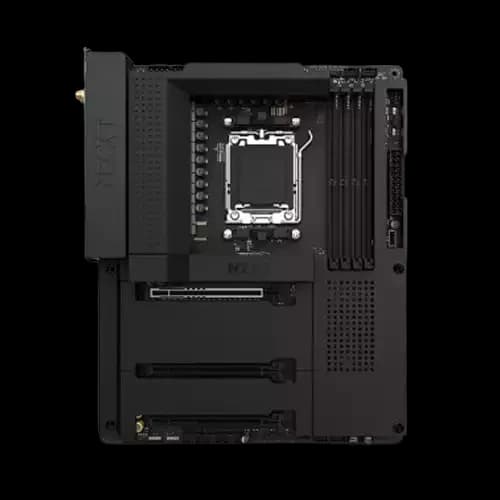
NZXT motherboards are designed for gamers, creators, and performance enthusiasts. In Bangladesh, prices vary depending on the chipset, socket type, and features. PCB Store brings you the latest NZXT motherboard price BD for all popular AMD boards.
Popular Models
NZXT N7 B550 AM4
Perfect for Ryzen 3000 and 5000 series. Supports DDR4 memory and has dual M.2 slots. Integrated Wi-Fi makes it convenient for modern setups.
NZXT N7 B650E AM5
Built for Ryzen 7000 series. Offers DDR5 support, PCIe 5.0, and enhanced cooling. Ideal for high-performance gaming and content creation PCs.
NZXT N7 X570 AM4
Offers robust power delivery for overclocking and multiple GPU setups. Features Wi-Fi 6 and premium audio.
These models cover a range from budget AMD motherboards BD to high-end performance boards. Each motherboard is crafted to fit the gaming motherboard for Ryzen while supporting the latest PC components.
NZXT Motherboard Features and Chipset Guide
Understanding the differences between AM4 vs AM5 motherboards is key when buying NZXT AMD boards. PCB Store explains it simply:
- AM4 Socket: Compatible with Ryzen 1000–5000 series. Supports DDR4 RAM and PCIe 4.0. Perfect for mid-range gaming and productivity setups.
- AM5 Socket: Compatible with Ryzen 7000 series. Supports DDR5 RAM and PCIe 5.0. Future-proof and suitable for high-end gaming rigs.
Chipset Overview:
- B450 – Budget-friendly, limited PCIe 4.0 support. Ideal for everyday gaming.
- B550 – Balanced option, PCIe 4.0 for graphics and storage. Most popular for Ryzen 5000 series.
- X570 – Premium option, PCIe 4.0 across all slots, suitable for enthusiasts.
- B650E – Advanced chipset for AM5, PCIe 5.0 support, DDR5-ready.
Key Components to Consider:
- CPU Socket – Ensure Ryzen CPU compatibility.
- RAM Slots – Supports DDR4 or DDR5, depending on model.
- PCIe & M.2 Slots – More slots allow better GPU and SSD expansion.
- Wi-Fi & Networking – Many NZXT boards include Wi-Fi 6E and Bluetooth 5.2.
- RGB & CAM Integration – Customizable lighting with NZXT CAM software.
Why Choose NZXT AMD Motherboards?
NZXT is known for premium design and performance. For gamers, creators, and PC builders in Bangladesh, NZXT AMD motherboards deliver stability, compatibility, and aesthetics.
Gaming Performance & Build Quality
- NZXT motherboards are optimized for Ryzen processors.
- Strong VRM design supports high-performance CPUs.
- Sleek layout with integrated RGB lighting for custom builds.
- Reinforced PCIe slots for heavy GPUs.
Compatibility with Ryzen CPUs
- Supports AM4 and AM5 sockets.
- Works with Ryzen 3000, 5000, and newer series.
- Flexible RAM support: DDR4 and DDR5, depending on the chipset.
- Ideal for both budget AMD motherboard BD buyers and high-end enthusiasts.
Unique NZXT Features
- Integrated Wi-Fi modules for wireless setups.
- Multiple M.2 slots for SSD expansion.
- Smart BIOS interface for easy tuning.
- Minimalist design that pairs with NZXT cases.
Compare NZXT AMD Motherboards – Features & Performance
Choosing the right NZXT motherboard in Bangladesh can be tricky with many options. At PCB Store, we break down the differences so you can make an informed choice. Understanding NZXT AMD motherboard compatibility with your Ryzen CPU, RAM, and GPU is key.
NZXT N7 B550 vs B650E – Which Should You Pick?
Socket & CPU Support
- B550 AM4 – Supports Ryzen 3000 and 5000 series. DDR4 memory only. Great for mid-range gaming rigs.
- B650E AM5 – Supports Ryzen 7000 series with DDR5 memory. PCIe 5.0 ready for future upgrades. Perfect for high-end gaming or content creation.
Memory & Storage
- B550 has up to 128GB DDR4 RAM across four slots. Dual M.2 NVMe slots for fast SSD storage.
- B650E supports DDR5 RAM and multiple M.2 slots with PCIe 5.0 bandwidth for ultra-fast storage. Ideal for heavy workloads and multitasking.
Expansion & Connectivity
- Both motherboards support PCIe slots for GPU upgrades.
- B650E includes additional PCIe lanes, better for multiple GPUs or high-speed devices.
- Wi-Fi 6E and Bluetooth 5.2 come standard on most B650E boards, while B550 may require separate adapters.
Design & Customization
- RGB headers for case lighting integration. Compatible with NZXT CAM software.
- Clean, minimal design on both boards, with B650E offering premium finishes for aesthetics.
NZXT X570 – Premium Option for Enthusiasts
For users wanting a high-performance setup, the NZXT X570 AM4 offers:
- Full PCIe 4.0 support on all slots
- Robust power delivery for overclocking Ryzen 5000 CPUs
- Advanced cooling for long gaming sessions
- Onboard Wi-Fi 6 and premium audio
This board is slightly more expensive but ideal for those prioritizing performance and durability. PCB Store ensures the latest NZXT motherboard price update is listed for easy comparison.
Comparison with Other AMD Motherboard Brands
Many Bangladeshi buyers compare NZXT with ASUS, MSI, and Gigabyte. Here’s how NZXT stands out.
NZXT vs ASUS
- ASUS offers a wide variety of chipsets.
- NZXT focuses on design and simplicity.
- NZXT boards are easier for beginners.
NZXT vs MSI
- MSI emphasizes overclocking features.
- NZXT balances performance with aesthetics.
- NZXT is better for clean builds.
NZXT vs Gigabyte
Gigabyte has budget-friendly options.
- NZXT targets mid to high-end buyers.
- NZXT warranty support is stronger in Bangladesh.
NZXT Motherboard Buyer’s Guide – How to Choose
Selecting the right NZXT AM4/AM5 motherboard can be overwhelming. At PCB Store, we simplify the process, helping you find the best motherboard for gaming, content creation, or high-performance computing in Bangladesh.
Step 1: Identify Your CPU
The first step is knowing your Ryzen processor:
- AM4 Socket – Supports Ryzen 1000 to 5000 series. Compatible with B450, B550, and X570 boards.
- AM5 Socket – Supports Ryzen 7000 series with DDR5. Compatible with B650E boards.
Always match the motherboard socket to your CPU. Choosing the wrong socket can cause incompatibility.
Step 2: Determine Memory Needs
Memory type and capacity are critical:
- DDR4 RAM – Works with B450, B550, and X570 boards. Ideal for mid-range gaming and productivity PCs.
- DDR5 RAM – Works with B650E AM5 boards. Offers faster speeds and future-proofing.
Consider your use: gaming usually requires 16–32GB, while content creation may need 32–64GB. PCB Store provides detailed NZXT AMD motherboard compatibility advice for your RAM.
Step 3: Check Expansion & Storage Options
Modern builds need enough PCIe and M.2 slots:
- PCIe Slots – For GPUs and expansion cards. More slots = more upgrades.
- M.2 Slots – High-speed NVMe storage. Multiple slots are vital for gamers and creators.
B650E supports PCIe 5.0 for future-ready GPUs and SSDs, while B550/X570 support PCIe 4.0.
Step 4: Consider Connectivity
Connectivity affects your daily PC use:
- Wi-Fi & Bluetooth – Essential for wireless peripherals. Many B650E boards include Wi-Fi 6E.
- USB Ports & Type-C – Important for external devices and fast transfers.
- Networking – Wired Ethernet for gaming stability.
PCB Store ensures every NZXT motherboard comes with all modern connectivity options.
Step 5: Decide on Budget
Budget plays a key role in choosing your motherboard:
- Budget AMD motherboard BD – B450 or entry-level B550 boards. Ideal for casual gaming and productivity.
- Mid-Range – B550 boards for Ryzen 5000 series. Balanced price and performance.
- High-End – B650E and X570 boards. Best for enthusiasts and creators needing maximum performance.
At PCB Store, we provide latest NZXT motherboard price updates to help buyers make informed decisions.
Step 6: Form Factor & Case Size
Confirm the motherboard’s physical size fits your PC case for proper installation and airflow:
- ATX – Standard size, fits most mid-tower and full-tower cases.
- microATX – Smaller, fits compact cases but with fewer expansion slots.
- Mini-ITX – Ultra-compact, ideal for small form factor builds.
Always check your case specifications before buying. At PCB Store, we guide buyers to match the right form factor with their PC components for smooth installation and long-term reliability.
Why Buy NZXT Motherboards from PCB Store
PCB Store is a trusted source for PC components in Bangladesh. Here’s why buyers choose us:
- We offer the most accurate NZXT motherboard price BD
- All motherboards are genuine and come with warranty
- We provide guidance on NZXT AMD motherboard compatibility with CPUs, RAM, and GPUs
- Reliable support for troubleshooting, warranty claims, and returns
- Competitive pricing across all popular NZXT models
Our goal is to make your purchase smooth, transparent, and value-driven.
Closing Thoughts
For tech-savvy buyers in Bangladesh, NZXT AMD motherboards deliver performance, design, and reliability. At PCB Store, we combine updated pricing, warranty support, and expert guidance to help you build the perfect Ryzen system. Whether you need a budget AMD motherboard or a premium AM5 board, we provide the right options with genuine local support.