Gamemax Casing Price in Bangladesh
Description
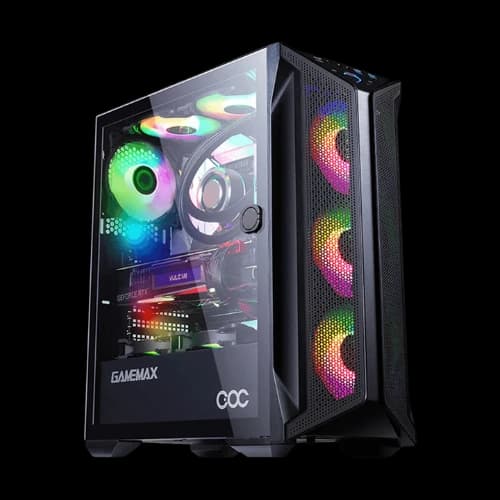
Are you building a gaming PC in Bangladesh and confused about which casing to pick? Gamemax casing price in Bangladesh starts from a very budget-friendly range. At PCB Store, we stock the latest Gamemax PC cases along with other PC Components for every type of build. Whether you need a PC case or a full-tower beast, we have the right option for you.
All Gamemax Casing Models Available in Bangladesh
We carry the full Gamemax lineup. Each model targets a different compact PC case builder. Below is a clear breakdown by series and use case.
Gamemax Revolt 3606 ARGB Gaming Case
The Revolt 3606 is a top pick for budget gaming builds. It supports ATX, M-ATX, and E-ATX motherboards. It comes with 3 x 120mm RGB fans pre-installed.
- Full mesh front panel for maximum airflow
- Tempered glass side panel to show off your build
- Supports up to 8 fans total
- PWM and Rainbow ARGB hub included
This case is perfect for your first best gaming PC build on a tight budget.
Gamemax Black Diamond A361 ATX Gaming Case
The Black Diamond is a mid-tower ATX case with premium looks. It features a built-in ARGB strip controller on the front panel. Cable management cutouts keep your build neat.
- Supports up to 5 fans
- PSU shroud for a clean interior look
- Compatible with 240mm and 120mm radiators
- ARGB header connects fans and LED strips directly
Great value for anyone building a mid-range gaming rig.
Gamemax Brufen C1 COC Cooling Gaming Chassis
The Brufen C1 uses GameMax's COC (Cooling and Overclocking) technology. A turbofan is built into the motherboard area. This creates a T-type airflow path inside the case.
- Supports up to 8 fans with V2.0 PWM ARGB hub
- Tempered glass side panel
- Connects directly to Gaming Motherboard ARGB headers
- Born for Intel Gen 10+ CPU builds
This is a strong pick if you plan to overclock your CPU or GPU.
Gamemax Nova N5 and N6 Mid Tower Cases
The Nova series offers a clean, modern aesthetic. Both N5 and N6 are mid-tower ATX cases. They offer solid airflow without going over budget.
- Multiple fan mounting positions: front, top, and rear
- Tempered glass left side panel
- Supports standard ATX and Micro-ATX motherboards
- USB 3.0 front panel port included
The Nova series suits content creators and everyday PC builders equally well.
Gamemax Abyss-TR M-908 E-ATX Full Tower Case
The Abyss-TR is the biggest and most powerful Gamemax case we carry. It supports E-ATX, ATX, Micro-ATX, and Mini-ITX motherboards. It is built for high-performance workstations or extreme gaming setups.
- 3 x 3.5" HDD bays and 4 x 2.5" SSD bays
- Supports up to 7 fans
- Mesh and tempered glass panel combination
- ABS front panel with a metal top panel
If you are pairing this with a High-Performance Power Supply and multiple GPUs, the Abyss-TR gives you all the room you need.
Best Gamemax Casing Fan Options and Cooling Upgrades
Every Gamemax case comes with at least one fan pre-installed. But serious builders always add more. Choosing the Best PC Casing Fan for your Gamemax build matters.
What to look for in a compatible case fan:
- 120mm fans fit front, rear, and top slots in most models
- 140mm fans offer more airflow at lower RPM and noise
- ARGB fans sync with Gamemax's built-in hub controller
- PWM fans adjust speed automatically based on temperature
The Revolt 3606 already includes 3 x 120mm ARGB fans. The Brufen C1 supports 8 fans total with its PWM ARGB hub. These setups are ready for serious thermal management right out of the box.
For the best cooling results, we recommend a push-pull fan setup on your front intake. Pair it with one or two rear exhaust fans. Your computer Components will run cooler and last longer.
Gamemax Casing and Gaming Motherboard Compatibility Guide
Your casing and Motherboard must work together. Gamemax cases support all major motherboard brands — ASUS, Gigabyte, MSI, and ASRock.
Compatibility quick reference:
- ASUS Aura Sync — works with Gamemax ARGB headers
- MSI Mystic Light — compatible via 3-pin ARGB connector
- Gigabyte RGB Fusion — supported on most Gamemax models
- ASRock Polychrome — plug directly into the ARGB hub
This means your RGB lighting stays fully synced across your whole build. One controller manages your fans, strips, and motherboard lighting together.
How to Choose the Right Gamemax Casing
Picking the wrong case ruins your entire PC build. Trust us, we see it happen a lot. The right Gamemax casing depends on four key things: your budget, your motherboard size, your cooling needs, and your GPU length.
Let us walk you through each step clearly.
Match Your Case to Your Motherboard Size
Your motherboard form factor decides everything. Always check compatibility before buying.
- ATX motherboards need a Mid Tower or full-tower case
- Micro-ATX fits in Mid Tower and Mini Tower cases
- Mini-ITX works in PC case designs
- E-ATX boards require Full Tower cases like the Abyss-TR
Most Gamemax mid-tower cases support ATX, M-ATX, and ITX together. This gives you flexibility for future upgrades.
Check Your GPU Clearance
Modern GPUs are large. Some triple-fan cards are over 320mm long. Always check the maximum GPU length your case supports.
Gamemax GPU clearance by type:
- Mini Tower models: up to 280–330mm GPU support
- Mid Tower models: up to 330–380mm GPU support
- Full Tower (Abyss-TR): supports large multi-GPU setups
If you are planning a best gaming build with a high-end GPU, always go mid-tower or above.
Plan Your Cooling Setup
Airflow is the most important technical factor in any case. Poor airflow kills components over time. Gamemax designs its cases with dedicated intake and exhaust paths.
- Mesh front panels allow maximum cool air intake
- The top and rear fan slots push hot air out efficiently
- Most models support 120mm, 240mm, and 360mm radiators
If you want liquid cooling support, the Revolt 3606, Brufen C1, and Abyss-TR all support AIO radiators up to 360mm.
Consider Your Power Supply Size
Your Power Supply must fit correctly inside your case. All Gamemax cases use standard ATX PSU mounting at the bottom. The PSU shroud covers cables neatly.
Always check:
- PSU length clearance (most Gamemax cases support up to 160–180mm PSUs)
- Bottom-mount vs rear-mount design
- Cable routing holes near the PSU area
A clean cable path means better airflow and a better-looking build.
Why Buy Gamemax Casing from PCB Store?
PCB Store is a trusted Components retailer in Bangladesh. We serve PC gamers, custom builders, content creators, and tech enthusiasts across the country.
What makes PCB Store different:
- Updated Gamemax casing price list every week
- Official warranty support for all products
- Fast delivery across Bangladesh
- Expert support team for pre-purchase advice
We do not just sell you a case. We help you build the right PC for your exact needs and budget.