1st Player Casing Fan Price in Bangladesh
Description
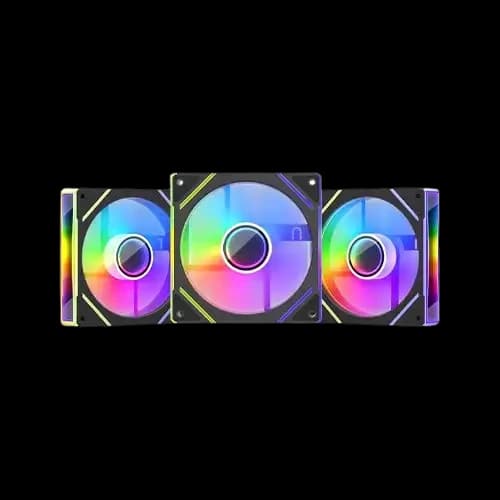
Are you building a gaming PC and wondering which Desktop Component offers the best cooling without breaking your budget? The 1st Player casing fan price in Bangladesh fits almost every budget — and at PCB Store, we carry the full lineup. From silent office builds to RGB-loaded gaming rigs, this guide covers every model, spec, and smart buying tip you need.
Why Choose 1st Player Casing Fans for Your PC Build?
1st Player is a trusted Brand. Their Case Fan models are designed for gamers and performance users who demand stable airflow and ARGB lighting.
- Strong airflow for the computer casing
- ARGB lighting for PC builds
- Long lifespan for continuous use
- Easy installation with controller and hub options
These fans are not just accessories. They are essential for keeping your system cool, especially when running heavy workloads like gaming, video editing, or rendering on high-end graphics cards.
1st Player Casing Fan Key Specifications Overview
Specs matter especially when you are pairing fans with a high-quality GPU or a beefy air cooler.
Here is a breakdown of what you need to understand before buying.
Fan Size and Mounting
All 1STPLAYER fans use the 120×120×25mm standard. They mount on front, rear, top, and bottom panels.
Most popular gaming cases in Bangladesh support at least three 120mm slots. This makes 3-in-1 combos the smart buy.
Fan Speed (RPM) and Airflow (CFM)
Fan speed determines how much air flows through your computer's casing each minute.
- Standard models run at 1,200 RPM (±10%)
- High-speed models like M1-D push up to 2,500 RPM
- Airflow ranges from 36 CFM to 48.25 CFM, depending on the model
For a custom PC build with a GPU, aim for at least 42–48 CFM total system airflow.
Noise Level (dBA)
Nobody wants a loud PC. Especially not in small Bangladeshi apartments.
- Most 1st Player models stay between 27 dBA and 32 dBA
- The M1-D is one of the quietest at 27.82 dBA
- Noise under 30 dBA feels almost silent during normal use
If you run an air cooler alongside casing fans, balanced dBA levels matter even more.
Bearing Type and Lifespan
Bearing quality decides how long your fan lasts.
- Hydro bearing models (M1-D, FIS) last up to 25,000 hours
- Standard sleeve bearing models last around 20,000 hours
- At 8 hours daily use, that means 5 to 8 years of life
Bangladesh's heat and humidity make bearing quality a real concern. Hydro bearing wins here.
Connector Type
- 3-pin ARGB connector for lighting control
- 4-pin PWM connector for speed control via motherboards
- The hub connects all 3 fans to a single motherboard header
This setup keeps your cable management clean. It also avoids using multiple fan headers on your PC motherboard.
1st Player ARGB Fan — Lighting and Aesthetics Explained
RGB is not just decoration. For many custom build enthusiasts in Bangladesh, lighting is part of the whole experience.
1STPLAYER uses ARGB — Addressable RGB. This is different from basic RGB.
What makes ARGB better than standard RGB:
- Each LED is individually controlled
- You can run dynamic color effects and animations
- Syncs directly with compatible motherboards via 5V 3-pin header
- Use the included controller if your board lacks an ARGB header
The included hub connects all three fans to one header. One cable. Clean build. Full control.
ARGB Sync Compatibility
Most modern PC motherboards support ARGB sync. Brands like ASUS Aura Sync, MSI Mystic Light, and Gigabyte RGB Fusion all work with 1STPLAYER fans.
If your board is older, the included standalone controller handles everything. No software needed.
This makes 1st Player fans genuinely plug-and-play for most PC build setups in Bangladesh.
How to Set Up the Right Airflow Configuration
Buying the right fan is only half the job. Placing it correctly is the other half.
Poor airflow ruins even the best desktop component setup. We see this mistake often at PCB Store.
Intake vs Exhaust — The Basic Rule
Air must flow in one direction through your computer casing. The front and bottom panels draw cool air in. The rear and top panels push hot air out.
This is called positive pressure airflow. It reduces dust buildup and keeps temperatures stable.
Recommended fan placement for a 3-fan setup:
- 2 fans at the front — intake position
- 1 fan at the rear — exhaust position
- Optional top fan for extra exhaust with radiator support
This setup works perfectly with most mid-tower casings popular in Bangladesh.
5-Fan Setup for High-Performance Builds
Running a graphics card or an overclocked processor? You need more airflow.
- 3 fans front — intake
- 1 fan rear — exhaust
- 1 fan top — exhaust
Pair this with a good air cooler, and your temperatures drop significantly. Even in Bangladesh's warm climate, this setup keeps everything cool under load.
Pairing Fans with Your Air Cooler
Your cooler and casing fans must work together. They share the same airflow path inside the case.
A good cooler pulls heat off your CPU. Casing fans move that heat out of the case. If fans fight each other in the direction, heat gets trapped.
Always align your air cooler fan direction with your front-to-back airflow path. This small detail makes a big difference in real temperatures.
Choosing the Right 1st Player Fan for Your Build Type
Not every build needs the same fan. We break it down simply here.
Your build type decides which series makes the most sense. Match the fan to the job.
Budget Gaming Build
You want cooling, some RGB, and low cost. The M3 ARGB combo is your pick.
It gives three fans, a hub, and a controller. Your casing looks great and stays cool. This is the most popular choice among student builders in Bangladesh.
Pair it with a basic cooler and a mid-range PC motherboard. You get a solid PC build without overspending.
Mid-Range Performance Build
You are pushing a faster processor and a mid-tier high-quality graphics card. The M1 or M1-D series fits here.
The M1-D hydro bearing runs cooler and quieter under sustained loads. It handles longer gaming or rendering sessions without noise issues.
It also syncs cleanly with most current-generation PC motherboards in the market.
High-End or Content Creator Build
You run heavy workloads. Video editing, 3D rendering, or streaming — these push your desktop parts stack hard.
The FIS or CC ARGB series handles this. Higher static pressure from the CC model helps move air through dense component layouts.
Office or Quiet Home Build
You want near-silent operation. Minimal RGB. Just clean, effective cooling.
The M1-D in black gives you the quietest 1st Player experience available. Under 28 dBA at full speed — barely audible.
A simple 2-fan setup with one intake and one exhaust is enough for light pc component loads.
Why Buy Your 1st Player Fan from PCB Store?
PCB Store is Bangladesh's trusted source for genuine PC components. We do not sell grey market or refurbished stock.
Every 1STPLAYER fan we carry comes with full warranty coverage. Our team knows these products inside out.
What makes PCB Store the right choice:
- Genuine 1STPLAYER products with Official warranty
- Fast delivery across Bangladesh
- Multiple payment options
We help builders at every level — from first-time custom PC build projects to full workstation setups. Our goal is to match you with the right pc component every time.