Thermalright Casing Fan Price in Bangladesh
Thermalright Casing Fan
1
/1
Filter
Filter
Description
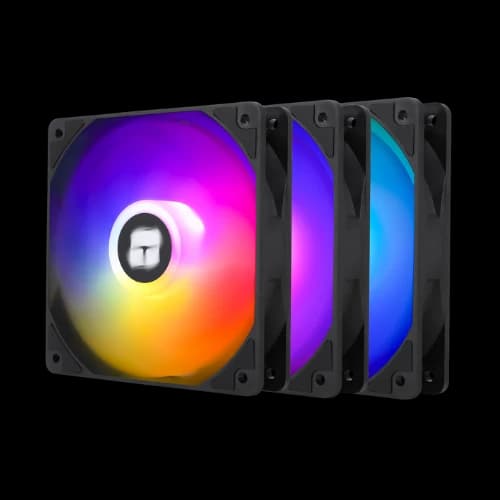
Looking for the best Thermalright casing fan price in Bangladesh? You are in the right place. At PCB Store, we stock every major Thermalright fan model — from budget single units to premium ARGB 5-packs. These fans are a top pick for PC building components in Bangladesh. Whether you are building a budget rig or a full Build, cooling matters. This guide covers everything — models, specs, buying tips, and more.
Why Thermalright Fans Are Trusted by PC Builders
Thermalright has earned a reputation among tech enthusiasts in Bangladesh. Here’s why:
- Cooling Efficiency for Motherboards: High RPM fans push strong airflow, keeping your system stable during heavy gaming.
- Noise Control for Content Creators: Low dBA fans reduce distractions, perfect for editing or streaming.
- ARGB Lighting for Custom Builds Fans with ARGB support sync with your system, adding style to your Special Build.
- Long Lifespan Bearings: Hydraulic and fluid dynamic bearings extend durability, reducing replacement costs.
When combined with a budget GPU or high-end graphics card, Thermalright fans maintain consistent cooling.
Thermalright Casing Fan Model Overview
We carry all major Thermalright RGB casing fan models in Bangladesh. Below is a breakdown of the series available at PCB Store.
Thermalright TL-C12CW-S — 120mm White ARGB Fan
This is one of the most popular picks in our store. It comes in single and 3-pack options. The white color works great with white PC builds.
Specifications at a glance:
- Size: 120mm x 120mm x 25mm
- Speed: 1550 RPM (max)
- Airflow: 66.17 CFM (max)
- Noise: 25.6 dBA (max)
- Bearing: S-FDB fluid bearing
- Connector: 4-pin PWM + 3-pin 5V ARGB
This fan is ideal for anyone building the best gaming PC build with a white theme. It pairs perfectly with a white Gaming Motherboard and white RAM setup.
Thermalright TL-C12C-S — 120mm Black ARGB Fan (X3 & X5 Pack)
The black version is popular for dark and stealth builds. It comes in 3-pack and 5-pack options. The X5 pack is perfect for full-tower cases.
Why builders pick this model:
- 9-blade design pushes more air per spin
- 1550 RPM max speed with very low noise
- Strong static pressure — good for radiators too
- ARGB ring gives a full 360-degree lighting effect
This model fits well with a mid-range or high-end Motherboard. It also pairs well with any Budget GPU to keep temps in check.
Thermalright TL-S12W — 120mm White ARGB 3-Pack
The TL-S12W is a lighter, more affordable ARGB fan. It is a good pick for entry-level PC components. The 3-pack gives great value.
Key specs:
- Speed: 1500 RPM (max)
- Airflow: 47.6 CFM (max)
- Noise: 23.2 dBA (max)
- Connector: 4-pin PWM + 3-pin 5V ARGB
At 23.2 dBA, this is one of the quietest fans we stock. Content creators and streamers love this model.
Thermalright TL-S12R — 120mm Single Fan (Non-ARGB)
This is a clean, no-frills cooling fan. No RGB. Just pure airflow. It is perfect for server builds, budget rigs, or plain-looking cases.
- Speed: 450–1500 RPM
- Noise: 23 dBA
- Bearing: Fluid bearing (20,000-hour life)
- Connector: 4-pin PWM
This model suits anyone who wants cooling without lighting. A solid pick for a Budget GPU build focused on thermals only.
Thermalright TL-B12-S3 — ARGB Black 3-Pack
This is a premium fan for RGB-heavy gaming builds. The black finish and ARGB glow make it a crowd favorite. It suits any PC build that uses glass panels.
Standout features:
- Full ARGB with motherboard sync
- Black blade design with high RPM
- Compatible with all major ARGB controllers
This fan pairs best with a high-end PCB Special Build and a top-tier Motherboard.
How to Choose the Right Thermalright Casing Fan
Picking the wrong fan wastes money. The right fan keeps your build cool and quiet. Here is a simple guide to help you choose correctly at PCB Store.
Check Your Case Fan Size First
Most PC cases in Bangladesh support 120mm fans. Some mid-towers and full-towers support 140mm. Always check your case manual before buying.
Common fan mounting locations:
- Front panel: 2 or 3 x 120mm intake fans
- Top panel: 2 x 120mm or 140mm exhaust fans
- Rear panel: 1 x 120mm exhaust fan
Thermalright focuses on 120mm fans for the Bangladesh market. All our PCB Store models are 120mm.
Airflow Fan vs Static Pressure Fan
Not all fans work the same way. The job determines the fan type you need.
Airflow fans move large volumes of air. Use them on the front and top panels. They are best for general case cooling in the best build.
Static pressure fans push air through tight spaces. Use them on CPU coolers, radiators, and heatsinks.
Most Thermalright casing fans balance both. That makes them flexible for all PC building component setups.
ARGB oder Non-RGB?
This depends on your build style and budget.
Choose ARGB if:
- Your case has a tempered glass panel
- Your Gaming Motherboard has a 3-pin 5V ARGB header
- You want lighting sync with RGB RAM or GPU
Choose Non-RGB if:
- You want a cleaner, minimal look
- You are building a budget rig with a Budget GPU
- Your motherboard has no ARGB headers
PCB Store stocks both types. We help you match the right fan to your board.
Check Your Motherboard Connector
Thermalright fans use two connectors. You must check both before buying.
- 4-pin PWM connector — controls fan speed automatically
- 3-pin 5V ARGB connector — controls lighting effects
Most modern PC Motherboard models have both headers. Older boards may only have a 4-pin fan header. In that case, lighting control needs a separate ARGB controller.
Plan Your Full Airflow Setup
A single fan does not cool a PC properly. You need a full airflow plan.
The basic rule is simple:
- Front and bottom fans pull cool air IN (intake)
- Rear and top fans push hot air OUT (exhaust)
This creates positive pressure inside the case. It reduces dust buildup. It also lowers CPU and GPU temperatures by 3–8 degrees Celsius on average.
For a Special Build with high-end components, we recommend at least 3 fans. The TL-C12C-S X3 or TL-C12CW-S X3 packs cover this perfectly in one purchase.
Thermalright Casing Fan for Every Build Type
At PCB Store, we see all types of builds. Here is which Thermalright fan suits each one.
Best Cooling for a Gaming PC Build
Gaming PCs run hot. The PC build needs at least 3 case fans. The TL-C12C-S X3 black or TL-C12CW-S X3 white pack is our top recommendation.
These fans push 66.17 CFM each. Together, three fans create strong airflow across all PC components. CPU and GPU temperatures stay stable during long gaming sessions.
Best Fan for a Budget GPU Setup
Running a Budget Graphics card does not mean ignoring cooling. Hot GPUs throttle performance. That kills your frame rates.
A single TL-S12R or TL-C12CW-S at the front panel makes a big difference. It pulls cool air directly toward the GPU. Temps drop. Performance stays stable.
Best Fan for Content Creation Builds
Content creators need silent PCs. Fans with high noise levels are distracting during recording or streaming.
The TL-S12W X3 pack is our top pick here. At 23.2 dBA, it is nearly silent. It keeps airflow strong without creating background noise. Pair it with a mid-range Motherboard, and you have a clean, quiet workstation.
Best Fan for a PCB Special Build
A PCB Special Build uses premium components across every part. Cooling must match that level.
The TL-B12-S3 ARGB 3-pack or TL-C12C-S X5 5-pack works best here. Five fans cover a full-tower case completely. ARGB lighting syncs across every fan. The result is a high-performance, visually impressive build.
Why Buy Thermalright Fans from PCB Store?
There are many shops in Bangladesh. But PCB Store offers something different. We focus on quality, not just quantity.
What makes PCB Store different:
- Official warranty support
- Fast delivery across all of Bangladesh
- Competitive pricing on every Thermalright model
We also carry the full range of PC Parts. Fans, coolers, cases, Budget GPU picks, thermal paste, and more. Everything a builder needs is in one place.