Thermaltake Casing Fan Price in Bangladesh
Thermaltake Casing Fan
1
/1
Filter
Filter
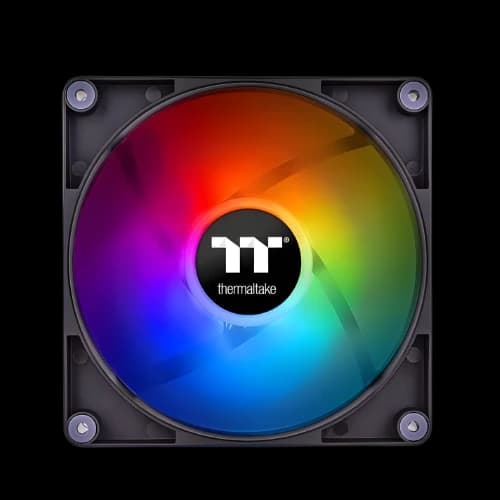
Description
Are you searching for the best Thermaltake casing fan price in Bangladesh? You are in the right place. At PCB Store, we carry the full Thermaltake fan lineup — from budget 120mm fans to premium ARGB sets. Our goal is simple. We help you find the right Desktop Component for your build, at the right price, with zero confusion.
Why Thermaltake Fans Are Popular in Bangladesh
Thermaltake is one of the most trusted names in PC cooling. Builders across Bangladesh choose it for one reason: it delivers real results.
Brand Trust and Build Quality
Every Thermaltake case fan is built with anti-vibration mounting pads. These reduce noise during long gaming or editing sessions.
The fan frames use durable materials. They do not crack or warp over time. This matters a lot in Bangladesh's humid weather.
- Long-lasting hydraulic bearings in most models
- Anti-vibration rubber corners for silent operation
- Strong 9-blade designs for better airflow per RPM
- Clean cable routing for tidy builds inside your Case
Thermaltake Fan Series Available in Bangladesh
We stock every major Thermaltake fan series at PCB Store. Here is what each series is best for.
Pure Series
The Pure series is the entry point into Thermaltake quality. Pure A12 (120mm) and Pure A14 (140mm) are the top sellers in Bangladesh.
They come with LED lighting in red, blue, green, and white. They are simple, reliable, and affordable. A great first casing fan for any Desktop Component build on a budget.
Riing Plus & Riing Trio
The Riing Plus and Riing Trio are Thermaltake's most popular RGB fans in Bangladesh.
The Riing Trio 12 features three individual light rings and 30 addressable LEDs. It is the fan that makes your custom pc build look like a professional gaming rig. Performance-wise, it uses a 9-blade design for high static pressure — perfect for radiators.
SWAFAN Series
The SWAFAN is Thermaltake's most flexible fan. It features a swappable blade design.
You get two sets of blades in the box — one for airflow, one for static pressure. You can switch them without any tools. This is perfect for PC builders who like to experiment or change their PC Casing layout.
TOUGHFAN Series
The TOUGHFAN EX series is built for performance, not looks. It uses MagForce 2.0 magnetic connections for quick daisy-chain setups.
If you run a thick radiator in your pc build, TOUGHFAN delivers the static pressure needed to push air through dense fins efficiently.
How to Choose the Right Thermaltake Case Fan
Picking the wrong fan is a common mistake. Many buyers in Bangladesh focus only on looks. But the right Case Fan choice depends on your build goals, your Computer Casing size, and your PC motherboard compatibility.
We break it down simply below.
Fan Size — 120mm vs 140mm
Fan size is the first thing to check. Measure your Casing fan mounts before buying anything.
Most mid-tower cases in Bangladesh support 120mm fans. Many ATX full-tower cases also support 140mm mounts on the front and top panels.
- 120mm: Fits more cases, great for tight builds and radiators
- 140mm: More airflow at lower RPM, quieter operation overall
- Always check your case manual for supported fan sizes
- Mixing 120mm and 140mm in one build is perfectly fine
If your PC Case supports both, go with 140mm at the front. Use 120mm at the rear exhaust. That setup gives you strong airflow without extra noise.
Airflow vs Static Pressure — Which Do You Need?
This is where most buyers get confused. Let us explain it simply.
Airflow fans move large volumes of air freely. They work best in open spaces inside your Case, like side vents or open front panels.
Static pressure fans push air through obstacles. They are built for radiators, CPU heatsinks, and dust-filtered front panels.
- Use airflow fans: open front panels, side vents, unrestricted mounts
- Use static pressure fans: radiators, dense heatsinks, filtered front panels
- Thermaltake SWAFAN gives you both blade types in one package
- Check the CFM and mmH2O ratings on the product spec sheet
For most custom-built setups in Bangladesh, a mix of both types gives the best thermal results. We always recommend at least one static pressure fan at the front intake.
RGB vs ARGB — Lighting Explained Simply
RGB and ARGB are not the same thing. Knowing the difference saves you money and frustration.
RGB fans have a single color shown across all LEDs at once. You can change the color, but every LED shows the same shade.
ARGB fans control each LED individually. You can have 10 different colors across one fan ring at the same time. The effects look far more dynamic and premium.
- RGB: connects to a 12V 4-pin RGB header on your PC motherboard
- ARGB: connects to a 5V 3-pin ARGB header on your Motherboards
- ARGB is compatible with ASUS Aura, MSI Mystic Light, and Gigabyte RGB Fusion
If your PC motherboard has a 5V ARGB header, always choose ARGB. The lighting quality is noticeably better for your pc build showcase.
Bearing Types and Noise Levels
Bearing type affects how long your fan lasts and how loud it runs. Thermaltake uses two main types of models.
Hydraulic bearings are the most common. They are quiet, affordable, and last up to 40,000 hours. Most Pure Series and Riing fans use hydraulic bearings.
LNC (Low Noise Cable) bearings are premium. They run even quieter. They are found in TOUGHFAN and select SWAFAN models.
- Hydraulic bearing: quiet, budget-friendly, 40,000-hour lifespan
- LNC bearing: ultra-quiet, premium models, best for silent builds
- Noise levels under 25 dBA are considered silent in home environments
- Bangladesh's warm climate does push fans to higher RPMs more often
Thermaltake Fan Compatibility with PC Motherboards and Cases
Compatibility is critical. A fan that does not match your PC motherboard headers or your Computer Casing mounts is useless.
At PCB Store, we help you match the right fan to your exact setup before you buy.
3-Pin vs 4-Pin PWM Header Guide
Older motherboards use 3-pin DC fan headers. You can plug a 4-pin fan into a 3-pin header, but you lose PWM speed control.
Modern PC Motherboards use 4-pin PWM headers. This lets the board control fan speed automatically based on CPU or system temperature.
- 3-pin fans: fixed speed or basic voltage control only
- 4-pin PWM fans: automatic speed adjustment based on temp sensors
- All Thermaltake SWAFAN, Riing Plus, and TOUGHFAN use 4-pin PWM
- Pure Series fans are available in both 3-pin and 4-pin versions
Always check your PC motherboard's manual for the number and type of fan headers. Most mid-range boards from ASUS, MSI, Gigabyte, and ASRock have 3 to 5 fan headers.
TT RGB Plus Software and Motherboard Sync
Thermaltake's TT RGB Plus software is a free Windows application. It controls lighting and fan speed across all TT fans in your build.
It also supports motherboard sync. That means your TT fans can follow the same lighting theme as your Motherboards RGB zones.
- Supports ASUS Aura Sync, MSI Mystic Light Sync, Gigabyte RGB Fusion 2.0
- Controls up to multiple fans and RGB products from one dashboard
- Works with Riing Trio, SWAFAN, Pure ARGB Sync, and TOUGHFAN EX ARGB
- Free download, no subscription needed
This makes Thermaltake one of the best ecosystem choices for a fully synced custom pc build. Your fans, your PC Motherboards RGB, and your RAM lighting can all match perfectly.
Fan Placement Guide for Your Computer Casing
Where you place your fans matters as much as which fans you buy. Poor placement wastes airflow. Good placement drops temps by 8–12°C in our own test builds.
Intake vs Exhaust Setup
Air should always flow in one clear direction through your Computer Case. Front and bottom panels should pull cool air in. The rear and top panels should push hot air out.
This is called positive air pressure. It keeps dust out and temperatures low.
- Front fans: intake (blowing air into the case)
- Rear fan: exhaust (pushing hot air out from behind)
- Top fans: exhaust (hot air rises naturally, so top exhaust is efficient)
- Bottom fans: intake (optional, useful for GPU cooling)
A common mistake in Bangladesh builds is running all fans as intake. That creates pressure conflicts and poor airflow paths. Always balance intake and exhaust fans.
Best Fan Layout for Custom PC Build
For a standard mid-tower custom pc build, we recommend this layout at PCB Store:
- 2 x 120mm or 140mm intake fans at the front (airflow type)
- 1 x 120mm exhaust fan at rear (static pressure or airflow type)
- 1 x 120mm exhaust fan at top rear (optional but recommended in BD climate)
This setup creates clean front-to-back airflow.
For liquid-cooled pc build setups, place your radiator at the front as intake. Use static pressure fans like Riing Trio or TOUGHFAN on the radiator. Keep the rear and top as the exhaust.
The result is a cool, stable, and quiet system — even during Dhaka's hottest months.
Why Buy Thermaltake Fans from PCB Store?
At PCB Store, we focus on value and trust. Buyers in Bangladesh want reliable cooling without confusion. That’s why our category page combines the Thermaltake casing fan price in Bangladesh with technical guidance.
- Genuine Thermaltake products.
- Warranty support.
- Wide range for gamers, creators, and performance users.
- Helpful content for Computer build decisions.
We don’t just sell fans. We help you understand airflow, noise, and compatibility. That’s how we build authority in the Bangladeshi market.