Peladn Graphics Card Price in Bangladesh
Peladn Graphics Card
1
/1
Filter
Filter
Description
Are you searching for the best PELADN graphics card price in Bangladesh without wasting hours comparing specs? You are in the right place. At PCB Store, we carry the full range of PELADN GPUs — from budget-friendly RX series cards to high-performance RTX models. Whether you are building a custom PC, upgrading your gaming PC components, or setting up a creative workstation, PELADN offers real performance at honest prices. This guide gives you everything — prices, series breakdowns, specs, and expert buying advice — so you can shop smart.
Popular PELADN Graphics Card Models
We highlight top Peladn models at PCB Store. Each one fits specific user needs. Gamers want smooth frames. Creators need strong rendering. We cover both.
Entry-Level: PELADN GT 730 Series
This series works for basic tasks. It has 4GB GDDR5 memory. Core frequency hits 902MHz. Use it for light gaming or office work. It fits old systems well.
Ports include 3DP and HDMI. Max resolution reaches 4096x2160. Cooling uses a single fan. Power draw stays low at 30W. We suggest it for starters in custom PC builds.
Mid-Range Gaming: PELADN RX 580 & RX 5500 XT
PELADN RX 580 offers 8GB GDDR5. Its 256-bit bus moves data quickly. Core clock is 1244MHz. It runs games at 1080p smoothly.
For better frames, try RX 5500 XT. It has 8GB GDDR6. Boost clock goes to 1845MHz. AMD tech boosts colors. We see it in many gaming setups.
Both models support multi-monitor use. They handle video editing too. Content creators pick them often. We bundle them with CPU options.
Use in custom PC builds for balance. Add a strong PSU. Our experts check compatibility. Get more from your budget GPU.
High-End: PELADN RTX 3050 & RTX 2080 Super
RTX 3050 brings ray tracing. It has 8GB GDDR6. CUDA cores number 2560. Base clock is 1552MHz. Boost hits 1777MHz.
For top power, RTX 2080 Super shines. 8GB GDDR6 with 3072 cores. Clock speeds reach 1815MHz. It tackles 4K gaming.
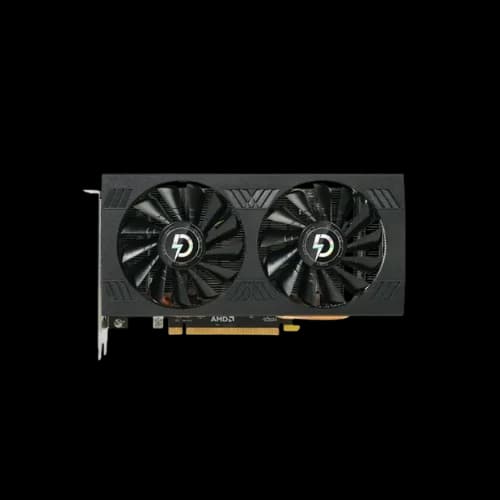
These cards use PCI-E 4.0. Outputs include multiple HDMI. Cooling features dual fans. Power needs 650W or more.
We recommend them for pro users. Pair with a high-end CPU for max output. Our store helps with full builds.
Key Specifications to Check Before Buying a PELADN GPU
Specs matter. But most buyers in Bangladesh get confused by numbers. Here is a simple breakdown of what each spec actually means for your custom PC build or gaming setup.
VRAM Size — How Much Memory Do You Need?
VRAM is the memory built into your graphics card. More VRAM means your GPU can handle larger textures and higher resolutions.
- 4GB VRAM — Basic office use, light gaming at 720p to 1080p
- 6GB VRAM — Entry-level 1080p gaming, light editing
- 8GB VRAM — Comfortable 1080p gaming, video editing, streaming
- 12GB VRAM — 1440p gaming, 3D rendering, content creation
- 16GB+ VRAM — Professional workloads, heavy 4K tasks
For most gamers in Bangladesh, 8GB GDDR6 is the sweet spot right now. It covers modern titles well and handles editing in Adobe tools without strain.
Memory Type — GDDR5 vs GDDR6 vs GDDR6X
Memory type affects how fast data moves between your CPU and GPU.
- GDDR5 — Older tech, found in RX 580 and budget cards. Still capable of 1080p
- GDDR6 — Current standard. Faster bandwidth, better efficiency
- GDDR6X — High-end standard. Found in RTX 3080 class cards. Much faster data transfer
Always prefer GDDR6 or above for any new gaming PC build in 2026.
Memory Bus Width — Why It Matters
Bus width controls how much data moves per clock cycle. Wider is faster.
- 64-bit — Very limited, only for basic use
- 128-bit — Acceptable for budget gaming GPU
- 192-bit — Good mid-range performance
- 256-bit — Strong bandwidth for 1080p to 1440p
- 320-bit and above — High-end territory
The PELADN RX 580 8GB uses a 256-bit bus. That is why it punches above its price point. A wider bus often matters more than raw clock speed.
Power Consumption and PSU Requirements
Every GPU needs power. Your Power Supply must meet the card's demand. Underpowered builds cause crashes and hardware damage.
Quick reference for common PELADN models:
- RX 550 4GB — Needs 300W+ PSU
- RX 580 8GB — Needs 500W+ PSU
- GTX 1660 Ti 6GB — Needs 450W+ PSU
- RTX 2070 Super 8GB — Needs 550W+ PSU
- RTX 3060 12GB — Needs 550W+ PSU
- RTX 3070 Ti 8GB — Needs 650W+ PSU
- RTX 3080 10GB — Needs 750W+ PSU
Always add 100W of headroom above the GPU requirement. Your CPU, Desktop Ram, storage, and fans all draw power too.
PCIe Compatibility
All modern PELADN graphics cards use a PCIe x16 slot. This slot is standard on every modern ATX, Micro-ATX, and Mini-ITX motherboard. PCIe 3.0 and PCIe 4.0 boards are both compatible. The newer PCIe 4.0 boards offer slightly more bandwidth, but the real-world difference is minimal for gaming.
Cooling System — Fan Count Matters
Cooling keeps your GPU alive under load. PELADN uses different cooling setups across its range.
- Single fan — Budget cards, light workloads only
- Dual fan — Most mid-range PELADN cards. Good for sustained gaming sessions
- Triple fan — Found on Taichi and high-end Moye series. Best thermal performance
If you plan to use your GPU for long gaming or rendering sessions, always pick dual-fan or triple-fan models.
Display Output Support
Most PELADN cards come with:
- 1x HDMI port
- 2x to 3x DisplayPort outputs
This supports multi-monitor setups, a common need for content creators and gamers who use a vertical GPU card holder display configuration. Always check the maximum supported resolution before purchase. Top PELADN models support up to 7680x4320 (8K).
Why Choose PCB Store for Your PELADN Graphics Cards?
PCB Store is your trusted destination for Peladn GPUs. We provide:
- Authentic products with a warranty.
- Expert guidance for custom PC builds.
- Bundles with gaming PC components and accessories.
Whether you’re upgrading your rig or starting fresh, PCB Store ensures you get the right GPU for your needs.