Neo Forza Ssd Price in Bangladesh
Description
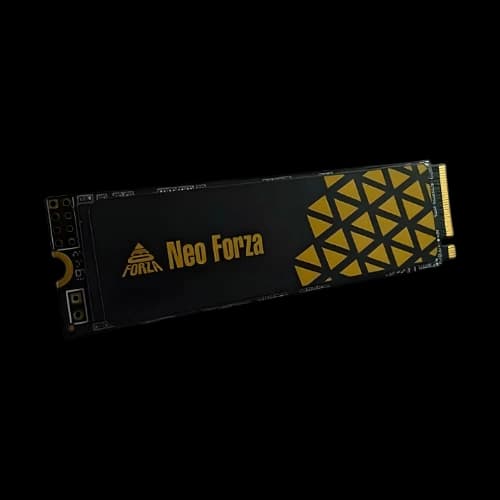
Have you been searching for a reliable SSD upgrade that balances speed, durability, and affordability? At PCB Store Bangladesh, we bring you the complete lineup of Neo Forza SSDs designed for gamers, content creators, and performance users. This guide explains everything about the Neo Forza SSD price in Bangladesh, specifications, and buying tips. Whether you are a PC builder upgrading a motherboard or a laptop user seeking faster boot times, Neo Forza delivers consistent performance.
Why Choose Neo Forza SSD?
Neo Forza is a trusted name in solid state drives. Their SSDs are built for speed, stability, and long-term use. At PCB Store, we highlight why Neo Forza is a smart choice for Bangladeshi buyers.
Speed and Performance
- NVMe PCIe Gen3 and Gen4 models deliver blazing read and write speeds.
- SATA3 SSDs provide reliable performance for budget-friendly builds.
- DRAM cache support improves multitasking and gaming responsiveness.
Whether you are running a GPU-heavy game, editing large video files, or transferring data between HDD and SSD, Neo Forza SSDs keep your system fast.
Durability and Warranty
Neo Forza SSDs are designed with advanced NAND flash technology. They offer consistent performance even under heavy workloads. Buyers in Bangladesh benefit from official warranty support, making them a safe investment for long-term use.
Gaming and Professional Use Cases
- Gamers: Faster load times, smoother gameplay, reduced lag.
- Content Creators: Quick rendering, stable storage for large files.
- Laptop Users: Lightweight, energy-efficient, and reliable upgrades.
- PC Builders: Perfect for custom builds with modern motherboards, processors, RAM, and power supply units.
Neo Forza SSD Price List in Bangladesh
At PCB Store, we categorize Neo Forza SSDs by capacity and form factor. This helps buyers choose the right drive for their PC component setup.
128GB Neo Forza SSD
Ideal for entry-level users upgrading from HDD. Perfect for laptops needing faster boot times.
256GB Neo Forza SSD
Balanced option for light gaming, office work, and multimedia storage.
512GB Neo Forza SSD
Best choice for mid-range PC builders. Offers enough space for OS, applications, and games.
1TB Neo Forza SSD
Designed for gamers and professionals. Handles large game libraries, video projects, and multitasking.
2TB Neo Forza SSD
High-capacity storage for advanced users. Suitable for servers, workstation builds, and heavy workloads.
Neo Forza SSD Models and Specifications
Neo Forza offers multiple models to fit different needs.
M.2 NVMe SSDs
- Compact design fits directly into motherboards.
- Faster than traditional SATA SSDs.
- Ideal for gaming rigs and high-performance PCs.
2.5-inch SATA SSDs
- Compatible with older laptops and desktops.
- Easy installation with standard SATA connectors.
- Affordable option for users upgrading from HDD.
Gen3 vs Gen4 Comparison
- Gen3 NVMe SSDs: Reliable speed for most users.
- Gen4 NVMe SSDs: Advanced performance for gamers and professionals needing maximum throughput.
Neo Forza SSD Performance Comparisons
When choosing an SSD, performance is often the deciding factor. At PCB Store Bangladesh, we highlight how Neo Forza SSDs stack up against other popular brands.
Neo Forza vs Traditional HDD
- HDDs rely on spinning disks, which are slower and prone to wear.
- Neo Forza SSDs use NAND flash, delivering instant boot times and faster file transfers.
- For PC builders, replacing HDD with SSD is the most impactful upgrade.
Neo Forza vs Other SSD Brands
- Neo Forza offers competitive speeds with NVMe PCIe Gen3 and Gen4 models.
- Compared to mainstream brands, Neo Forza balances performance and affordability.
- Ideal for gaming PCs, laptops, and workstation builds where speed matters.
Gaming Performance
- Faster map loading in open-world games.
- Reduced stuttering when paired with high-end GPU and RAM.
- Smooth multitasking with background apps while gaming.
Professional Workloads
- Video editors benefit from faster rendering and project loading.
- Developers experience quicker compilation times.
- Designers can handle large files without lag.
Advanced Use Cases for Neo Forza SSD
Neo Forza SSDs are not just for gamers. They fit into multiple scenarios for tech-savvy buyers in Bangladesh.
Custom PC Builds
- M.2 NVMe SSDs integrate directly into modern motherboards.
- Perfect for gaming rigs with powerful processors, GPUs, and RAM.
- Supports hybrid setups with HDD for bulk storage and SSD for speed.
Content Creation
- Handles large video files, 3D projects, and design assets.
- Faster read/write speeds improve workflow efficiency.
- Stable performance under heavy workloads.
Business and Enterprise
- Reliable storage for servers and office PCs.
- High-capacity models suitable for database management.
- Long-term durability reduces maintenance costs.
Installation and Optimization Tips for Neo Forza SSD
At PCB Store Bangladesh, we know buyers want not just the product but also guidance on how to use it effectively. Installing and optimizing your Neo Forza SSD ensures maximum performance for gaming, professional workloads, and everyday computing.
Preparing for Installation
- Backup your data from the existing HDD or SSD.
- Check your motherboard for available slots (M.2 or SATA).
- Gather tools: screwdriver, SATA cable if needed.
Installing M.2 NVMe SSD
- Locate the M.2 slot on your motherboard.
- Insert the SSD at a 30-degree angle.
- Secure with the mounting screw.
- Boot into BIOS to confirm detection.
Installing 2.5-inch SATA SSD
- Mount the SSD in the drive bay.
- Connect SATA cable to the motherboard.
- Connect power supply cable.
- Boot system and format the drive.
Optimization Tips
- Enable AHCI mode in BIOS for better performance.
- Keep at least 10–15% free space for optimal speed.
- Update firmware regularly.
- Use SSD-friendly utilities for health monitoring.
Neo Forza SSD Buying Guide
Choosing the right SSD depends on your usage.
Choosing the Right Capacity
- 128GB–256GB: Best for light users and laptops.
- 512GB–1TB: Balanced choice for gamers and professionals.
- 2TB: Heavy-duty storage for advanced workloads.
Compatibility with Laptops and PCs
Neo Forza SSDs fit most modern motherboards and laptops. Check form factor (M.2 or 2.5-inch) before purchase.
Installation Tips
- For M.2 SSDs, insert into the motherboard slot and secure with a screw.
- For 2.5-inch SATA SSDs, connect with SATA cable and mount in drive bay.
- Always backup data before installation.
Where to Buy Neo Forza SSD in Bangladesh
PCB Store is your trusted destination for Neo Forza SSDs. We provide:
- Authentic products with warranty.
- Wide range of capacities and interfaces.
- Expert guidance for PC builders and laptop users.
Whether you are upgrading a processor-based workstation, building a gaming rig with GPU and RAM, or replacing your laptop’s HDD, PCB Store ensures you get the right SSD.
Closing Thoughts
At PCB Store Bangladesh, we recommend Neo Forza SSDs for anyone seeking speed, reliability, and value. Whether you are a PC gamer, a content creator, or a laptop user, Neo Forza SSDs deliver consistent performance. With multiple capacities, interfaces, and form factors, they fit every build—from entry-level upgrades to high-end custom rigs.
By choosing Neo Forza SSDs from PCB Store, you invest in a product that balances affordability with advanced performance. Upgrade your PC components today and experience the difference in speed, durability, and efficiency.