Corsair Casing Fan Price in Bangladesh
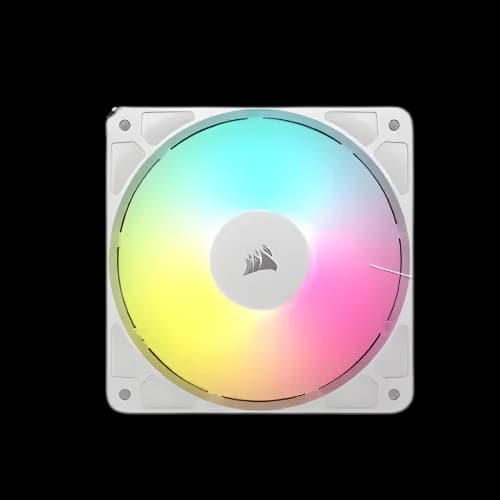
Corsair Casing Fan
1
/1
Filter
Filter
Description
Are you building a custom PC and still guessing which Corsair casing fan is right for you? We get that question a lot at PCB Store. The Corsair casing fan price in Bangladesh fits many budgets — from entry ARGB models to premium iCUE LINK kits. We stock the full lineup. This guide helps you pick the right fan, understand key specs, and buy with confidence.
Why Your PC Needs a Quality Corsair Casing Fan
A PC without good airflow is a slow PC. Heat is your biggest enemy.
Your desktop component lineup — CPU, GPU, RAM, and motherboards — all produce heat under load. Without proper cooling, performance drops fast. That is called thermal throttling.
A quality case fan pulls cool air in. It pushes hot air out. This keeps your system at safe temperatures during long gaming or work sessions.
Corsair fans are not just about cooling. They are built to last. They run quietly. And they look great inside a computer casing with a glass panel.
Here is what makes a Corsair casing fan different from a generic fan:
- Magnetic levitation or hydraulic bearings for a longer lifespan
- Anti-vibration rubber corners for lower noise
- PWM speed control for automatic temperature management
- iCUE software support for full RGB and fan speed customization
- Optimized blade design for both airflow and static pressure
If you are doing a custom PC build, cooling is not optional. It directly affects how long your high-quality graphics card and CPU survive under heavy load.
Corsair Casing Fan Series Available in Bangladesh
We carry every major Corsair fan series at PCB Store. Each series has a different strength. Let us break them down simply.
Corsair QL Series
The QL series is the most eye-catching fan Corsair makes. Each fan carries 34 individually addressable RGB LEDs across four light loops.
Both front and back faces light up. That means the effect looks great whether the fan faces you or not. This is ideal for open-frame builds or cases with glass side panels.
QL fans use hydraulic bearings and PWM control. They run at 525 to 1,500 RPM. Noise stays at around 26 dBA at mid-speed.
The QL120 comes in single, triple kit, and white or black variants. The QL140 comes in single and dual kit options.
Best for: Gamers who want maximum RGB visibility inside their casing.
Corsair SP RGB Elite Series
The SP Elite uses Airguide technology. Anti-vortex vanes around the fan frame direct airflow precisely.
This makes it the right fan for radiators and CPU cooler heatsinks. It pushes concentrated air through tight spaces rather than scattering it.
Eight individually addressable RGB LEDs sit around the fan hub. It is not as flashy as the QL, but the cooling performance is more focused.
Best for: Builders mounting fans on a liquid cooler radiator or dense heatsink.
Corsair ML Series
ML stands for Magnetic Levitation. This bearing type uses magnets to float the fan blade. There is no physical contact between the blade and the frame during operation.
The result is:
- Extremely low noise (down to 16 dBA)
- Lifespan up to 200,000 hours
- Consistent performance over years of use
The ML120 RGB Elite comes with iCUE-compatible RGB lighting and a Lighting Node for control. Speed ranges from 400 to 2,000 RPM, giving wide flexibility for silent or maximum cooling modes.
Best for: Content creators and streamers who need silence while recording.
Corsair RS & LL Series
The RS120 and RS140 ARGB models offer solid performance at lower prices. They are addressable RGB, so each LED can show a different color via iCUE or motherboard software.
The RS120-R is a reverse-blade model. Its motor faces outward. This creates a cleaner look inside a case when paired with standard fans.
The LL series uses dual light loops with 16 LEDs per fan. It was one of the first Corsair fans to show lighting from both sides.
Best for: Budget-conscious builders who still want ARGB in their PC build.
How to Choose the Right Corsair Casing Fan for Your Build
Buying the wrong fan wastes money. Let us help you choose right the first time.
There are four key decisions every buyer needs to make. We walk through each one below.
120mm vs 140mm — Which Size Fits Your Case?
Fan size is the first thing to check. Most cases support 120mm, 140mm, or both.
- 120mm fans fit almost every case. They are the universal standard for custom builds in Bangladesh
- 140mm fans move more air at lower RPM. They run quieter for the same cooling output
- Check your case manual for supported fan mount sizes before buying
If your case supports 140mm, go for it. You get better airflow with less noise. If your case only fits 120mm, that is still excellent for most builds.
A mid-tower case typically supports two to three 120mm fans at the front and one at the rear.
Airflow Fan vs Static Pressure Fan — Know the Difference
This is one of the most misunderstood specs in PC cooling.
Airflow fans move a large volume of air across open spaces. Use them on case intakes and exhausts. CFM (cubic feet per minute) is the key number here — higher CFM means more air moved.
Static pressure fans push air through resistance. Use them on radiators, heatsinks, and CPU air cooler units where airflow is blocked by fins or metal.
Using the wrong type hurts cooling performance. An airflow fan on a radiator will underperform badly compared to a static pressure fan.
Corsair's SP series is purpose-built for static pressure. The QL and RS series are better suited for case airflow positions.
PWM vs DC Control — What Your Motherboard Supports
Fan speed control comes in two types.
- PWM (4-pin) fans adjust speed automatically based on CPU or system temperature. Your PC motherboard sends a signal to the fan to speed up or slow down
- DC (3-pin) fans adjust speed by changing voltage. Less precise but still functional
Most modern PC motherboards support PWM fan headers. Corsair QL, ML, and SP fans all use 4-pin PWM connectors. This gives you precise, automatic speed control without manual adjustment.
If your motherboard has both 3-pin and 4-pin headers, always connect Corsair PWM fans to the 4-pin headers first. You get maximum control that way.
RGB vs ARGB — Lighting That Matches Your Build
Many buyers confuse RGB with ARGB. They are not the same.
- RGB lights all LEDs in the same color at the same time. You can change the color, but every LED matches
- ARGB (Addressable RGB) controls each LED independently. You can run different colors, animations, and effects across individual LEDs
All current Corsair fan series support ARGB through iCUE software. The difference is the number of LEDs and the level of customization available per model.
If you are building a system with other iCUE-compatible pc components — like Corsair RAM or keyboard — ARGB fans let you sync all lighting into one unified effect.
Why Choose PCB Store for Your Corsair Casing Fan
At PCB Store, we focus on value-driven recommendations. Corsair fans are not the cheapest, but they deliver:
- Durability: Long-lasting components save money over time.
- Performance: Stable cooling for components like CPUs and GPUs.
- Aesthetics: RGB lighting adds personality to your PC build.
- Trust: Corsair is a global leader in PC cooling solutions.
For tech enthusiasts in Bangladesh, investing in Corsair means fewer upgrades and better system stability.