Cooler Master Casing Fan Price in Bangladesh
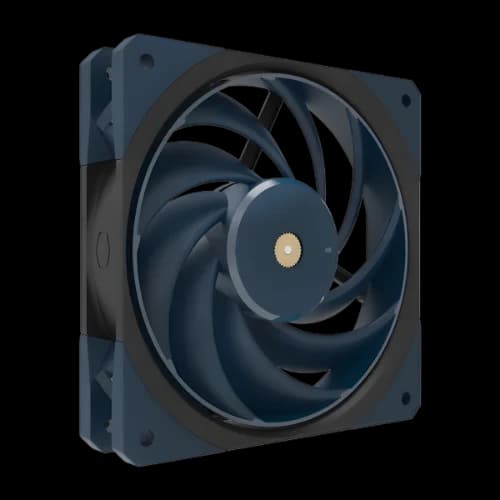
Cooler Master Casing Fan
1
/1
Filter
Filter
Description
Are you tired of your PC overheating during long gaming sessions? The right Cooler Master casing fan price in Bangladesh makes all the difference for your build. At PCB Store, we stock the full Cooler Master fan lineup — from silent non-LED models to blazing ARGB fans. Whether you are a PC gamer, a content creator, or building a custom PC for the first time, we have the right cooling solution for you. Our goal is simple: give you the best computer parts at the fairest price, with fast delivery across Bangladesh.
Why Cooler Master Fans Are Popular
Cooler Master casing fans dominate the market because they solve real problems for PC builders.
Strong Airflow for Gaming PCs
High airflow fans keep temperatures low during gaming or rendering. This prevents thermal throttling and improves performance.
ARGB Lighting for Custom Builds
ARGB fans add personality to your PC case. Builders can sync lighting with motherboards for a unified look.
Long-lasting Build Quality
Cooler Master fans are built with durable bearings and strong blades. They last longer and reduce replacement costs.
Cooler Master Casing Fan Available in Bangladesh
We carry the complete Cooler Master fan range. Every model is genuine, comes with a brand warranty, and is ready to ship.
Our collection includes three main series:
- SickleFlow Series — High airflow, rifle bearing, ARGB/RGB options
- MasterFan MF Series — Dual-ring ARGB, PWM control, 120mm and 140mm
- MasterFan SF Series — Low-profile, compact, ideal for small builds
SickleFlow Series
The SickleFlow is Cooler Master's most popular fan series. It delivers a high airflow output with low noise. The curved blade design pushes more air without extra sound.
Key specs of the SickleFlow range:
- Fan speed: 650–1,800 RPM (PWM controlled)
- Airflow: up to 62 CFM
- Noise level: 8–27 dBA
- Bearing type: Rifle bearing (sealed, dust-resistant)
- LED options: ARGB, RGB, and non-LED
The SickleFlow 120 and SickleFlow 140 ARGB are our best-selling models. They fit most mid-tower and full-tower cases available in Bangladesh.
MasterFan MF120 Halo
The MF120 Halo is a premium pick for RGB enthusiasts. It features dual-ring ARGB lighting with 16.7 million color options.
Why builders love the MF120 Halo:
- Dual-loop ARGB rings for stunning lighting
- PWM fan speed: 650–1,800 RPM
- Compatible with ASUS Aura Sync, MSI Mystic Light, and Gigabyte RGB Fusion
- Available in black and white variants
If you are building a custom PC with a glass side panel, the MF120 Halo is a top choice. It looks great and keeps your system cool at the same time.
MasterFan SF120M
Need a reliable fan without RGB? The SF120M is our go-to recommendation for clean, silent builds. It uses PWM control with three speed modes: High, Medium, and Low.
- Fan speed range: 650–2,000 RPM
- Noise level: as low as 17.4 dBA on Low setting
- 4-pin PWM connector
- No LED — perfect for workstation or office builds
This fan is an ideal choice for users who want to build a custom PC focused on performance, not aesthetics.
120mm vs 140mm Fans — Which Size Fits Your Build?
Size matters in PC cooling. Picking the wrong fan size wastes money and reduces airflow. Here is what you need to know before buying.
120mm fans are the most common size. They fit almost every mid-tower and full-tower casing sold in Bangladesh. They spin faster and work well as exhaust or radiator fans.
140mm fans move more air at lower RPM. They are quieter and more efficient. But not every case supports 140mm mounting points.
Check your case manual before ordering. Most popular cases in Bangladesh support:
- Front: 2x 120mm or 2x 140mm intake fans
- Rear: 1x 120mm exhaust fan
- Top: 2x 120mm or 1x 140mm exhaust fan
For a Case Fan slot or any standard ATX mid-tower, 120mm is the safe default. If your case has 140mm support up front, use it. You get better airflow with less noise.
How Many Fans Does Your PC Need?
This depends on your build type. A basic rule: more airflow means lower temperatures.
Recommended fan counts by build type:
- Budget / Office PC — 1 rear exhaust fan (minimum)
- Mid-range Gaming PC — 2 front intake + 1 rear exhaust (3 fans total)
- High-end Gaming / Content Creation PC — 3 front intake + 1 rear + 1 top exhaust (5 fans)
- Liquid Cooling Build — radiator fans + 1–2 case fans for extra airflow
At PCB Store, we sell fans individually and in 3-in-1 packs. The 3-in-1 ARGB packs give better value for complete builds.
PWM vs 3-Pin Fans — A Simple Explanation
Many buyers in Bangladesh are confused by this. We keep it simple.
3-pin fans run at a fixed speed. The motherboard can lower the voltage to reduce the speed slightly. But control is limited.
4-pin PWM fans receive a dedicated control signal from the motherboard. The fan adjusts speed precisely based on CPU or system temperature. You get:
- Quieter operation at idle
- Maximum cooling under full load
- Better energy efficiency
Most Cooler Master fans use 4-pin PWM. If your best budget motherboard has PWM headers — and most do — always choose PWM fans. It is a smarter long-term decision for your system.
Cooler Master vs Other Brands in Bangladesh
Bangladesh buyers often ask: Is Cooler Master worth the extra price over budget brands?
Here is an honest comparison:
Cooler Master vs Value-Top: Value-Top fans are cheap. They cost less but use sleeve bearings that wear out faster. Cooler Master rifle bearings last much longer. For serious builds, the extra cost is worth it.
Cooler Master vs DeepCool: DeepCool Case Fan makes solid fans at competitive prices. Both brands are reliable. Cooler Master offers a wider model range and better software integration for ARGB builds.
Cooler Master vs Thermaltake: Thermaltake Case Fan focuses on premium aesthetics. Cooler Master balances performance and price better for mid-range builds in Bangladesh.
For builders using a budget motherboard looking to get maximum value from their cooling setup, Cooler Master sits in the sweet spot. Not the cheapest. Not the most expensive. Just reliable, consistent, and widely supported.
Why Choose PCB Store for your Casing Fan?
We are not just a shop. We are a team of PC builders ourselves. We understand what Bangladesh builders need — genuine products, fair prices, and fast support.
At PCB Store, you get:
- 100% genuine Cooler Master products
- Brand warranty on every fan
- Cash on Delivery across Bangladesh
- Technical support before and after purchase
We also stock a full range of PC parts — motherboards, CPUs, RAM, storage, power supplies, and cases. Whether you need one fan or a full build, PCB Store has you covered.