Maxgreen Casing Fan Price in Bangladesh
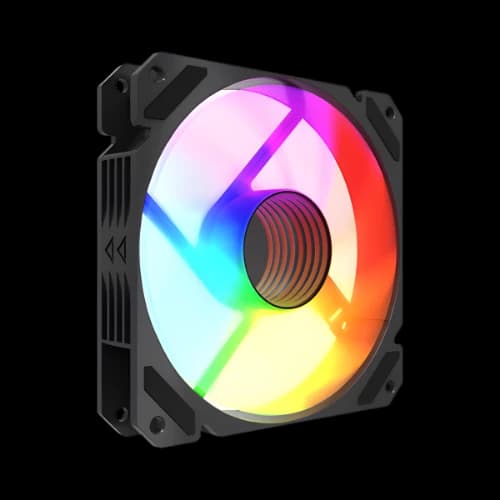
Description
Are you trying to find the best MaxGreen casing fan price in Bangladesh? You are not alone. Thousands of PC builders across Bangladesh search for affordable, high-performance ARGB fans every month. At PCB Store, we stock the full MaxGreen ARGB fan lineup — including the M19, M57, and M59 — to help you PC build setups that look great and stay cool. These fans are trusted by gamers, content creators, and PC enthusiasts across the country.
Why MaxGreen ARGB Fan Are Popular in Bangladesh
PC builders in Bangladesh want two things. Good cooling performance. And great looks at a fair price.
MaxGreen ARGB fans deliver both. That is why they have become one of the most searched computer parts in Bangladesh's PC market today.
At PCB Store, we see this demand every day. Gamers, content creators, and first-time builders all ask for MaxGreen fans. They trust the brand for quality and affordability.
ARGB Lighting — More Than Just Good Looks
ARGB stands for Addressable RGB. Each LED on the fan can be controlled individually. This gives you far more lighting options than standard RGB fans.
The MaxGreen M19, M57, and M59 all use a 3-pin ARGB connector. This means:
- Direct sync with compatible motherboards
- Full color and effect control via motherboard software
- Works with ARGB hubs and controllers, too
When you customize PC setups in Bangladesh, ARGB lighting makes your rig stand out. It gives your case a premium look without a premium price.
Hydraulic Bearing — Built to Last
All MaxGreen ARGB fans use hydraulic bearing technology. This is important for long-term performance.
Hydraulic bearings work by using a thin layer of fluid. This reduces metal-to-metal friction inside the fan motor.
The result:
- Quieter operation over time
- Less wear on internal parts
- Up to 40,000 hours of fan lifespan
For a budget PC build in Bangladesh, this lifespan is excellent. You will not need to replace these fans for years.
Airflow Design — 9-Blade Engineering
The MaxGreen M57 uses a 9-blade fan design. More blades mean more consistent airflow across the full rotation.
This design reduces turbulence inside your casing. Your CPU, GPU, and other components stay cooler under load.
Good airflow management means:
- Lower CPU temperatures during gaming
- Better GPU performance under sustained load
- Longer component lifespan overall
Letest MaxGreen ARGB Casing Fan Model
MaxGreen makes some of the most popular pc parts in Bangladesh. Their ARGB casing fans give you real cooling performance at a price that respects your budget.
We carry three core models at PCB Store:
- MaxGreen M19 ARGB 120mm — Quietest option at 22.8 dBA. Runs at 900 RPM. Best for silent builds.
- MaxGreen M57 ARGB 120mm — Balanced performance. 1000 RPM. 9-blade design. Comes with a 1-year warranty.
- MaxGreen M59 ARGB 120mm — Highest airflow. 1000 RPM. 32.5 CFM. Best for gaming rigs with hot components.
All three use a hydraulic bearing. This reduces noise and extends fan life up to 40,000 hours.
MaxGreen M19 ARGB 120mm Casing Fan
The M19 is the go-to choice for quiet builds. It runs at 900 RPM and generates only 22.8 dBA of noise. That is nearly silent during normal use.
It uses a 3-pin ARGB connector. You can sync the lighting with your motherboard directly.
Key specs:
- Fan speed: 900 RPM ±10%
- Airflow: 38 CFM
- Noise level: 22.8 dBA
- Bearing: Hydraulic
- Connector: 3-pin ARGB
- Voltage: 5V + 12V
This fan fits perfectly inside any standard case. It is a smart pick for office PCs and silent gaming setups.
MaxGreen M57 ARGB 120mm Casing Fan
The M57 is the most popular MaxGreen fan at PCB Store. It runs at 1000 RPM and delivers steady airflow. The 9-blade design pushes air efficiently across your components.
It comes with a 1-year warranty — the only MaxGreen fan model with warranty coverage in Bangladesh.
Key specs:
- Fan speed: 1000 RPM ±10%
- Noise level: approximately 18 dB
- Blades: 9-blade optimized design
- Connector: 3-pin ARGB
- Warranty: 1 year
The M57 is ideal if you want a high airflow fan that also looks great. The ARGB lighting syncs beautifully with any compatible motherboard.
MaxGreen M59 ARGB 120mm Casing Fan
The M59 delivers the strongest airflow in the MaxGreen fan family. At 32.5 CFM and 1000 RPM , it moves more air than the M19 while keeping noise at 28.9 dBA.
Key specs:
- Fan speed: 1000 RPM
- Airflow: 32.5 CFM
- Noise level: 28.9 dBA
- Connector: 3-pin ARGB
- Bearing: Hydraulic
Many MaxGreen casings come pre-installed with the M59. It is the right pick for builds that run a powerful GPU or CPU under heavy load.
How to Build a Custom PC with MaxGreen Fans
Building a custom PC in Bangladesh does not have to be expensive. With the right computer component and a smart plan, you can build a powerful rig on a tight budget.
Here is how MaxGreen fans fit into a smart custom build.
Choose Your PC Case First
Your PC case determines how many fans you can install. Most mid-tower ATX and M-ATX cases support:
- 2 to 3 front intake fans (120mm)
- 1 rear exhaust fan (120mm)
- 1 to 2 top exhaust fans (120mm)
MaxGreen ARGB fans are all 120mm. They fit in every standard casing sold at PCB Store in Bangladesh.
Many MaxGreen casings already come pre-installed with M57 or M59 fans. This saves you money on your initial build.
Plan Your Airflow Direction
Good airflow is not just about how many fans you have. It is about direction.
Follow this simple rule:
- Front and bottom fans = intake (pull cool air in)
- Rear and top fans = exhaust (push hot air out)
With two M59 fans at the front and one M57 at the rear, your build will have strong positive airflow pressure. This keeps dust out and temperatures down.
Pair With the Best Budget Motherboard
Your motherboard must support ARGB headers to use MaxGreen Brand at full potential. Most modern budget motherboards in Bangladesh now include at least one 3-pin ARGB header.
When picking the best budget motherboard for your build, check for:
- At least one 3-pin ARGB header
- Support for your CPU socket (AM4, LGA1700, etc.)
- Enough fan headers for your build
Pairing MaxGreen fans with a good budget motherboard lets you control all lighting from one software dashboard. This makes your build cleaner and easier to manage.
Total Fan Count for Your Build
Here is our recommended fan setup at PCB Store for different build types:
- Entry-level build: 2 fans minimum (1 intake + 1 exhaust)
- Mid-range gaming build: 3 fans (2 intake + 1 exhaust)
- High-performance gaming rig: 5 fans (3 intake + 2 exhaust)
More fans do not always mean better cooling. Proper placement matters more than quantity.
How to Choose the Right MaxGreen Fan
Every PC build is different. Your cooling needs depend on your components, case size, and how hard you push your system.
Here is our simple guide at PCB Store to help you decide fast.
For Silent and Office Builds
Choose the MaxGreen M19 ARGB. It runs at 900 RPM. Noise is only 22.8 dBA. You will barely hear it.
Good for:
- Office workstations
- Home use PCs
- Entry-level gaming builds
- Quiet content creation setups
For Balanced Gaming and All-Round Builds
Choose the MaxGreen M57 ARGB. It runs at 1000 RPM. Comes with a 1-year warranty. The 9-blade design gives consistent airflow.
Good for:
- Mid-range gaming PCs
- Streaming and content creation rigs
- Any build where warranty matters
- Builders pairing with the motherboard
For High-Performance and Heavy-Load Builds
Choose the MaxGreen M59 ARGB. Strongest airflow at 32.5 CFM. Handles heat from powerful GPUs and CPUs without struggle.
Good for:
- High-end gaming rigs
- Overclocked systems
- Workstations running heavy software
- Builds with multiple hot components
Why Buy from PCB Store Bangladesh?
PCB Store is more than just a retailer. We are a trusted partner for PC gamers, content creators, and performance users.
Trusted Source
We specialize in Computer Parts, including casing fans, motherboards, storage, and peripherals. Every product is verified for authenticity.
Local Support and Warranty Handling
Buying locally means faster warranty claims and reliable after-sales support. PCB Store ensures you get genuine MaxGreen casing fans with warranty coverage in Bangladesh.
Value for Gamers and Creators
Our catalog is designed to build custom PC projects. Whether you need a high airflow fan for gaming or a stylish ARGB fan for streaming setups, PCB Store delivers.