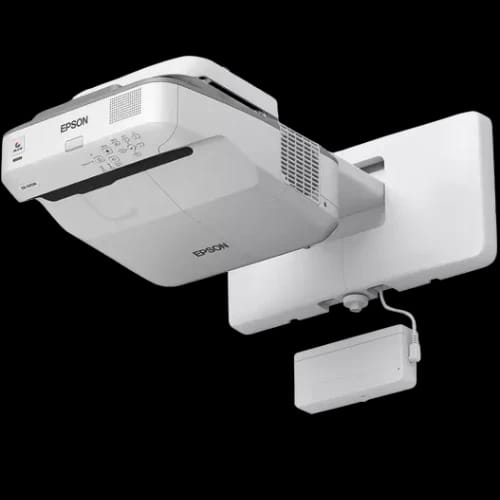
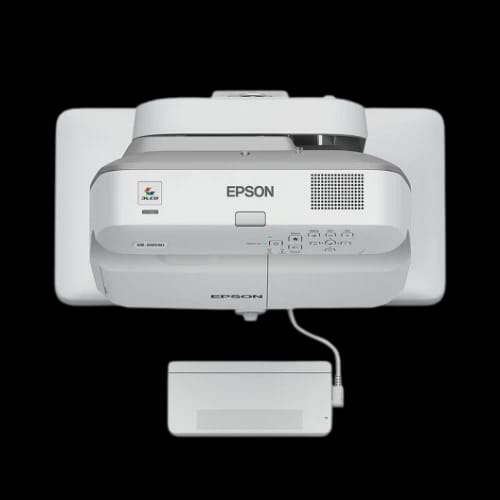
Epson EB-695Wi Ultra-Short Throw Interactive 3LCD Projector
Key Features
- Epson EB-695Wi model
- Ultra-short throw
- Interactive pen touch
- 3LCD projection
- WXGA resolution
- Classroom focused design
Out Of Stock
Share:
Any Questions? Ask On
Technical Specifications
Display & Projection
Optical & Lens
Interactivity & Features
Connectivity & Control
Power & Acoustics
Physical & Environment
Software & OS Support
Warranty
Product Description
Epson EB-695Wi Ultra-Short Throw Interactive 3LCD Projector
Slow collaboration kills momentum. Poor visibility frustrates students. The Epson EB-695Wi Ultra-Short Throw Interactive 3LCD Projector targets these pain points with wall-mounted precision, pen and finger interactivity, and bright WXGA visuals from inches away.
Built for classrooms and meeting rooms, this model sits firmly in Office Equipment under the Projector sub-category. Epson positions it for daily institutional use where clarity, touch response, and safety matter.
Epson EB-695Wi Ultra-Short Throw Interactive Projector Overview
This projector uses 3LCD Technology with a 0.59-inch LCD panel. It produces balanced color and white light output. Both reach 3,500 lumens in normal mode and 2,900 lumens in economy.
WXGA resolution with HD ready support fits modern lesson content. The 16:10 aspect ratio matches interactive whiteboards. Contrast reaches 14,000:1, supporting readable text and defined diagrams.
Short sentences matter in classrooms. So does predictable image size. This unit projects 60 to 100 inches from just 0.4 to 0.6 meters. Teachers avoid shadows. Students stay focused.
Image Performance That Serves Teaching Accuracy
Color handling uses 10-bit video processing with support for up to 1.07 billion colors. Blackboard mode improves legibility on dark surfaces. Presentation and sRGB modes suit slides and documents.
Refresh rates between 100 Hz and 120 Hz reduce flicker. Text stays stable. Motion appears controlled. That matters during fast annotation.
Manual keystone correction supports vertical and horizontal tweaks. Installation stays flexible. Image geometry stays readable.
Ultra-Short Throw Optics Built for Wall Mounting
The 0.28–0.37:1 throw ratio defines this projector. It sits close to the wall. Light avoids presenters’ eyes. Interaction feels natural.
Optical lens focus stays manual for accuracy. Digital zoom ranges from 1 to 1.35x. Offset sits at 6:1, matching classroom boards.
This design supports fixed installs. It reduces trip hazards. It also keeps students safe.
Interactive Features That Change Classroom Flow
Interactivity defines the EB-695Wi. It supports pen and finger-touch input. Dual pen use allows two users at once. Multi-screen interactivity supports collaborative tasks.
Teachers write directly on projected content. Students participate without extra hardware. PC interactive mode connects lessons to Windows or macOS systems.
Split-screen function supports comparison. Document camera compatibility supports real-time demonstrations.
Connectivity for Modern Classrooms and Offices
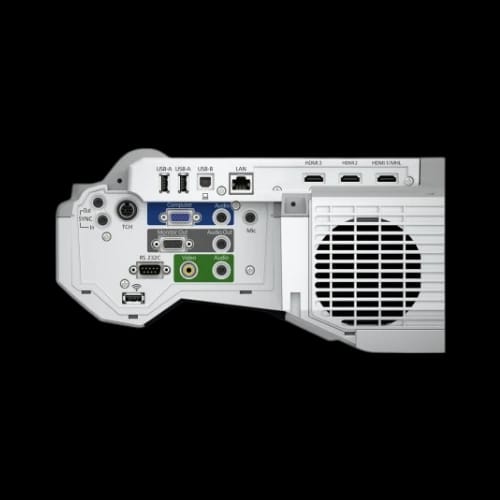
This projector handles complex setups. Inputs include three HDMI ports, VGA in and out, RGB, Composite, and MHL. USB Display supports image, mouse, and sound over one cable.
Network ports include Ethernet and optional Wireless LAN. Epson iProjection works in ad-hoc or infrastructure modes.
Control integrates with AMX, Crestron, and Control4 systems. IT teams keep oversight simple.
Audio and Built-In Classroom Practicality
A 16-watt speaker handles room audio. External speaker support exists for larger spaces. Microphone input supports voice reinforcement.
AV Mute Slide helps pause content visually. Direct power on and off saves time between classes. Auto brightness adjustment responds to ambient light.
Noise levels stay controlled. Economy mode runs at 30 dB. Eco2 drops to 29 dB. Lessons stay audible.
Power Use and Operational Efficiency
Power consumption measures 301 watts in normal mode. Eco mode drops to 258 watts. Standby power stays low at 0.37 watts.
The 250-watt lamp lasts 5,000 hours in normal use. Economy extends life to 10,000 hours. Fewer replacements reduce downtime.
Dynamic lamp control adjusts output based on content. Bright slides stay visible. Dark scenes save power.
Software Support and Operating System Compatibility
Included software supports real classrooms. Easy Interactive Tools handles annotation. EasyMP Multi PC Projection supports multiple sources. Epson Projector Management supports monitoring.
Operating system support covers Windows 10, Windows 8 series, macOS 10.7 to 10.10, Linux, and Ubuntu distributions. Mixed environments work without friction.
Security and Installation Safety Considerations
Security features include password locks, Kensington lock, control panel lock, and wireless LAN security. Institutional environments demand these controls.
Epson advises proper mounting. Use approved ceiling or wall mounts. Attach a safety wire. Regular inspections reduce risk, especially in smoky or oil-heavy environments.
These guidelines support long-term reliability and user safety.
Reliability, Warranty, and Long-Term Trust
Epson backs this projector with a 60-month carry-in warranty or 8,000 hours. The lamp carries 60 months or 1,000 hours, whichever comes first.
This warranty reflects Epson’s confidence. It also lowers ownership risk for schools and offices in Bangladesh.
Who Should Use the Epson EB-695Wi Projector?
This model fits classrooms, training rooms, and meeting rooms. Wall-mounted positioning supports fixed schedules. Interactive lessons benefit most.
Schools upgrading from whiteboards see immediate workflow changes. Corporate training rooms gain touch-based collaboration without complex hardware.
Buying the Epson EB-695Wi from PCB Store Bangladesh
PCB Store offers this Epson projector for Bangladesh buyers seeking verified products and local support. Stock targets institutional demand.
Availability varies. Early purchase avoids academic calendar shortages. Contact PCB Store for current pricing, bundle options, and installation guidance.
Delivery Charge Info
Inside Dhaka: ৳350
Outside Dhaka: ৳400
FAQs
Does the Epson EB-695Wi support finger-touch and pen input together?
Yes. The projector supports both pen and finger-touch interaction at the same time. Dual pen support allows two users to write or draw simultaneously, supporting collaborative classroom activities without extra input devices.
Is the Epson EB-695Wi compatible with Windows and macOS systems?
Compatibility covers Windows 10, Windows 8 series, macOS versions from 10.7 to 10.10, Linux, and Ubuntu distributions. Mixed-device classrooms and offices can connect without software limitations.
How much power does the Epson EB-695Wi consume during normal use?
Normal on-mode power consumption measures 301 watts. Eco mode lowers this to 258 watts. Energy-saving standby drops consumption to 0.37 watts, supporting continuous installation without high idle costs.
Does ultra-short throw projection reduce heat near the wall?
Yes. The projector mounts close to the wall and directs light outward. Heat disperses away from users. Proper ventilation remains required within Epson’s supported operating temperature range.
How often does the lamp need replacement?
Lamp life reaches 5,000 hours in normal mode. Economy mode extends durability up to 10,000 hours. Actual lifespan depends on usage patterns and ambient conditions.
Is the Epson EB-695Wi suitable for bright classrooms?
The projector outputs 3,500 lumens for both color and white brightness. This level supports clear visibility in well-lit classrooms without forcing room darkening during lessons.
Epson EB-695Wi vs standard short-throw projectors: what differs?
Ultra-short throw models project from inches away, reducing shadows and glare. Standard short-throw units sit farther back, increasing shadow risk during interaction.
Does this projector support wireless presentation?
Yes, with an optional wireless LAN unit. Epson iProjection supports ad-hoc and infrastructure modes, allowing wireless screen sharing from compatible devices.
What is the price of Epson EB-695Wi at PCB Store in Bangladesh?
Pricing varies based on availability and institutional bundles. PCB Store provides current pricing in Bangladesh upon inquiry, along with warranty confirmation and optional accessories.
Popular Products