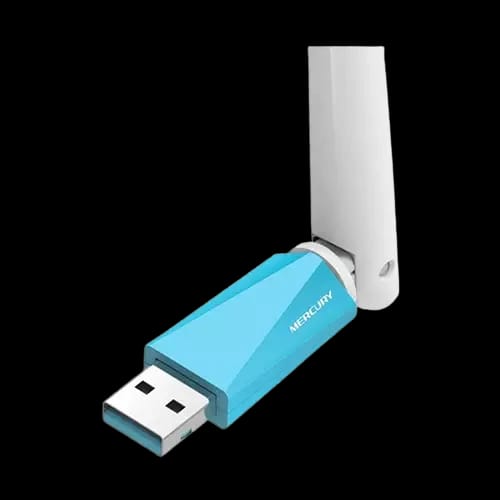
MERCURY MW150UH Wireless High Gain 150M Adapter
Key Features
- MERCURY MW150UH
- 150 Mbps N150
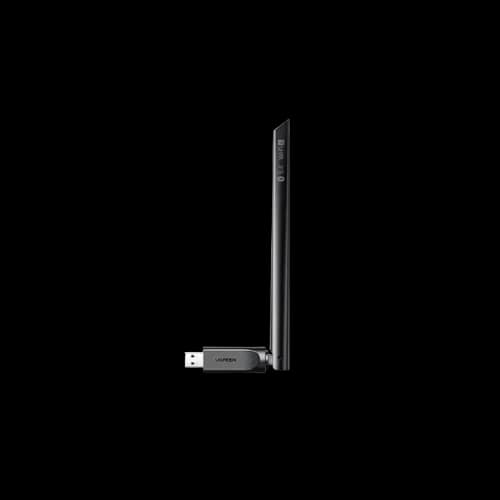
- External high-gain antenna
- USB 2.0 interface
- IEEE 802.11 b/g/n
- WPA/WPA2 security
Out Of Stock
Share:
Any Questions? Ask On
Technical Specifications
General
Connectivity
Wireless
Security
Functions
Warranty
Product Description
MERCURY MW150UH WIRELESS HIGH GAIN 150M ADAPTER
Still stuck with weak Wi-Fi on your desktop? MERCURY MW150UH WIRELESS HIGH GAIN 150M ADAPTER targets longer reach.
MERCURY MW150UH Wireless USB Adapter overview for everyday Wi-Fi fixes
Dead zones feel personal. One room works, the next room drops. This MERCURY MW150UH adapter attacks that problem with an external high-gain antenna and a simple USB 2.0 connection.
You plug it into a PC. You point the antenna. You get a steadier signal path. For many users, that’s the whole win.
At PCB Store in Bangladesh, Network and Router shoppers often want a fast, low-effort Wi-Fi upgrade. This MERCURY option fits that need without extra boxes on the desk.
MERCURY MW150UH Wireless High Gain 150M Adapter specifications and wireless performance
This adapter keeps the setup simple. The hardware side stays familiar.
Core specifications (as provided):
- Interface: USB 2.0
- Antenna: External antenna
- Color: Blue
- Wireless Speed group: 150Mbps (N150)
- Option: 150 Mbps N – Mini Adapter
- Standards and protocols: IEEE 802.11b / 802.11g / 802.11n
- Security: WEP, WPA/WPA2, WPA-PSK/WPA2-PSK
- Extra function: Supports analog AP function (build a wireless LAN)
About the “150M” and the “up to 300Mbps” line
Your product info mentions 150Mbps (N150) and also says up to 300Mbps with 11N. Both appear in the provided details, so treat them as stated claims inside the same listing.
Real-world throughput depends on the network, distance, and interference. In practice, this class of USB Wi-Fi adapter targets stable connectivity more than headline numbers. The external antenna also focuses on reception comfort, not just raw speed.
Key features of MERCURY MW150UH Wireless High Gain Adapter
External high-gain antenna for longer reception range
The standout feature is the external high-gain nondirectional antenna. You can rotate and adjust it. That matters when your PC sits under a desk or behind a monitor.
Why the adjustable antenna helps:
- You can aim it away from metal cases or clutter.
- You can reposition it for a cleaner signal route.
- You can react to room layout changes fast.
This is useful for Wireless Router users who fight walls and corners. It also fits Pocket Router setups when you travel and rely on varied room signals.
USB 2.0 plug-and-play style convenience
USB 2.0 keeps compatibility broad. Many older desktops still carry USB 2.0 ports. This adapter speaks that language.
If you build PCs or manage office systems, USB Wi-Fi often saves time. No case opening. No PCIe card install. No cable run. Just connect and configure.
Support for IEEE 802.11n / g / b networks
You get support for 802.11b, 802.11g, and 802.11n. That matters in mixed homes. Some routers still broadcast legacy modes for older devices.
In a Network and Router purchase, buyers often care about “Will it connect to my current router?” This standards list answers that question directly.
Security and encryption support for safer connections
Public Wi-Fi creates risk. So do shared home networks. The MERCURY MW150UH listing includes common security methods:
- WEP
- WPA/WPA2
- WPA-PSK/WPA2-PSK
These options let you match what your Wireless Router already uses. If you change router security later, the adapter still stays relevant.
Technical highlights that matter day to day
Stable reception focus
This adapter’s design pushes a simple message: keep reception steady at longer distance. The external antenna supports that goal.
Signal strength often drops before speed drops. You feel it as buffering, slow loads, or sudden disconnects. A high-gain antenna can reduce those dips in many layouts.
Analog AP function for basic wireless LAN setup
The listing says it supports analog AP function and can help you “easily build wireless LAN.” That can help in certain scenarios where you want a device to behave like a small access point.
If you manage a small room setup, this can help you shape connectivity. Keep expectations realistic though. The best results still depend on how your network shares internet and how your OS handles AP mode.
Compatibility and real use-cases
Best match for desktops without built-in Wi-Fi
Many budget desktops ship with no Wi-Fi card. A USB adapter fixes that fast. You avoid extra internal hardware work.
This makes sense for:
- Home PCs placed far from the Wireless Router
- Office desktops that need quick Wi-Fi access
- Backup internet setups when Ethernet fails
Useful for casual gaming networks
Your related category includes Gaming Router, and that signals a common shopper story. Gamers hate lag spikes. A USB Wi-Fi adapter won’t beat a clean Ethernet line, but it can help if your signal stays weak.
Pair it with a Gaming Router broadcast that reaches your room well. Then adjust the antenna position for the cleanest path.
Works across common router types
Homes in Bangladesh often run mixed devices. One room uses a Wireless Router. Another room uses a Pocket Router or a shared hotspot. This adapter supports 802.11b/g/n, so it can connect across those typical setups.
Reliability, support, and what to check before purchase
USB Wi-Fi adapters live a hard life. They get unplugged, moved, and bumped. The MW150UH uses a simple USB 2.0 format and an external antenna design. That keeps daily handling straightforward.
Warranty terms were not provided in your details. So treat warranty as seller-dependent.
Before checkout at PCB Store, check:
- The warranty policy listed on the product page
- Return window rules for Network and Router items
- Any included support notes for setup
That approach keeps trust high and avoids surprise later.
Where to get MERCURY MW150UH Wireless High Gain 150M Adapter in Bangladesh
If you want a quick Wi-Fi fix, don’t wait until the next drop ruins a call. PCB Store in Bangladesh stocks Network and Router gear for practical upgrades like this adapter.
Pick it when you need:
- USB 2.0 convenience on a desktop
- An external antenna you can reposition
- Compatibility with common Wireless Router standards
Check the PCB Store listing for current stock status. If inventory runs low, grab it early and avoid another week of weak signal frustration.
Delivery Charge Info
Inside Dhaka: ৳80
Outside Dhaka: ৳130
FAQs
Does the MERCURY MW150UH work with any Wireless Router at home?
It supports IEEE 802.11b, 802.11g, and 802.11n. That covers many home router broadcasts. If your router offers these modes, the adapter can connect. Security options also match common WPA/WPA2 setups.
Is MERCURY MW150UH good for a desktop PC with no Wi-Fi?
Yes. It uses a USB 2.0 interface, so you can add Wi-Fi without opening the case. Plug it in, configure the connection, and keep the antenna adjustable for better reception in tricky desk placements.
How much power does this USB Wi-Fi adapter consume?
The provided details do not list wattage or current draw. As a USB 2.0 device, it pulls power from the USB port. For exact consumption, rely on the manufacturer documentation or the PCB Store listing notes.
Will the MERCURY MW150UH overheat during long use?
No thermal spec appears in the provided information. Heat depends on airflow, ambient temperature, and continuous load. Keep it in open air and avoid covering it. If it feels hot, move it away from tight spaces.
Why does the description mention 150Mbps and also up to 300Mbps?
Both lines appear in the product details you provided. Treat 150Mbps (N150) as the main group label, while “up to 300Mbps with 11N” appears as an additional claim. Real results vary with network conditions.
Can I adjust the antenna for better signal in another room?
Yes. The external antenna uses a flexible design and allows free orientation adjustment. Try different angles and positions to improve reception. Small changes can reduce drops when walls, furniture, or the PC case blocks signal paths.
Does MERCURY MW150UH support WPA2 security for safer Wi-Fi?
Yes. The listing includes WPA/WPA2 and WPA-PSK/WPA2-PSK support, along with WEP. Use WPA2 modes on your Wireless Router when possible. That gives stronger protection than older WEP settings.
MERCURY MW150UH vs a basic mini USB N adapter: what changes?
This model emphasizes an external high-gain nondirectional antenna and adjustable orientation. Many mini adapters use tiny internal antennas. If your room has weak signal, the external antenna design often gives more positioning control.
What is the price and availability of MERCURY MW150UH at PCB Store in Bangladesh?
Your provided data does not include a price. Check the PCB Store product page for the latest price in Bangladesh and live stock status. If the listing shows limited quantity, ordering sooner reduces availability risk.
Can it create a wireless LAN using analog AP function?
The product details state it supports analog AP function and helps build a wireless LAN. Your exact experience depends on system setup and network sharing options. Review your OS network settings to configure AP mode properly.
Popular Products