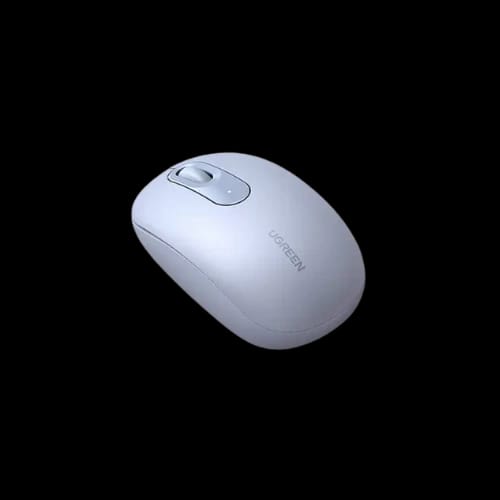
UGREEN MU105 (90671) 2.4G Wireless Mouse (Dusty Blue)
Key Features
- UGREEN MU105 (90671)
- Silent click design
- 2.4G wireless connection
- Ergonomic hand shape
- 2400 DPI control
- Dusty blue finish
Share:
Technical Specifications
General Information
Connectivity & Interface
Design & Control
Power Details
Warranty
Product Description
UGREEN MU105 (90671) 2.4G Wireless Mouse (Dusty Blue)
A quiet workspace matters. Cursor delays break focus. Hand strain builds over long hours. The UGREEN MU105 (90671) 2.4G Wireless Mouse (Dusty Blue) targets these pain points with stable wireless control, silent clicks, and an ergonomic shape tuned for daily computing.
This page explains what the mouse does, who it fits, and why it belongs in a modern desk setup. Every detail stays grounded in the provided information, written for clarity and buying confidence.
UGREEN MU105 Wireless Mouse Overview for Daily Computing
The UGREEN MU105 sits in the Computer Accessories category, under the Mouse sub-category. It comes from Ugreen, a brand known for practical peripherals. The series is Regular, built for routine office and home use.
This wireless mouse uses a USB dongle interface. Plug it in. Start working. No cables. No clutter. The dusty blue finish adds a subtle color tone without visual noise.
Short sessions or long shifts, the design favors comfort and control.
Performance and Control: UGREEN MU105 2400 DPI Wireless Mouse
Pointer accuracy defines user experience. The UGREEN MU105 offers a maximum DPI of 2400, suitable for spreadsheets, browsing, and design basics.
Movement feels consistent across common surfaces. The single operating mode keeps behavior predictable. That matters for muscle memory and precision.
Key performance points:
- Wireless connection through a USB dongle
- Stable working range up to 10 meters
- Max DPI rated at 2400 DPI
- Single mode operation for steady control
This mouse targets users who value reliability over gimmicks.
Silent Clicking Experience with UGREEN MU105 Mouse
Noise distracts. Shared spaces demand quiet tools. The UGREEN MU105 features no click sound, which suits offices, libraries, and late-night use.
The buttons respond without sharp feedback. Each press feels controlled, not mushy. The mouse does not support 2X click, which keeps input clean and intentional.
Silent clicking benefits include:
- Fewer distractions in shared environments
- Better focus during long tasks
- Polite operation in meetings or calls
A quiet mouse changes how a workspace feels.
Ergonomic Shape and Dusty Blue Finish
Comfort drives productivity. The ergonomic style and size of the UGREEN MU105 supports natural hand posture. It fits relaxed grips during extended sessions.
The dusty blue color looks professional. It avoids flashy lighting or aggressive styling. There is no lighting, by design, to reduce visual fatigue and battery drain.
Design highlights:
- Ergonomic form for everyday comfort
- Neutral dusty blue color
- No lighting for a distraction-free desk
This mouse blends into work setups with ease.
Wireless Freedom with USB Dongle Connectivity
The UGREEN MU105 uses a 2.4G wireless connection through a USB dongle. This setup favors simplicity and compatibility.
Plug the dongle into a laptop or desktop USB port. The mouse connects without manual pairing. The 10-meter working range supports flexible desk layouts and presentations.
Connection benefits:
- No cable drag
- Clean desk aesthetics
- Reliable signal within standard rooms
Wireless should feel invisible. This one does.
Battery and Power Details You Should Know
The mouse ships with a battery included, so it works right out of the box. Battery type and runtime are not specified, which keeps expectations honest.
There is no lighting. That reduces unnecessary power draw. The design suits users who prefer simple, predictable operation without constant charging concerns.
What matters here is readiness. Insert the dongle. Start working.
Compatibility and Use Cases for UGREEN MU105 Mouse
This wireless mouse fits common computing environments. The USB dongle interface supports desktops and laptops with standard USB ports.
Ideal use cases include:
- Office productivity
- Remote work setups
- Study desks
- Home computing
The mouse focuses on daily tasks, not gaming features or decorative extras.
Reliability, Brand Trust, and Warranty Support
Ugreen builds accessories for long-term use. The UGREEN MU105 includes a 1-year warranty, which adds peace of mind.
Warranty support matters in the Bangladesh market. It signals confidence in build quality and post-sale service.
For buyers at PCB Store, warranty coverage aligns with local expectations and retail standards.
Why the UGREEN MU105 Fits the Computer Accessories Market
Not every mouse needs lights, macros, or complex software. Many users want quiet operation, stable wireless control, and comfort.
The UGREEN MU105 delivers those priorities in a clean package. It fits naturally within the Mouse sub-category of Computer Accessories offered by PCB Store.
This product suits users who value calm, control, and simplicity.
Ready to Upgrade Your Desk Setup?
If noisy clicks, tangled cables, or hand fatigue slow you down, this mouse offers a practical shift. The UGREEN MU105 (90671) 2.4G Wireless Mouse (Dusty Blue) balances comfort, silence, and wireless freedom.
Check availability at PCB Store in Bangladesh. Stock changes quickly. Choose a mouse that respects your focus and workspace.
Delivery Charge Info
Inside Dhaka: ৳80
Outside Dhaka: ৳130
FAQs
Is the UGREEN MU105 compatible with Windows and macOS systems?
Yes. The USB dongle connection works with most systems that support standard USB mouse input, including Windows and macOS. No extra drivers are mentioned or required for basic operation.
Does the UGREEN MU105 wireless mouse support Bluetooth connection?
No. This model uses a 2.4G wireless connection through a USB dongle. It does not offer Bluetooth mode or multi-device switching.
How far can the UGREEN MU105 work from the computer?
The rated wireless working range is up to 10 meters. This distance suits desks, meeting rooms, and casual presentations without signal drops.
Is the UGREEN MU105 suitable for gaming use?
This mouse targets daily computing. With a maximum DPI of 2400 and single mode operation, it fits casual use, not competitive gaming needs.
Does the UGREEN MU105 produce any clicking noise?
No. The mouse is designed with silent clicking. This feature supports quiet offices, shared rooms, and late-night work sessions.
What kind of battery does the UGREEN MU105 use?
A battery is included in the package. Specific battery type and runtime are not listed, so users should rely on standard replacement options when needed.
How does the UGREEN MU105 compare to other wireless mice in its class?
Compared to typical wireless mice, the UGREEN MU105 focuses on silent clicks, ergonomic comfort, and simple USB dongle use, rather than lighting, software control, or multi-mode features.
Is the UGREEN MU105 available at PCB Store in Bangladesh, and what is the price?
Yes. PCB Store lists this model in Bangladesh. Pricing may vary based on stock and offers, so checking the current PCB Store product page gives the most accurate information.
Related Products


Popular Products