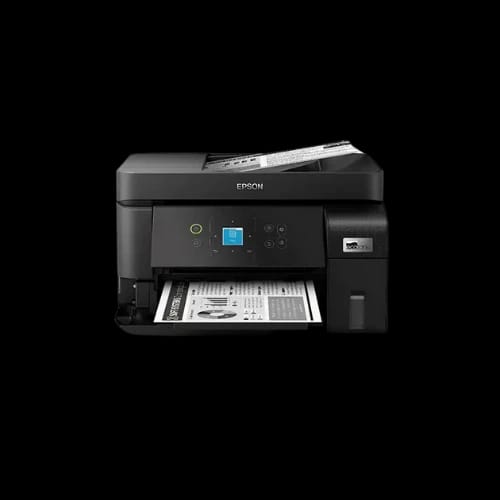
Epson EcoTank M2050 InkTank Multifunction Printer
Key Features
- Epson EcoTank M2050
- Monochrome ink tank
- Print scan copy
- Automatic document feeder
- Wi-Fi and Ethernet
- Low power usage
Share:
Technical Specifications
General Information
Printing
Scanning & Copying
Paper Handling
Connectivity
Ink & Yield
Power & Physical
Warranty information
Product Description
Epson EcoTank M2050 InkTank Multifunction Printer — Tired of high printing costs slowing your office workflow?
High-volume printing often drains budgets and patience. The Epson EcoTank M2050 InkTank Multifunction Printer targets that pain directly. It focuses on fast monochrome output, low running cost, and stable network printing for offices that print daily.
This model sits in the office equipment category and printer sub-category. Epson designed it for workgroups, small offices, and service counters. PCB Store in Bangladesh lists it as a business-focused EcoTank solution from a trusted Japanese brand.
Epson EcoTank M2050 InkTank Printer Overview for Office Users
The Epson M2050 belongs to the EcoTank series. It uses an ink tank system instead of cartridges. That choice reduces refill frequency and keeps operating costs predictable.
This printer handles print, scan, and copy tasks. An Automatic Document Feeder supports multi-page jobs. The output stays strictly black and white, ideal for text-heavy documents.
Epson uses on-demand inkjet with Piezo electric technology. This method controls droplet placement without heat. It supports consistent output during long print sessions.
Print Performance of Epson EcoTank M2050 InkTank Multifunction Printer
Speed matters in offices. The Epson EcoTank M2050 InkTank Multifunction Printer reaches up to 33 ppm in draft mode on A4. ISO standard speed hits 18 ipm for simplex black prints.
Resolution reaches 1200 x 2400 dpi with variable-sized droplet technology. Text appears sharp and readable. Legal documents, invoices, and reports stay clean.
Key print performance points:
Black-only output for business text
Bi-directional printing for faster page handling
Minimum ink droplet size of 2.8 pl
400 x 2 black nozzles for stable coverage
There is no automatic duplex printing. Users who need double-sided pages must flip sheets manually.
Scanning and Copying Capabilities for Daily Office Tasks
The built-in flatbed scanner supports color image scanning. It uses a CIS sensor with 1200 dpi optical resolution. Scan size reaches full A4.
The Automatic Document Feeder handles up to 30 sheets. That helps with contracts, forms, and ID copies.
Scan speed details:
Monochrome 200 dpi: 12 seconds flatbed, 5.0 ipm ADF
Color 200 dpi: 28 seconds flatbed, 5.0 ipm ADF
Bit depth supports accurate grayscale and document archiving. Copy tasks benefit from stable scanning consistency.
Paper Handling and Media Support of Epson M2050 Printer
The Epson EcoTank M2050 InkTank Multifunction Printer supports varied paper sizes. It handles A4, Legal, envelopes, photos, and long banners up to 1200 mm.
Paper handling capacity fits office needs:
Input tray: 100 sheets A4 plain paper
Output tray: 30 sheets A4 plain paper
Supported paper weight ranges from 64 to 90 g/m². Custom margins allow control from the driver.
Connectivity Options for Networked Office Printing
This printer supports flexible connectivity. USB 2.0 works for direct desktop setups. Built-in Ethernet fits wired office networks.
Wireless support includes:
Wi-Fi IEEE 802.11 b/g/n
Wi-Fi Direct for device-to-printer links
Multiple users can share the printer across the office.
Power Usage and Operating Efficiency
Power consumption stays moderate. Operating usage reaches 14W. Standby draws 5.8W. Sleep mode drops to 0.7W.
Power-off usage stays low at 0.2W. Rated voltage supports AC 240V at 50–60Hz.
The printer weighs 5.0 kg. Its compact footprint fits desks and counters.
Ink Yield and Running Cost Advantage
The EcoTank system defines this printer’s value. Standard black ink yields 2,000 pages. High-capacity bottles reach 6,000 pages.
This design suits frequent printing environments. It reduces refill interruptions.
Operating System Support and Software Compatibility
The Epson EcoTank M2050 InkTank Multifunction Printer supports a wide OS range. It works with Windows XP through Windows 11. Server versions up to Windows Server 2022 remain supported.
Mac users get compatibility from Mac OS X 10.9.5 onward.
Reliability, Build Quality, and Warranty Coverage
Epson designs this model for office duty cycles. Build quality stays practical and business-focused.
Warranty coverage includes 1 year or 50,000 pages, whichever comes first.
Who Should Buy the Epson EcoTank M2050 InkTank Printer?
This printer fits small offices, accounting desks, service counters, and schools. Users needing color output should consider other models. Black document volume users gain the most value.
Buy Epson EcoTank M2050 InkTank Multifunction Printer from PCB Store Bangladesh
PCB Store offers this Epson printer for the Bangladesh market. Buyers get official warranty support and local availability. Offices that print daily benefit most from early purchase planning.
Delivery Charge Info
Inside Dhaka: ৳350
Outside Dhaka: ৳400
FAQs
Is the Epson EcoTank M2050 InkTank Multifunction Printer suitable for home offices?
Yes. It suits home offices with heavy black document printing. The ink tank system lowers refill frequency. Network support allows multiple devices. Users needing color output should choose another model.
Does the Epson M2050 support automatic duplex printing?
No. This printer does not support automatic duplex printing. Double-sided printing requires manual page flipping. Many offices accept this limitation for lower running costs.
How much power does the Epson EcoTank M2050 consume during use?
Operating power reaches 14W. Standby uses 5.8W. Sleep mode drops to 0.7W. Power-off usage stays at 0.2W for energy-conscious offices.
Can the Epson EcoTank M2050 handle Wi-Fi printing from multiple users?
Yes. Built-in Wi-Fi and Ethernet allow shared office use. Wi-Fi Direct supports direct device printing without routers.
Is the Epson EcoTank M2050 compatible with Windows 11 and macOS?
Yes. It supports Windows XP through Windows 11, including server editions. macOS compatibility starts from Mac OS X 10.9.5.
Does the Epson M2050 face overheating issues during long print jobs?
The Piezo electric inkjet system avoids heat-based printing. This reduces thermal stress during extended print sessions.
Related Products
৳43,000
৳43,999
Popular Products