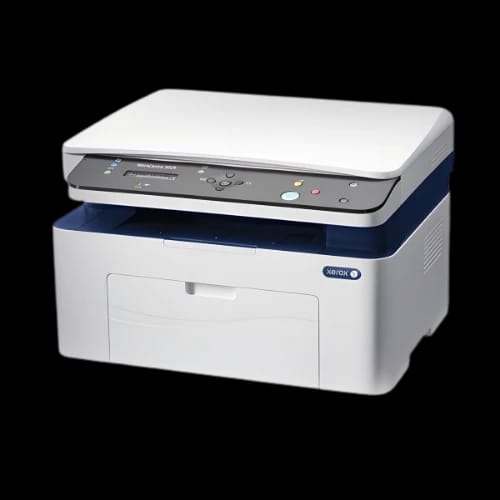
Xerox WorkCentre 3025NI Monochrome Multifunction Laser Printer
Key Features
- Xerox WorkCentre 3025NI
- 20 ppm speed
- Built-in Wi-Fi connectivity
- 4-in-1 multifunction capabilities
- 1200 dpi resolution
- Mobile printing support
Out Of Stock
Share:
Any Questions? Ask On
Technical Specifications
General
Printing
Copy & Scan
Paper Handling
Connectivity
Fax
Power
Warranty
Product Description
Xerox WorkCentre 3025NI Monochrome Multifunction Laser Printer — Is Your Office Still Wasting Time on Slow, Disconnected Printing?
Slow print queues kill productivity. The Xerox WorkCentre 3025NI Monochrome Multifunction Laser Printer solves that — right out of the box. This compact office equipment unit combines printing, copying, scanning, and faxing into a single machine built for real workloads. Xerox, a globally trusted name in document technology, engineered the WorkCentre 3025NI specifically for small to medium offices that demand speed, reliability, and wireless freedom without stretching the budget.
Xerox WorkCentre 3025NI Specs and Performance at a Glance
The WorkCentre 3025NI is a monochrome laser printer that delivers up to 20 pages per minute in both print and copy modes. First print output arrives in as fast as 8.5 seconds — no long warm-up waits between tasks.
Print resolution reaches 600 x 600 dpi, with enhanced image quality pushing up to 1200 x 1200 dpi equivalent for sharper text and graphics. Copy resolution holds steady at 600 x 600 dpi, keeping documents sharp and professional across every output.
Key specifications summary:
- Print Technology: Laser
- Print Speed: Up to 20 ppm
- Print Resolution: 600 x 600 dpi (enhanced up to 1200 x 1200)
- First Print Out Time: As fast as 8.5 seconds
- First Copy Out Time: As fast as 10 seconds
- Monthly Print Volume: Up to 15,000 images/month
- Dimensions: 406 x 360 x 309 mm
- Weight: 8.6 kg
- Color: White
This laser printer sub-category sits perfectly between home-office lightweights and heavy-duty departmental machines.
Key Features That Make the Xerox WorkCentre 3025NI a Smart Office Choice
Built-In Wi-Fi, Ethernet, and USB Connectivity
The 3025NI ships with three connection paths: 10/100BaseTX Ethernet, Wi-Fi 802.11 b/g/n, and High-Speed USB 2.0. No driver-only setups, no single-point-of-failure connections. Teams can print from wired desktops, wireless laptops, or directly via USB — simultaneously, without a dedicated print server.
Mobile printing is also native. Apple AirPrint and Google Cloud Print support means staff can print directly from iPhones, iPads, and Android devices. For businesses moving toward mobile-first workflows, that matters.
Full Multifunction: Print, Copy, Scan, and Fax
This is not a single-function device. The WorkCentre 3025NI handles four core office tasks:
- Print — laser-quality monochrome documents at 20 ppm
- Copy — up to 20 cpm with a 10-second first-copy-out time
- Scan — 8-bit greyscale laser scanning built in
- Fax — a fully embedded fax module with advanced features
Having all four functions in one machine reduces hardware costs and desk clutter. Xerox designed this unit for office environments where every square inch and every taka counts.
Advanced Fax Capabilities for Business Workflows
The fax module inside the 3025NI is not basic. It includes:
- Address book and auto redial
- Broadcast fax for sending to multiple recipients
- Junk Fax Filter to block unwanted incoming transmissions
- LAN fax for network-integrated faxing
- Secure fax receive mode for sensitive document handling
- Receive Fax Forward to PC — automatically routes incoming faxes to a computer
- MH/MR/MMR/JBIG/JPEG compression for efficient transmission
For offices in Bangladesh that still depend on fax for legal, financial, or government communications, this feature set is a genuine operational asset.
Print Features Built for Professional Output
Xerox packed the 3025NI with a print feature list that punches above its class. These are not marketing checkboxes — they solve real daily workflow problems.
Document management features:
- N-up printing (multiple pages per sheet)
- Booklet printing for internal documents
- Poster printing for notices and displays
- Fit-to-page and Scaling for non-standard document sizes
- Watermarks for draft or confidential document marking
- Skip blank pages to avoid wasting toner
Driver-level controls:
- Bi-directional driver for real-time printer feedback
- Earth Smart driver settings for eco-conscious printing
- Toner save mode to extend cartridge life
- Store and Recall driver settings for team-standard configurations
- Job Monitoring for print queue visibility
- Custom page size support for non-standard media
These tools give IT administrators and office managers direct control over output quality, toner consumption, and print policies.
Paper Handling and Monthly Duty Cycle
The WorkCentre 3025NI handles paper across two input paths. The main tray holds 150 sheets, and the manual feed slot accepts single-sheet specialty media. Both trays support custom sizes from 76 x 127 mm to 216 x 356 mm, covering everything from cards to legal-size paper.
Output capacity reaches 100 sheets before the tray needs clearing. For a machine rated at up to 15,000 images per month, this keeps operational interruptions minimal in moderate-volume office environments.
Manual duplex printing is supported. Staff can produce double-sided documents manually — useful for reports, proposals, and internal memos where paper savings matter.
Power Consumption and Efficiency
Power efficiency is a real operating cost consideration for any office in Bangladesh. The WorkCentre 3025NI manages its energy draw across three clear states:
- Operating mode: 313 W
- Standby mode: 37 W
- Power save mode: 2.3 W
The drop to 2.3 W in power save mode is significant. During off-peak hours or overnight, the machine draws almost nothing. Over weeks and months, that saves real electricity costs — a factor worth weighing for businesses managing tight utility budgets.
Compatibility and Use Cases
The 3025NI integrates with standard office environments running Windows and Mac operating systems. AirPrint compatibility extends native support to Apple's iOS and macOS ecosystem without additional drivers.
Ideal use cases for this office equipment:
- Small business offices needing all-in-one document handling
- Legal, finance, and accounting firms requiring fax capability
- Medical clinics and educational institutions with moderate print volumes
- Home offices needing network-connected multifunction capability
- Retail and service businesses requiring fast, reliable document output
The white chassis and compact 406 x 360 x 309 mm footprint fit naturally on a shared desk, counter, or shelf unit without dominating the space.
Reliability and Warranty
Xerox Corporation is a benchmark brand in the office equipment and laser printer category. The WorkCentre series carries decades of enterprise-grade engineering heritage. The 3025NI is designed for up to 15,000 monthly impressions, reflecting a duty cycle appropriate for sustained daily office use.
Xerox products sold through authorized channels in Bangladesh come with manufacturer warranty coverage. Always verify warranty terms and service availability with your authorized reseller before purchase.
Get the Xerox WorkCentre 3025NI at PCBstore Bangladesh
PCBstore Bangladesh stocks the Xerox WorkCentre 3025NI Monochrome Multifunction Laser Printer for businesses and professionals across the country. Stock levels on popular office equipment models shift fast — particularly on wireless multifunction laser printers in this price tier.
If your office needs a machine that handles print, copy, scan, and fax from a single compact unit — with Wi-Fi, AirPrint, Ethernet, and a full fax module — the WorkCentre 3025NI is a clear choice. Check current pricing and availability directly at PCBstore Bangladesh, and place your order before stock runs out.
Delivery Charge Info
Inside Dhaka: ৳230
Outside Dhaka: ৳290
FAQs
Does the Xerox WorkCentre 3025NI support wireless printing from mobile phones?
Yes. It supports Apple AirPrint and Google Cloud Print natively, allowing direct wireless printing from iPhones, iPads, and Android smartphones without additional apps or drivers.
What is the monthly duty cycle of the Xerox WorkCentre 3025NI?
The printer supports up to 15,000 images per month, making it suitable for small to medium offices with consistent daily print volumes.
Does the Xerox WorkCentre 3025NI support automatic duplex printing?
No. The 3025NI supports manual duplex printing only. Users must flip paper manually to print on both sides of a sheet.
What paper sizes does the Xerox WorkCentre 3025NI accept?
Both the main tray and manual feed slot support custom sizes ranging from 76 x 127 mm to 216 x 356 mm, covering standard A4, letter, and legal formats.
How much power does the Xerox WorkCentre 3025NI consume?
It draws 313 W during operation, 37 W on standby, and drops to just 2.3 W in power save mode — keeping energy costs low during idle periods.
Xerox WorkCentre 3025NI vs Xerox WorkCentre 3020: which is better for office use?
The 3025NI adds built-in fax capability, LAN fax support, and advanced fax features absent in the 3020. For offices requiring fax alongside Wi-Fi and full multifunction performance, the 3025NI is the stronger choice.
Is the Xerox WorkCentre 3025NI compatible with Apple Mac computers?
Yes. The printer supports Apple AirPrint, enabling direct printing from macOS and iOS devices over Wi-Fi without manual driver installation.
Does the Xerox WorkCentre 3025NI have a scan-to-PC feature?
The unit includes a built-in laser scanner with 8-bit greyscale capability. It also supports Receive Fax Forward to PC, routing incoming faxes directly to a connected computer.
What is the price of the Xerox WorkCentre 3025NI at PCBstore in Bangladesh?
Pricing is subject to availability and may change. Visit PCBstore Bangladesh at pcbstore.com.bd or contact their sales team directly for the current price and stock status of the Xerox WorkCentre 3025NI.
What type of connectivity does the Xerox WorkCentre 3025NI offer?
It provides three connectivity options: 10/100BaseTX Ethernet for wired networks, Wi-Fi 802.11 b/g/n for wireless access, and High-Speed USB 2.0 for direct computer connection.
Popular Products