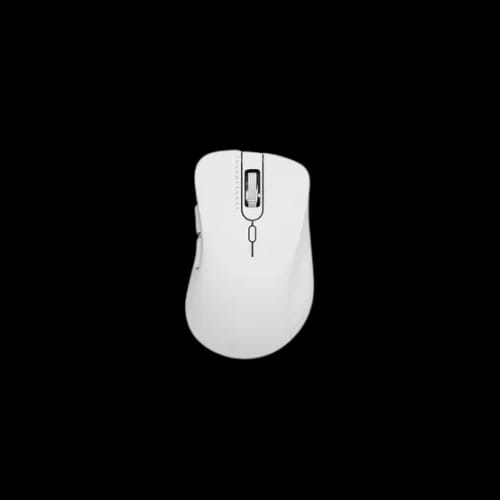
ThundeRobot ML101 Wireless Office Mouse
Key Features
- ThundeRobot ML101
- Wireless connectivity
- 1600 DPI sensor
- 6-button design
- Optical tracking
- 1-year warranty
Out Of Stock
Share:
Any Questions? Ask On
Technical Specifications
eneral
Connectivity
Sensor & Performance
Buttons
Warranty
Product Description
ThundeRobot ML101 Wireless Office Mouse
Tired of laggy cursor control? The ThundeRobot ML101 Wireless Office Mouse fixes that fast.
A bad mouse slows everything down. Missed clicks, jumpy tracking, cramped hands, and messy cables can turn basic office work into daily friction. The ThundeRobot ML101 Wireless Office Mouse is built for users who want dependable wireless control, practical comfort, and clean desk usability without overcomplicating their setup.
For buyers searching for a wireless office mouse price in Bangladesh, this model makes sense in the Computer Accessories category because it focuses on the things that matter most in real use: stable wireless connection, responsive cursor movement, a useful button layout, and straightforward everyday reliability. At PCB Store, this Mouse fits well for home desks, office counters, student study tables, and compact workstations across Bangladesh.
ThundeRobot ML101 Wireless Office Mouse for Everyday Productivity
Office users rarely ask for flashy extras. They want a mouse that responds quickly, feels natural in hand, and keeps up with repeated daily work. The ThundeRobot ML101 Wireless Office Mouse is positioned exactly in that lane.
Its wireless design helps reduce cable clutter, which matters more than many people expect. A cleaner desk improves mouse movement, keeps work areas organized, and makes laptop-based setups easier to manage. For shared spaces, front desks, and mobile work use, that convenience becomes a real benefit.
The optical tracking approach also gives this model practical appeal. Cursor response stays focused on office tasks like document handling, browsing, spreadsheet movement, software navigation, and regular click-heavy workflows.
ThundeRobot ML101 Wireless Office Mouse Performance and User Experience
A wireless office mouse lives or dies by how it feels during long sessions. The ThundeRobot ML101 Wireless Office Mouse is designed for routine use, which makes it relevant for users who spend hours in front of a screen.
With 1600 DPI resolution, this mouse targets the sweet spot for common desktop work. It gives enough cursor speed for efficient movement across displays while still feeling controlled during precise pointer placement. That balance works well for users who switch between browsing, documents, office apps, and general business software.
The six-button design also adds a layer of convenience. More buttons can reduce repeated hand movement and help users work faster, especially during daily navigation tasks.
Why the experience feels practical
- Wireless connection keeps the desk tidy
- Optical tracking supports consistent pointer control
- 1600 DPI suits common office movement needs
- Six buttons offer more functional input options
- Suitable for laptop and desktop based work setups
This is not the type of product that tries to impress with noise. It earns attention by being useful.
ThundeRobot ML101 Wireless Office Mouse Features That Matter in Real Use
A lot of buyers in Bangladesh search for a wireless mouse based on actual pain points. They want fewer cable problems, more freedom, and dependable click response throughout the workday. The ThundeRobot ML101 Wireless Office Mouse addresses those priorities in a clean, straightforward way.
Wireless connectivity gives flexibility in desk positioning. You are not locked into cable length or awkward routing. That can make a visible difference in reception desks, office cubicles, cashier counters, tutoring centers, and home offices.
The button count is another practical advantage. For users who rely on repetitive navigation, having six buttons can feel more efficient than a basic two-button office mouse.
Useful advantages for buyers at PCB Store
- Better desk freedom for office and home use
- Cleaner setup for modern workspaces
- Responsive tracking for regular digital tasks
- More control points for workflow shortcuts
- A balanced option within the mouse category
Buyers often overlook how much a mouse affects daily comfort and speed. Then they replace a poor one and notice the difference immediately.
ThundeRobot ML101 Wireless Office Mouse for Students, Offices, and Workstations
This model fits a broad range of real-world use cases in Bangladesh. It is especially relevant for users who want a reliable wireless mouse without stepping into unnecessary complexity.
A university student building a simple study setup can use the ThundeRobot ML101 Wireless Office Mouse for class notes, research tabs, assignments, and presentations. A freelancer working from a compact room setup can keep the desk cleaner and move freely between laptop tasks. Small offices and shared desks also benefit from a mouse that avoids cable drag and keeps the workspace organized.
Gaming cafe setups may need a different category focus, but many support stations, billing counters, and admin terminals still need a practical wireless mouse like this. That is where this product makes commercial sense.
Good fit for these users
- Students using laptops for daily study
- Office staff handling documents and software
- Freelancers building compact productivity desks
- Reception or billing counters needing cable-free control
- Home users who want a clean and simple setup
Power, Efficiency, and Practical Control
A good office mouse should feel responsive without becoming tiring to use. The ThundeRobot ML101 Wireless Office Mouse stays focused on that kind of work rhythm.
The 1600 DPI level supports efficient pointer movement for routine productivity. It is quick enough for modern displays and common desktop navigation, yet controlled enough for precise clicking in office environments. For buyers comparing wireless office mouse options at PCB Store Dhaka, that balance is often more useful than extreme settings.
The six-button layout also adds efficiency in subtle ways. It can help reduce extra cursor travel and repeated input steps during normal workflows. That matters in admin work, report preparation, browser-heavy tasks, and software-based business operations.
Reliability, Warranty, and After-Sales Support in Bangladesh
A product becomes easier to trust when support is clear. The ThundeRobot ML101 Wireless Office Mouse includes a 01 year warranty, which gives buyers more confidence during purchase.
That matters even more in Bangladesh, where many customers want direct store support rather than vague seller promises. PCB Store handles after-sales service across Bangladesh, including warranty claims, technical issues, and product support directly through the store team. That local support adds real value to the buying decision.
For many shoppers, price matters. Support matters too. A mouse used every day should come from a seller that stands behind the product.
Buy ThundeRobot ML101 Wireless Office Mouse from PCB Store Bangladesh
If your current mouse skips, drags, or clutters your desk, replacing it is not a luxury. It is a workflow fix. The ThundeRobot ML101 Wireless Office Mouse is a smart choice for buyers who want wireless convenience, practical control, and trusted store-backed support in Bangladesh.
You can check the latest ThundeRobot ML101 Wireless Office Mouse price in Bangladesh and availability at PCB Store. For office setups, student desks, and home productivity spaces, this model offers the kind of everyday value that holds up over time. Stock can move quickly on practical accessories, especially when buyers want reliable local warranty coverage.
Delivery Charge Info
Inside Dhaka: ৳80
Outside Dhaka: ৳130
FAQs
Is the ThundeRobot ML101 Wireless Office Mouse good for office work?
Yes, it is well suited for office tasks like browsing, documents, spreadsheets, and software navigation. Its wireless design, 1600 DPI control, and six-button layout make daily productivity more comfortable and efficient.
Can I use the ThundeRobot ML101 Wireless Office Mouse with a laptop?
Yes, this mouse is a practical choice for laptop users who want cable-free control. It works well for study, remote work, browsing, and general productivity in compact desk setups.
Does the ThundeRobot ML101 Wireless Office Mouse consume a lot of power?
The provided details do not list battery specifications or power draw. For most buyers, the main advantage is its wireless convenience and clean desk usability for regular office-oriented workloads.
Is 1600 DPI enough for the ThundeRobot ML101 Wireless Office Mouse?
Yes, 1600 DPI is a strong fit for everyday office use. It offers a balanced cursor speed for browsing, multitasking, document work, and accurate pointer movement on common desktop displays.
Does the ThundeRobot ML101 Wireless Office Mouse have thermal issues?
A mouse like this does not typically face thermal concerns in normal use. Based on the provided information, its focus is wireless operation, optical tracking, and practical daily input performance.
How many buttons does the ThundeRobot ML101 Wireless Office Mouse have?
It comes with six buttons. That gives users more input flexibility than a basic office mouse, which can be useful for navigation-heavy work and repeated software actions.
ThundeRobot ML101 Wireless Office Mouse vs a basic wired mouse: which is better?
The ML101 offers a cleaner desk setup and more movement freedom than a basic wired model. Buyers who value less cable clutter and easier positioning will likely prefer the wireless option.
Is the ThundeRobot ML101 Wireless Office Mouse available at PCB Store in Bangladesh?
Yes, this product is positioned for buyers in Bangladesh and can be checked through PCB Store. Availability may vary, so reviewing the current stock status before ordering is a smart move.
What is the ThundeRobot ML101 Wireless Office Mouse price in Bangladesh?
The exact price is not included in the provided information. For the latest price in Bangladesh, visit PCB Store or contact the store directly for current availability and purchase support.
Does the ThundeRobot ML101 Wireless Office Mouse come with warranty support?
Yes, it includes a 01 year warranty. PCB Store also provides direct after-sales service across Bangladesh for warranty claims, technical support, and customer assistance.
Popular Products