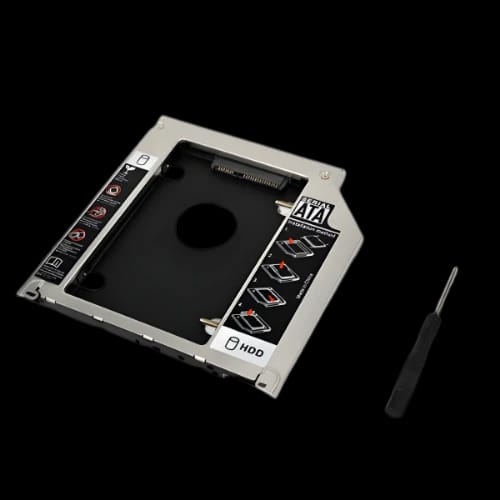
Second Hard Disk Drive CADDY-Secondary CD-ROM Storage for Laptop
Key Features
- Universal 2nd HDD/SSD Caddy
- SATA III 6Gbps Speed
- Supports 2TB Capacity
- 12.7mm Thick Profile
- Plug and Play Setup
Share:
Any Questions? Ask On
Technical Specifications
Model Information
Physical Dimensions
Interface & Speed
Performance & Support
Power & Indicators
Warranty
Product Description
Second Hard Disk Drive CADDY-Secondary CD-ROM Storage for Laptop
Is your laptop storage full while your CD-ROM sits empty? The Second Hard Disk Drive CADDY-Secondary CD-ROM Storage for Laptop expands your space instantly. Most modern files and software outgrow factory drives quickly. Replacing an idle optical drive with a high-capacity HDD or SSD is a smart, cost-effective upgrade. This hardware allows you to keep your OS on the main drive while using the caddy for massive storage.
Upgrade Your Laptop Storage with the Universal 2nd HDD/SSD Caddy
Adding a Second Hard Disk Drive CADDY-Secondary CD-ROM Storage for Laptop turns an obsolete bay into a functional tool. This Laptop Caddy fits the standard 12.7mm optical drive slot found in many traditional laptops. It acts as a bridge, allowing a 2.5-inch SATA drive to communicate directly with your motherboard.
Whether you are a video editor or a student, two drives provide better organization. You can separate professional software from personal media files. This Laptop Accessory is a staple for users in Bangladesh who want more power without buying a new machine.
High-Speed SATA Performance and Data Reliability
The Second Hard Disk Drive CADDY-Secondary CD-ROM Storage for Laptop supports SATA I, II, and III interfaces. This handles data transfer rates up to 6 Gbps when paired with a SATA III SSD. Speed is vital when moving large files or running secondary applications.
Integrated Design: The unit fits flush with your laptop chassis.
Plug and Play: No drivers are needed for modern operating systems.
Dual Boot Support: You can install a second OS on the drive inside this caddy.
This device features an aluminum or plastic/aluminum hybrid build. This construction assists with heat dissipation. Keeping your Laptop drives cool is essential for long-term hardware health.
Massive 2TB Capacity Support for Large Media Libraries
Storage needs never stop growing. The Second Hard Disk Drive CADDY-Secondary CD-ROM Storage for Laptop supports drives up to 2 TB. This allows you to carry your entire movie collection or game library everywhere.
Using this caddy from PCB Store ensures you get a product that fits the standard 12.7mm profile. Since it requires no external power supply, it draws what it needs from the laptop bus. This keeps your mobile setup clean. The LED indicators on the front show when the drive is active.
Simple Installation and Universal Compatibility
The Second Hard Disk Drive CADDY-Secondary CD-ROM Storage for Laptop is designed for easy DIY installation. You simply remove the screw holding your CD-ROM and slide the caddy in. You can even transfer your original plastic faceplate to the caddy for a factory-finish look.
It is a perfect fit for various brands. Users looking for a Laptop Caddy find this the most cost-effective way to boost performance. If your laptop has a 12.7mm tray-loading optical drive, this unit will fit perfectly.
Get the Best Laptop Caddy Price at PCB Store in Bangladesh
If you need more space, the Second Hard Disk Drive CADDY-Secondary CD-ROM Storage for Laptop is a logical choice. It is a small investment with a massive return in productivity. Avoid the hassle of external hard drives that dangle from your USB ports.
Visit PCB Store in Bangladesh to secure your unit. Stocks move quickly because this is a top-tier Laptop Accessory for professionals. Upgrade your storage today and stop deleting files to make room for new ones.
Delivery Charge Info
Inside Dhaka: ৳80
Outside Dhaka: ৳130
FAQs
Is the Second Hard Disk Drive CADDY compatible with all laptops?
It fits laptops with a 12.7mm optical bay. Please measure your current DVD drive thickness before purchase. It will not fit slim laptops requiring a 9.5mm caddy.
Will using this caddy drain my laptop battery faster?
Power consumption depends on the drive installed. A 2.5-inch HDD uses more power than an SSD. Generally, the impact on battery life is minimal during standard daily tasks.
Does this Laptop Caddy cause overheating issues?
The aluminum hybrid material helps dissipate heat. Since it sits in the optical bay, it has its own space. Proper internal airflow remains the most important factor for cooling.
Can I boot Windows from the drive inside the caddy?
Yes, this caddy supports dual boot functionality. You can install an operating system on the secondary drive and select it from your BIOS boot menu during the startup process.
How does this caddy compare to an external hard drive?
The caddy is internal, so it doesn't occupy USB ports or require carrying extra cables. It also offers faster SATA III speeds compared to many external USB enclosures.
What is the price of this HDD Caddy at PCB Store in Bangladesh?
Prices vary based on current market rates. Please visit the PCB Store website or their physical shop in Bangladesh for the most accurate, up-to-date pricing and availability details.
Do I need to install any software to use this?
No software is required for this device. This is a plug-and-play component. Once the drive is mounted, your operating system will recognize it as a standard storage volume.
Popular Products