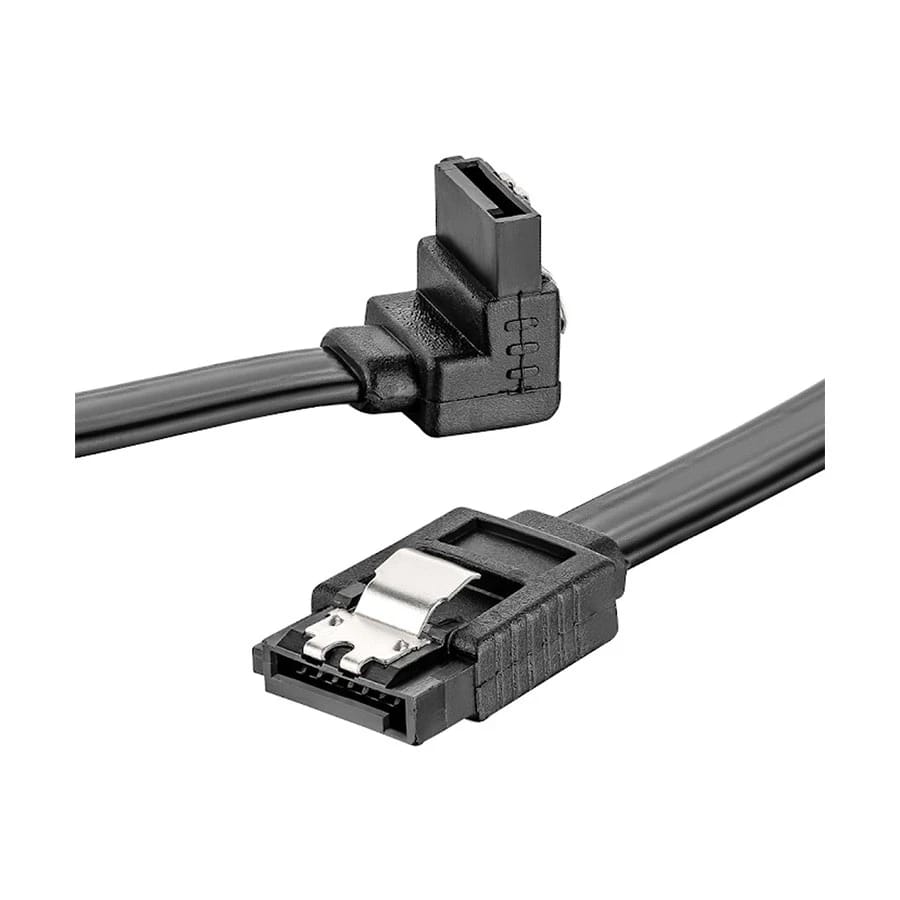
SATA CABLE FOR HDD & SATA SSD (NON BRAND)
Key Features
- Unbranded SATA data cable for internal storage
- Connects a SATA HDD or SATA SSD to a compatible motherboard
- Standard 7-pin SATA data connections
- Requires a separate drive power connection
- No warranty
Share:
Any Questions? Ask On
Technical Specifications
General
Product Description
A Simple Data Connection for Your SATA Drive
The SATA Cable for HDD and SATA SSD provides the data link between an internal SATA storage drive and a compatible motherboard. This non-brand cable is a straightforward option when you need an additional connection for a desktop build, a storage upgrade or a replacement cable. Its price in Bangladesh is BDT 30 at PCB Store, and it carries no warranty.
For Internal SATA Storage
Use this cable with a hard disk drive or SATA solid-state drive that has a standard SATA data port. It can connect the drive to an available SATA port on the motherboard. This makes it relevant to desktops using internal SATA storage, whether the drive holds an operating system, applications or additional files. Check both the drive interface and motherboard connection before ordering.
A 2.5-inch SATA SSD and a SATA hard drive use separate connections for data and power. This cable handles the data connection. You must also provide the appropriate power connection from the computer power supply. Connecting the data cable alone will not power the drive, and a spare power lead alone will not provide communication with the motherboard.
Check the Interface Before You Buy
The standard SATA data connection uses seven pins and a keyed shape. Match the connector orientation before fitting the cable; it should seat correctly without excessive force. This cable is intended for an internal SATA connection. A computer requiring an external USB connection needs a suitable adapter or enclosure, while an NVMe drive requires a compatible NVMe connection rather than this cable.
For a storage upgrade, check that your motherboard has a free SATA port and that the case has a suitable place for the drive. Plan the route between those points so the cable does not cross a fan or become trapped behind a panel. The connector area also needs enough clearance once the case is closed. A tidy route makes later maintenance easier.
Practical Installation
Shut down the computer and disconnect its power before working inside the case. Connect one end to the drive data port and the other to the motherboard SATA port, following the component instructions. Support the connectors as you fit them and avoid pulling on the cable when disconnecting it. Secure the drive and keep loose cables away from moving fans before restoring power.
After installation, check that the system detects the drive. A newly installed blank drive may need initialization or formatting through your operating system before it appears as usable storage. Take care when selecting a disk for formatting, since that action removes its existing data. If a previously working drive is not detected, check both its data and power connections.
SATA Cable Price in Bangladesh
PCB Store offers this unbranded SATA data cable for BDT 30 with no warranty. It is a low-cost connection accessory for compatible internal SATA HDD and SSD installations. Confirm your drive type and required connection before purchasing.
Delivery Charge Info
Inside Dhaka: ৳80
Outside Dhaka: ৳130
FAQs
Does this cable power the drive?
No. It carries data; the drive also needs a separate power connection.
Can I use this cable with an NVMe SSD?
No. It connects SATA drives to compatible SATA ports.
What is the SATA data cable price in Bangladesh?
This unbranded SATA data cable costs BDT 30 at PCB Store.
Which drives can use this SATA cable?
It connects compatible SATA hard drives and SATA SSDs to a motherboard SATA data port.
What connector does this SATA data cable use?
It uses standard 7-pin SATA data connections. Match the keyed connector orientation when connecting it.
Can this cable connect a SATA drive directly to USB?
No. A USB connection requires a suitable SATA-to-USB adapter or enclosure.
What should I check before installing a SATA data cable?
Check for an available motherboard SATA port, a separate drive power connection and enough cable-routing clearance. Shut down and disconnect the computer from power before installation.
Does this unbranded SATA cable include a warranty?
No. This cable is sold without a warranty.
Popular Products