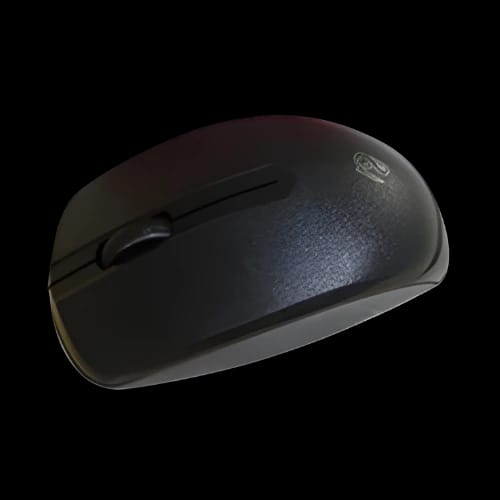
Rizyue M11 Wireless Bluetooth Mouse
Key Features
- Rizyue M11 Wireless Bluetooth Mouse
- Dual Wireless Modes
- Up to 3000 DPI
- Ergonomic Lightweight Design
- Replaceable Battery Power
Out Of Stock
Share:
Any Questions? Ask On
Technical Specifications
General Information
Connectivity & Control
Design & Power
Warranty
Product Description
Rizyue M11 Wireless Bluetooth Mouse
Slow cursor response breaks focus. Poor grip hurts wrists. The Rizyue M11 Wireless Bluetooth Mouse targets both problems with stable wireless control and a lightweight ergonomic build designed for long sessions. It is an accessory worth having in anyones setup.
It is offered by the brand Rizyue and available in Bangladesh through PCB Store.
Rizyue M11 Wireless Bluetooth Mouse Overview for Everyday Precision
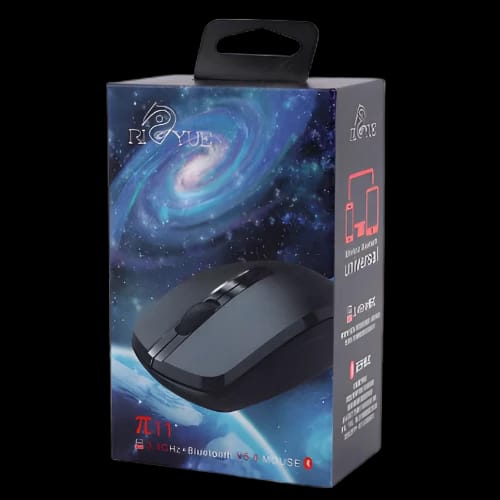
This Rizyue Mouse is built for users who need freedom from cables. It supports Bluetooth and 2.4GHz wireless connections. This dual-mode design suits laptops, desktops, and compact workspaces.
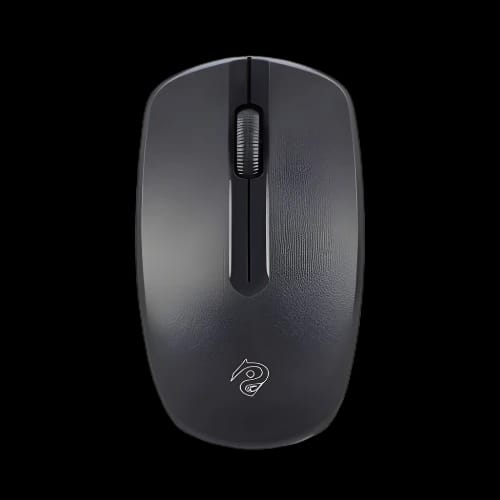
The mouse features a clean black finish. Its shape follows natural hand curves. The body stays light, which reduces wrist pressure during long hours.
Power comes from a standard replaceable battery. There is no charging downtime. You swap the battery and keep working.
Rizyue M11 Wireless Bluetooth Mouse Specifications and Performance
The Rizyue M11 focuses on balance. It avoids unnecessary extras. Each component supports daily productivity.
Core specifications include:
- Connectivity: Bluetooth and 2.4GHz wireless
- Buttons: 3 responsive buttons
- DPI: Up to 3000 DPI
- Power Source: Replaceable battery
- Color: Black
- Design: Lightweight and ergonomic
Cursor movement stays responsive on common surfaces. The DPI range handles browsing, office work, and casual creative tasks.
Some sources also list 1000 DPI. This suggests adaptive tracking depending on usage mode or system settings.
Wireless Stability with Rizyue M11 Bluetooth and 2.4GHz Modes
Wireless interference frustrates users. The Rizyue M11 Wireless Bluetooth Mouse reduces that stress.
Bluetooth mode works well for modern laptops and tablets. It frees the USB port. The 2.4GHz wireless mode supports desktops using the included receiver.
Switching between modes helps users manage multiple devices. One mouse can serve work and home systems without re-pairing delays.
Rizyue M11 Wireless Bluetooth Mouse Ergonomic Design Benefits
Hand fatigue builds slowly. Bad mouse design accelerates it. The Rizyue M11 uses a curved, low-profile shape.
This form supports palm and claw grips. The lightweight body reduces strain during repeated movements.
Short sessions feel easy. Long sessions feel controlled. The design suits students, office workers, and casual users.
Precision Control with Rizyue M11 Wireless Bluetooth Mouse DPI Range
Cursor accuracy matters. The Rizyue M11 Wireless Bluetooth Mouse offers tracking up to 3000 DPI.
Lower DPI supports reading, spreadsheets, and browsing. Higher DPI helps faster navigation across large screens.
The sensor performs well for its class. It targets general productivity rather than competitive gaming.
Power Efficiency and Battery Usage of Rizyue M11 Wireless Bluetooth Mouse
Charging cables clutter desks. Recharge cycles interrupt work. The Rizyue M11 avoids those issues.
It uses a standard replaceable battery. You can carry spares. Battery replacement takes seconds.
This approach suits users who prefer predictable power. There is no waiting time or charging anxiety.
Compatibility and Use Cases for Rizyue M11 Wireless Bluetooth Mouse
The Rizyue M11 Wireless Bluetooth Mouse supports a wide range of setups.
It works well with laptops, desktops, and compact PCs. Bluetooth suits ultrabooks. The 2.4GHz receiver fits older systems.
Common use cases include:
- Office productivity
- Online classes
- Home computing
- Travel setups
- Light creative work
This mouse fits users who value simplicity and flexibility.
Build Quality and Daily Reliability of Rizyue M11 Wireless Bluetooth Mouse
Daily devices need consistency. The Rizyue M11 focuses on reliable button response and stable tracking.
The three-button layout stays familiar. Clicks feel responsive for routine tasks.
The lightweight shell supports portability. It fits backpacks without adding bulk.
Why Choose Rizyue M11 Wireless Bluetooth Mouse from PCB Store
PCB Store operates in Bangladesh with a focus on genuine PC products. Buying locally improves availability and support clarity.
The Rizyue M11 Wireless Bluetooth Mouse suits users seeking wireless freedom at a practical level. It avoids complexity. It delivers core performance.
This mouse fits students, professionals, and home users who want comfort and stable control.
Availability can change fast. Stock movement stays high for popular wireless accessories.
Get the Rizyue M11 Wireless Bluetooth Mouse in Bangladesh Today
If wired clutter annoys you, this mouse fits your setup. If wrist comfort matters, its ergonomic design helps.
PCB Store offers access within Bangladesh. Local availability reduces waiting time and uncertainty.
Wireless productivity starts with the right tool. The Rizyue M11 Wireless Bluetooth Mouse meets daily needs without overcomplication.
Delivery Charge Info
Inside Dhaka: ৳80
Outside Dhaka: ৳130
FAQs
Is the Rizyue M11 Wireless Bluetooth Mouse compatible with laptops and desktops?
Yes. It supports Bluetooth for modern laptops and 2.4GHz wireless for desktops using a USB receiver. This dual compatibility makes it suitable for most systems used in Bangladesh.
Does the Rizyue M11 Wireless Bluetooth Mouse require charging?
No. It uses a standard replaceable battery. You do not need to recharge it. Battery replacement is quick and avoids downtime during work or study.
How much power does the Rizyue M11 Wireless Bluetooth Mouse consume?
Power usage stays low due to its simple button layout and efficient wireless operation. A single battery typically lasts for extended daily use without frequent replacement.
Does the Rizyue M11 Wireless Bluetooth Mouse overheat during long use?
No. The mouse does not generate heat during operation. Its internal components draw minimal power, which prevents thermal discomfort during extended sessions.
Is the Rizyue M11 Wireless Bluetooth Mouse suitable for gaming?
It suits casual gaming and everyday tasks. It is not designed for competitive gaming. The DPI and button layout focus on productivity and general use.
What is the difference between Rizyue M11 Wireless Bluetooth Mouse and a wired mouse?
The Rizyue M11 offers cable-free movement and cleaner desks. Wired mice may offer lower latency, but this model focuses on convenience and flexibility.
Rizyue M11 Wireless Bluetooth Mouse vs generic wireless mouse – what changes?
The Rizyue M11 provides dual connectivity and ergonomic shaping. Many generic models lack Bluetooth support or refined comfort for long working hours.
What is the price of Rizyue M11 Wireless Bluetooth Mouse at PCB Store in Bangladesh?
Pricing may vary based on stock and offers. PCB Store lists the Rizyue M11 Wireless Bluetooth Mouse with local availability in Bangladesh for quick purchase.
Popular Products