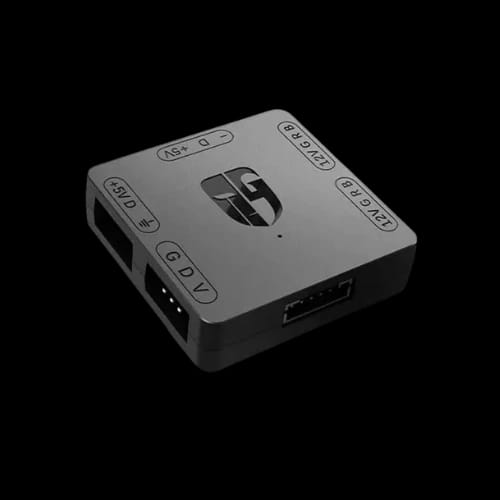
RGB convertor (5V TO 12V RGB TRANSFER HUB)
Key Features
- DeepCool RGB Convertor
- 5V ARGB translation
- SATA power stability
- Multiple port expansion
- 600mm cable reach
Out Of Stock
Share:
Any Questions? Ask On
Technical Specifications
Connectivity & Ports
Physical Dimensions
Performance
Warranty Information
Product Description
DeepCool RGB Convertor (5V TO 12V RGB TRANSFER HUB)
Are you struggling to connect 5V ARGB fans to a 12V motherboard header without damaging your hardware? The DeepCool RGB Convertor (5V TO 12V RGB TRANSFER HUB) solves this compatibility gap instantly. It allows addressable RGB components to sync with standard 12V systems. Many users face the frustration of mismatched lighting connectors. This device acts as a bridge for your PC components.
Bridge the Gap with DeepCool RGB Convertor 5V to 12V Technology
Modern PC building often involves mixing different generations of lighting standards. You might have a high end motherboard with only 4 pin 12V headers. Meanwhile, your new fans use 3 pin 5V ARGB connectors. Plugging them in directly is impossible and dangerous. The DeepCool RGB Convertor converts the signal effectively. This RGB converter fits into any build seamlessly.
PCB Store offers this solution for enthusiasts in Bangladesh. It simplifies the complex wiring of RGB setups. You no longer need to replace your motherboard to get modern lighting. This small hub handles the voltage translation for you. It ensures your 5V lights react to your 12V motherboard software.
Technical Performance of the DeepCool RGB Transfer Hub
This hub uses a SATA power connection to maintain signal stability. It draws power directly from your PSU. This prevents overloading your motherboard headers. The input side takes a 4 pin 12V signal. The output side provides ports for your 5V devices.
Port Configuration and Connectivity
The device features multiple ports for maximum utility. It includes two 4 pin 12V ports. It also provides three 3 pin 5V ports. This layout supports multiple fans or light strips. The physical size is compact and easy to hide. It weighs only 33 grams. You can tuck it behind the motherboard tray easily.
Cable Length and Reach
The package includes a 600 mm HUB strip cable. This length is sufficient for large ATX cases. You can route cables cleanly around your components. DeepCool designed this for clean cable management. It stays out of sight while doing the heavy lifting.
Why Every Builder Needs an RGB Converter
Compatibility issues can halt a PC build project quickly. Using the wrong voltage can fry your LED strips. This hub protects your investment by regulating the flow. It translates the Rainbow mode signal into something your 12V header understands.
Simplified Lighting Control
You can use your existing motherboard software like Aura Sync or Mystic Light. The converter passes the data through to your 5V devices. While 12V headers usually limit color options, this hub maximizes what is possible. It creates a unified look across all PC components.
Brand Reliability
DeepCool is a respected name in the PC cooling industry. This company produces high quality accessories for gamers. Their RGB converter is a specialized tool for specific problems. It reflects their expertise in power management and lighting.
Usage Scenarios for the RGB Transfer Hub
This product is ideal for users upgrading their cooling systems. If you bought ARGB fans for an older PC, you need this hub. It works well with various brands, not just DeepCool.
Upgrading to ARGB fans on 12V motherboards.
Adding 5V light strips to older gaming rigs.
Syncing multiple RGB devices through a single header.
The setup process is straightforward for any builder. Connect the SATA power first. Link the 12V input to your motherboard. Then, plug your 5V devices into the output ports.
Stability and Build Quality in Bangladesh
The DeepCool RGB Convertor is built to last. It uses quality plastics and secure connectors. The pins are sturdy and resist bending during installation. In the humid climate of Bangladesh, durable electronics are essential. This hub maintains consistent performance without overheating.
PCB Store ensures that local customers get genuine products. Using a fake converter can lead to short circuits. Stick with a trusted brand like DeepCool for your power needs.
Buy DeepCool RGB Convertor at PCB Store Today
Stop worrying about mismatched headers and flickering lights. Get the DeepCool RGB Convertor (5V TO 12V RGB TRANSFER HUB) to finish your build. Demand for this specific sub category of PC components is high in Bangladesh.
Visit PCB Store to check the latest stock. This hub is the most cost effective way to fix lighting issues. Do not risk your expensive hardware with DIY voltage mods. Buy the professional solution now. Enhance your gaming setup with perfect lighting synchronization.
Delivery Charge Info
Inside Dhaka: ৳100
Outside Dhaka: ৳150
FAQs
Can I use this hub to control individual LEDs on my 5V fans?
The converter allows 5V ARGB fans to work on 12V headers, but lighting effects might be limited to the motherboard software capabilities. It translates signals so 5V devices can safely receive power and data.
Does the DeepCool RGB Convertor require extra software?
No extra software is needed for this device. It uses your existing motherboard RGB software to manage the lights. It acts as a hardware bridge between different voltage standards for your PC components.
Will this hub support more than five fans at once?
The hub has five total ports for your lighting needs. For more devices, you might need to daisy chain your fans. Always check the total power draw to stay within the SATA power limits.
What happens if I plug a 5V fan into a 12V header without this?
Plugging a 5V ARGB fan directly into a 12V header will likely burn out the LEDs instantly. The voltage difference is too high. This hub prevents that damage by regulating the output.
Does it work with all motherboard brands like ASUS and MSI?
Yes, it is compatible with major brands including ASUS, MSI, and Gigabyte. It uses standard 4 pin 12V RGB headers found on most boards. It bridges the gap to 3 pin 5V devices.
Popular Products