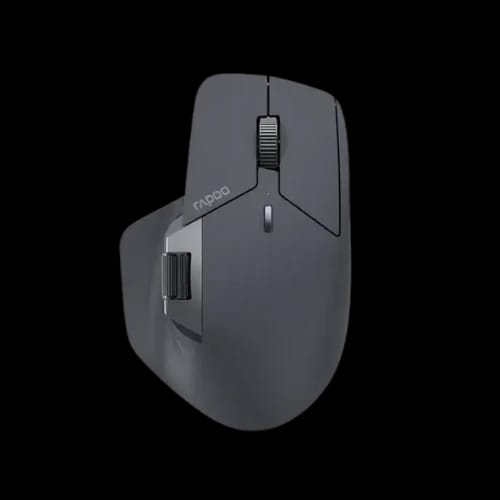
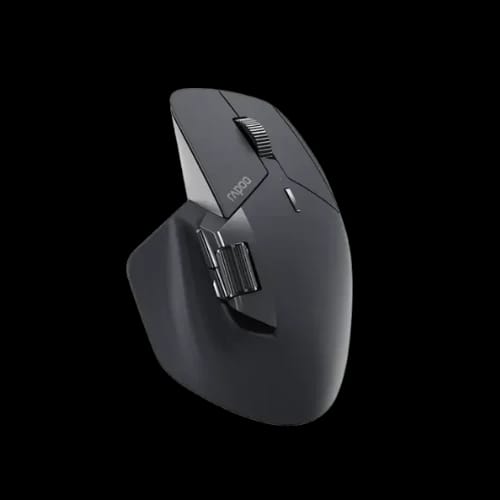
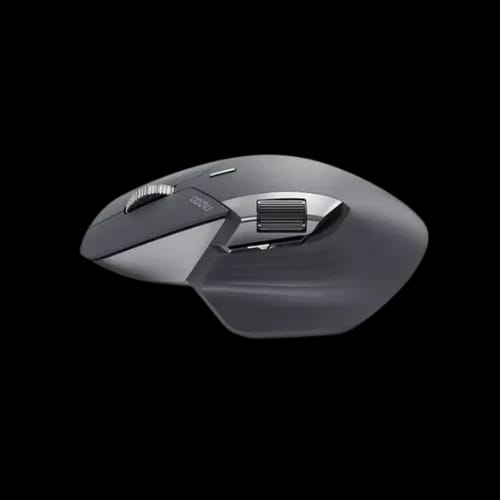
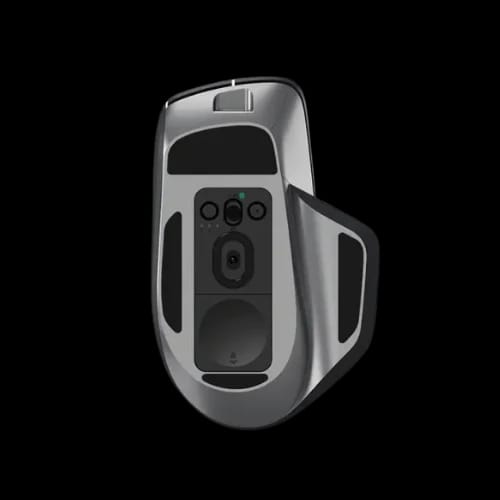
Rapoo MT760 PRO Tri-Mode Wireless Mouse
Key Features
- Rapoo MT760 PRO
- Tri-mode connectivity
- 12000 DPI precision
- Ergonomic design
- Multi-device support
- USB-C charging
Out Of Stock
Share:
Any Questions? Ask On
Technical Specifications
General
Connectivity
Performance
Design & Physical
Battery & Power
Compatibility
Warranty
Product Description
Precise Rapoo MT760 PRO Tri-Mode Wireless Mouse for Comfort
Wrist pain, dropped connections, and sluggish cursors are killing your productivity — and the wrong mouse is usually to blame.
The Rapoo MT760 PRO Tri-Mode Wireless Mouse solves all three without asking you to choose between performance and comfort. Built for professionals who refuse to compromise, it delivers precision tracking, multi-device flexibility, and ergonomic support in a single package.
For buyers researching Rapoo Mouse Price in BD, this model consistently stands out as one of the most well-rounded options in its category. Those hunting best mouse deals will find the MT760 PRO punches well above its price point across every practical metric that matters in daily use.
Rapoo MT760 PRO Wireless Mouse Performance and Precision Control
Precision is not a feature you notice when it works — you notice it the moment it fails. The MT760 PRO is engineered so that moment never arrives.
Checking overall PC Accessories Price in BD before committing to a peripheral purchase is always a smart move. The MT760 PRO sits at a sweet spot where performance and value intersect without forcing a compromise.
High-Grade Sensor for Smooth Tracking
Precision starts at the sensor level. This model uses a high-grade PAW3311 sensor that tracks smoothly across various surfaces. Whether you are editing graphics or navigating spreadsheets, cursor movement feels controlled and responsive.
With adjustable DPI levels up to 12000, users can fine-tune sensitivity based on workflow. Lower settings help with pixel-level accuracy, while higher levels support fast navigation across large displays.
For users considering alternatives in the same tri-mode category, the Keychron M6 Tri-Mode Wireless Mouse (Black) is worth evaluating alongside the MT760 PRO — both target precision-focused users who need reliable wireless switching across multiple devices.
Tri-Mode Connectivity for Every Setup
The tri-mode connectivity adds genuine flexibility to daily workflows. You can switch between Bluetooth, 2.4GHz Nearlink, and wired modes depending on your setup.
That matters for professionals juggling multiple systems or switching between office and home environments. No single connection mode fits every situation — this mouse adapts instead of forcing a workaround.
Key performance highlights include:
- Adjustable DPI settings for tailored sensitivity across different workflow types
- High tracking speed for fluid cursor movement on varied surfaces
- Stable performance across all three connection modes without latency spikes
- Minimal input delay whether connected via Bluetooth or the nano USB receiver
Ergonomic Design of Rapoo MT760 PRO for Long Work Sessions
Comfort is not optional for daily users. One poorly designed mouse can cause wrist strain that compounds over weeks into something genuinely painful.
The MT760 PRO takes ergonomics seriously — and it shows in every curve and button placement decision the designers made.
Sculpted Shape That Reduces Fatigue
The Rapoo MT760 PRO adopts a right-handed ergonomic shape designed to reduce strain during extended use. The contour supports your palm naturally, helping prevent wrist fatigue across long sessions.
At 105g, it feels solid without being heavy. The button placement is intuitive, allowing quick access without finger stretching or awkward repositioning mid-task.
For designers, developers, and office users in Bangladesh, this design makes a real difference over long sessions. It suits both desk setups and portable workstations without adjustment.
Core ergonomic advantages include:
- Sculpted design for natural hand positioning during extended work
- Reduced wrist strain during prolonged daily usage
- Thoughtful button placement for efficient one-handed operation
- Balanced weight distribution for better directional control
Multi-Device Compatibility and Connectivity Options
Switching between devices should feel effortless. A mouse that forces you to re-pair or reconnect manually every time is a friction point you do not need in a productive day.
The MT760 PRO eliminates that friction entirely through broad OS support and clean connection switching.
Cross-Platform Support for Hybrid Workflows
This mouse supports multiple operating systems including Windows, macOS, Android, iOS, and Chrome OS. That opens genuine doors for hybrid workflows where a single peripheral must serve multiple roles.
The nano USB receiver provides stable wireless connectivity, while Bluetooth 5.0 supports clean pairing with laptops and tablets. Wired mode adds reliability when needed, especially during critical tasks where wireless interruptions are not acceptable.
This flexibility is particularly valuable in shared environments like offices or freelance setups in Dhaka. One device handles multiple roles without interruption or compromise.
Battery Efficiency and Charging Convenience
Battery anxiety disrupts productivity at the worst possible moments. The MT760 PRO addresses this directly rather than treating battery life as an afterthought.
Its 800mAh lithium battery supports long sessions across all connection modes, significantly reducing the need for frequent charging interruptions during the workday.
USB Type-C Charging for Modern Convenience
The USB Type-C charging port allows fast and convenient recharging from any modern cable. You can even continue working in wired mode while the battery charges — no forced downtime.
For users in Bangladesh where consistent power access can vary by location and time of day, this reliability adds real practical value. The optimized power management across modes extends usable time further than the raw battery capacity suggests.
Real-World Use Cases in Bangladesh
This mouse fits into multiple environments without feeling like a compromise in any of them. Students working on assignments benefit from the precision and comfort combination.
Freelancers handling design or coding tasks appreciate the customizable DPI and ergonomic support during marathon work sessions. Gaming café setups can lean on wired mode for stability, while office environments benefit from wireless flexibility throughout the day.
Even casual users will notice smoother navigation compared to standard mice at a similar price point. The MT760 PRO does not require a specialized workflow to deliver its value.
Build Quality and Long-Term Reliability
Durability matters in daily-use accessories more than most buyers realize at the point of purchase. The Rapoo MT760 PRO features solid construction and responsive buttons designed for repeated use without degradation.
The scroll wheel feels controlled and deliberate — not loose or rattly the way budget peripherals tend to feel after a few months of regular use.
With a 2-year brand warranty, buyers gain genuine peace of mind backed by local support. The trusted PCB Store in Bangladesh handles after-sales service directly, including warranty claims and technical support without routing you through international channels.
This local support network makes a measurable difference. You are not left waiting on international service delays when something needs attention.
Where to Buy Rapoo MT760 PRO Online in BD?
The Rapoo MT760 PRO is available at PCB Store Dhaka with reliable stock and verified authenticity backed by direct brand authorization.
Customers across Bangladesh rely on PCB Store for genuine computer accessories, competitive pricing, and responsive support after the purchase. For those tracking Rapoo best price in Bangladesh across multiple sellers, PCB Store consistently delivers on both price accuracy and product authenticity.
Those exploring a complete peripheral setup or full system configuration can also browse build your PC BD options through PCB Store — where procurement guidance matches your actual workflow requirements rather than pushing the highest-margin option.
Sourcing through a verified local channel removes import risk, protects your warranty, and ensures you have direct support available when you need it most.
Delivery Charge Info
Inside Dhaka: ৳80
Outside Dhaka: ৳130
FAQs
What is the price of the Rapoo MT760 PRO Tri-Mode Wireless Mouse in Bangladesh?
The Rapoo MT760 PRO is available at PCB Store Bangladesh with competitive pricing. Visit PCB Store directly or contact their team for the current listed price and live stock status.
Where can I buy the Rapoo MT760 PRO Wireless Mouse in Bangladesh?
PCB Store in Bangladesh stocks genuine units with official warranty coverage and direct after-sales support, making it the most reliable local source for this model.
What makes this mouse ideal for professionals and daily office users?
It combines a PAW3311 precision sensor, ergonomic right-handed design, and tri-mode wireless connectivity — purpose-built for users who need reliable performance across long daily work sessions.
Is this mouse compatible with macOS, Android, and Chrome OS?
Yes. This unit supports Windows, macOS, Android, iOS, and Chrome OS, making it a genuinely cross-platform peripheral for hybrid and multi-device workflows.
How does this mouse compare to the Keychron M6 Tri-Mode Wireless Mouse?
Both target tri-mode wireless users, but this unit emphasizes ergonomic shaping and wrist comfort. The Keychron M6 suits users prioritizing a more symmetrical form factor and different build aesthetics.
What DPI range does this unit support?
It supports adjustable DPI up to 12000, covering everything from pixel-level precision work to fast navigation across large multi-monitor setups.
How long does the battery last and how does it charge?
The 800mAh lithium battery supports extended sessions across all modes. It charges via USB Type-C and allows continued use in wired mode during charging.
Does this unit work while charging?
Yes. Switching to wired mode during charging keeps the mouse fully functional, eliminating any forced downtime during critical work periods.
What warranty and after-sales support is available in Bangladesh?
This mouse carries a 2-year brand warranty. PCB Store handles all warranty claims, technical issues, and product support directly in Bangladesh without international service delays.
Popular Products