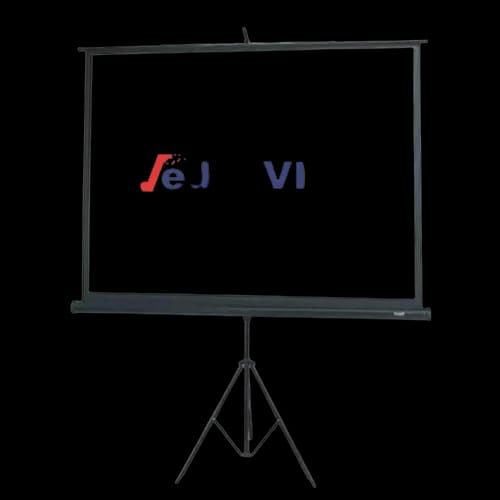
Mediaview Tripod Projector Screen 84″ x 84″
Key Features
- Mediaview Tripod Projector Screen 84″ x 84″
- 1:1 Aspect Ratio
- Manual Pull-Up
- Adjustable Tripod Stand
- Foldable Lightweight Design
- Matte White Surface
Out Of Stock
Share:
Any Questions? Ask On
Technical Specifications
Display
Operation & Type
Installation & Design
Surface & Materials
Warranty Information
Product Description
Mediaview Tripod Projector Screen 84″ x 84″ — Tired of warped images on a bare wall?
A wall looks easy. Then the image bends at the corners. Blacks turn gray. Text loses bite. The Mediaview Tripod Projector Screen 84″ x 84″ fixes that fast with a matte white surface and a stable, adjustable tripod stand.
This Office Equipment choice fits real meeting rooms. It also suits classrooms and home setups. In Bangladesh, shoppers often want portable gear that sets up fast. PCB Store stocks this kind of Projector Accessories item for practical use, not showroom talk.
Mediaview Tripod Projector Screen 84″ x 84″ display basics for square-format projection
The screen uses a 1:1 aspect ratio. That square format works well for slides, charts, and mixed content. It also helps when your projector output or usage favors a balanced frame.
What you get from the display design
- Matte white surface hardness for controlled light reflection
- Matte finish aimed at better perceived color accuracy
- High-quality projection surface for cleaner viewing than painted walls
Short story: it’s built to show content as it should look.
Product specifications and performance overview of Mediaview Tripod Projector Screen 84″ x 84″
This projector screen keeps the spec list focused. No bloated marketing. Just usable details.
Core specs
- Aspect Ratio: 1:1
- Operation: Manual Pull-Up
- Type: Tripod
- Installation: Portable
- Surface Hardness: Matte White
- Materials: High-Quality Projection Surface
- Stand: Adjustable Tripod
- Design: Foldable and Lightweight
- Warranty: No Warranty
Manual pull-up means simple control. Pull it up. Set the height. Lock it in. Done.
Key features and real benefits of Mediaview Tripod Projector Screen 84″ x 84″
Manual pull-up operation that stays simple
No power needed. No motor noise. No waiting. Manual pull-up keeps the workflow quick, which matters in meetings and classes.
Adjustable tripod stand for better viewing height
Projectors vary. Seating height varies too. The adjustable tripod helps you align the image for the room, not the other way around.
Foldable and lightweight build for easy transport
Portable setups live or die on carry comfort. This design folds down, travels easier, and stores without taking over a corner.
Matte finish that helps the image look cleaner
Glossy surfaces can create hot spots. The matte finish helps reduce harsh reflections, so text and charts look more stable across the screen.
Technical highlights for Mediaview Tripod Projector Screen 84″ x 84″ portable use
This screen is built around portability. That shows up in three places: setup style, structure, and surface.
Portable installation
You can move it between rooms without wall mounting. That matters for shared offices, coaching centers, and event spaces in Bangladesh.
Tripod stability
A tripod base gives a predictable footprint. It also avoids drilling holes. The stand is adjustable, so you can tune height quickly.
Matte white surface
Matte white is a practical choice for mixed lighting. It’s also forgiving for slide decks and training material.
Compatibility and best use-cases for Mediaview Tripod Projector Screen 84″ x 84″
This sits in Projector Screen territory under Projector Accessories, inside Office Equipment that supports day-to-day work.
Best-fit scenarios
- Training rooms and office meetings
- Coaching centers and classrooms
- Portable presentations for client sites
- Events that need fast setup and teardown
The 1:1 aspect ratio suits square framing and general content. If your projector output is widescreen, you can still use it. You just won’t fill the full square area.
Reliability and warranty notes for Mediaview Tripod Projector Screen 84″ x 84″
The screen lists No Warranty. That means your buying decision should focus on correct use and careful handling.
Practical reliability tips
- Retract the screen slowly, not with a snap.
- Keep the surface clean and dry.
- Store it folded in a safe spot.
- Avoid sharp objects near the screen material.
For many buyers at PCB Store in Bangladesh, this is a normal trade. You get portability and simplicity. You manage it with care.
Where this Mediaview projector screen fits at PCB Store in Bangladesh
You’re not buying a wall upgrade. You’re buying a repeatable setup. Pull it out, place it, present, pack it away. That routine matters.
If you need a dependable portable screen for office use, the Mediaview Tripod Projector Screen 84″ x 84″ lands in the sweet spot. Check PCB Store in Bangladesh when you want fast availability and a product category that matches real work needs.
Delivery Charge Info
Inside Dhaka: ৳230
Outside Dhaka: ৳290
FAQs
Is the Mediaview Tripod Projector Screen 84″ x 84″ good for office presentations?
Yes. It’s built for portable installation and quick setup. The adjustable tripod helps fit different room layouts. The matte white surface supports readable slides, charts, and training content in common indoor lighting.
Does the 1:1 aspect ratio work with widescreen projectors?
It works, but widescreen images may not fill the full square area. You can still project normally by adjusting your projector’s image size and placement. The unused area will remain blank above or below.
How does the manual pull-up operation work day to day?
You pull the screen up by hand and set it to a comfortable height. It keeps control simple and avoids power needs. It suits meetings, classes, and events where speed matters more than automation.
Does this projector screen consume power?
No. The operation is manual pull-up, so it does not need electricity. That helps in places with limited outlets or frequent setup changes. Your projector still needs power, but the screen does not.
Will the screen surface cause glare or hot spots?
The surface is matte white with a matte finish, which helps control reflections compared to glossy surfaces. It can reduce harsh bright areas. Results still depend on projector brightness and room lighting direction.
Can the Mediaview Tripod Projector Screen 84″ x 84″ handle heat from a projector?
Projectors throw light, not direct heat onto the screen surface. Normal use is fine. Keep the projector at a safe distance and avoid placing it too close. Good ventilation for the projector helps overall performance.
Is this screen easy to carry between rooms?
Yes. It’s described as foldable and lightweight with portable installation. That makes it practical for shared office rooms, coaching centers, and event spaces. The tripod design supports quick placement without wall mounting.
Mediaview Tripod Projector Screen 84″ x 84″ vs wall projection: which is better?
A screen gives a dedicated matte white surface and more consistent results. Walls often have texture, color tint, or uneven lighting. The screen also sets a defined frame, which helps slides look cleaner.
What is the price and availability at PCB Store in Bangladesh?
Price can change based on stock and offers at PCB Store in Bangladesh. Check the current listing for the latest price and availability. If it’s out of stock, look for restock updates from the store.
Popular Products