MAXPAD 75" Interactive flat panel
Key Features
- MAXPAD 75" Interactive Display
- Windows 10 System
- Intel i5 Built-in PC
- 4MP Camera Mic
- Infrared Multi-Touch
- 128G SSD + 500G HDD
Share:
Any Questions? Ask On
Technical Specifications
Display
Operating System
Touch System
Built-in Computer
Camera & Audio
Wireless Connectivity
Interface Ports
Durability
Warranty
Product Description
MAXPAD 75" Interactive Display — Sick of laggy meetings and blurry video calls on big screens?
Big rooms punish weak displays. Text looks soft. Touch feels delayed. Video calls sound hollow. The MAXPAD 75" Interactive Display targets those daily problems with an all-in-one interactive system built for work, training, and hybrid collaboration.
At PCB Store in Bangladesh, this model fits buyers searching in the Monitor space who need an Interactive Display that behaves like a full Windows PC. You get a large 75-inch surface, multi-touch input, built-in camera and microphone, and a Windows 10 computer inside.
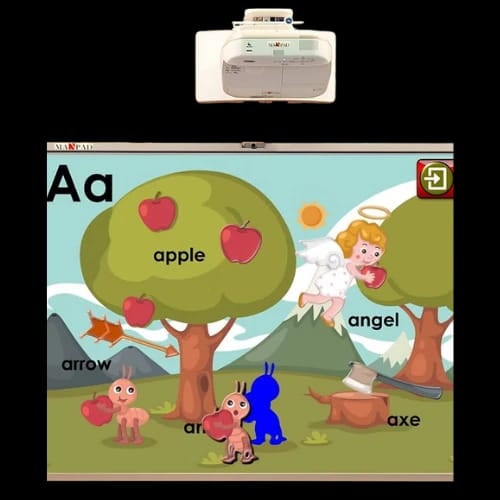
MAXPAD 75" Interactive Display overview for office, classroom, and training rooms
The main idea is simple. Put the display, touch system, and computer in one unit. That reduces desk PCs, extra cabling, and “where is the adapter?” delays.
This MAXPAD interactive system runs Windows 10. That matters for teams already using Windows software. Open your tools. Connect your peripherals. Present, annotate, and collaborate on a single screen.
What you get in one device
- 75" MAXPAD Interactive System
- Windows 10 operating system
- Built-in HD Camera (4MP) and Microphone
- Optical infrared multi-touch sensor for touch input
- Built-in computer with Intel i5, 8G RAM, 128G SSD + 500G HDD
- Wireless: AC WiFi and Bluetooth 4.1
- Ports: USB 3.0, HDMI, Ethernet, Audio in & out, VGA
MAXPAD 75" Interactive Display specifications and real-world performance expectations
Specs only matter when they solve friction. This setup focuses on responsive collaboration and device flexibility.
Windows 10 inside changes the workflow
A built-in Windows environment can cut setup time. Teams can run familiar apps and file formats without relying on a separate PC. That also simplifies training rooms where rotating users need a predictable interface.
Intel i5 + 8G RAM for daily multitasking
The built-in Intel i5 processor with 8G RAM is aimed at routine productivity. Think presentations, browser-based dashboards, training content, and video meetings. The experience depends on workload, but this hardware is positioned for steady day-to-day use.
Dual storage layout for speed and capacity
You get 128G Solid State Drive plus a 500G Hard Disk Drive. The SSD is useful for system responsiveness. The HDD provides extra space for files, recordings, or shared training materials.
MAXPAD 75" Interactive Display multi-touch system for smooth collaboration
Touch response can make or break an interactive display. This model uses an optical infrared multi-touch sensor. That choice is common in interactive panels because it supports direct touch interaction across a large surface.
Typical ways teams use multi-touch
- Whiteboarding during standups and planning sessions
- Marking up proposals and design drafts on-screen
- Training sessions where the instructor annotates live
- Group collaboration where multiple users interact
For internal navigation, link your catalog paths naturally like: Monitor, Interactive Display, and MAXPAD product lines.
MAXPAD 75" Interactive Display built-in camera and microphone for video meetings
External webcams often fail in large rooms. Angles get awkward. Audio pickup gets weak. This MAXPAD includes a built-in HD Camera with 4MP resolution and a Microphone.
That setup supports quick meeting starts. Walk in, connect, and launch your call. Fewer accessories also means fewer points of failure.
Where the 4MP camera helps most
- Hybrid meetings with a wider view of the room
- Training sessions that need clear presenter framing
- Quick internal calls without setting up peripherals
MAXPAD 75" Interactive Display connectivity and ports for flexible setup
Rooms vary. Some rely on wired networks. Others move content from laptops and USB drives. This unit covers common connection needs through both wireless and physical interfaces.
Wireless connections for modern spaces
- AC WiFi for network access
- Bluetooth 4.1 for compatible accessories
Ports for legacy and current devices
- USB 3.0 for faster peripheral connections
- HDMI for video input or external sources
- Ethernet for stable wired networking
- Audio in & out for sound routing
- VGA for older systems and project setups
This mix is useful in Bangladesh offices where hardware generations often overlap.
MAXPAD 75" Interactive Display durability for high-traffic rooms
Interactive displays in shared spaces take abuse. Marks. Scratches. Accidental spills. This panel is built around practical durability features:
- Dry Erase Surface for frequent writing and cleaning
- Scratch/water resistance for everyday mishaps
- Long life time for repeated daily use
These details matter in training rooms, coaching centers, and busy meeting zones where many hands touch the screen.
MAXPAD 75" Interactive Display use cases in Bangladesh offices, schools, and showrooms
This model sits at the intersection of display, whiteboard, and Windows workstation. It works best where sessions are interactive, not passive.
For corporate meeting rooms
Run Windows-based presentations, dashboards, and collaboration tools. Use touch to annotate decisions in real time. Keep cables minimal with built-in WiFi and a simple port layout.
For classrooms and coaching centers
The dry erase surface supports constant writing. Multi-touch supports interactive lessons. Storage helps keep lesson materials on-device when needed.
For training and demo spaces
VGA and HDMI help connect older and newer sources. Ethernet supports stable networks for fixed rooms. The built-in camera and mic can support remote participants.
If you maintain internal navigation, use anchor text such as Monitor Category, Interactive Display Sub-Category, and MAXPAD Brand Category within relevant paragraphs.
MAXPAD 75" Interactive Display reliability and long-term ownership notes
Reliability is not only about components. It is also about daily maintenance habits. Dry-erase surfaces and resistance features reduce wear from frequent cleaning and continuous handling.
For long sessions, basic best practices help:
- Keep ventilation paths clear around the unit
- Use stable power and proper grounding
- Avoid harsh cleaners that can damage surfaces
Warranty terms were not provided in your product data. For warranty confirmation, rely on the official PCB Store listing or the supplied invoice details at purchase time.
MAXPAD 75" Interactive Display availability at PCB Store Bangladesh
If you want a large interactive screen without building a setup from separate parts, this MAXPAD configuration keeps it straightforward. You get Windows 10, Intel i5 hardware, multi-touch, and conferencing basics in one display.
For purchase decisions, focus on three questions:
- Do you need a Windows 10 interactive screen in a shared room?
- Will built-in camera and microphone reduce meeting delays?
- Do your devices match the ports: USB 3.0, HDMI, Ethernet, VGA?
Check PCB Store Bangladesh for current stock and the latest listing details. Browse related items through internal paths like Monitor, Interactive Display, and MAXPAD collections.
Delivery Charge Info
Inside Dhaka: ৳300
Outside Dhaka: ৳350
FAQs
Does the MAXPAD 75" Interactive Display work without an external PC?
Yes. It includes a built-in computer with Intel i5, 8G RAM, 128G SSD, and 500G HDD. Windows 10 runs directly on the display, so you can operate it as a standalone system.
How does the optical infrared multi-touch feel during writing and annotation?
It is designed for direct touch interaction across the 75-inch surface. Optical infrared touch typically suits whiteboarding, pinch gestures, and multi-user collaboration, especially in meeting rooms and classrooms.
Can I connect older laptops that only have VGA output?
Yes. The interface list includes VGA along with HDMI and USB 3.0. That helps mixed-device environments where legacy systems still exist alongside newer laptops and media sources.
What wireless options are included for accessories and networking?
The unit supports AC WiFi for network access and Bluetooth 4.1 for compatible accessories. This setup helps reduce desk clutter and supports flexible placement in rooms without heavy cabling.
Is this display suitable for video conferencing in a medium-to-large room?
It includes a built-in HD camera with 4MP resolution and a microphone. This can reduce setup time versus external peripherals, especially for regular calls, training sessions, and hybrid meetings.
How much storage do I really get, and why two drives?
You get 128G SSD plus a 500G HDD. The SSD helps system responsiveness, while the HDD gives extra capacity for files, training materials, or local content without needing immediate external storage.
Will the MAXPAD 75" Interactive Display overheat during long sessions?
Thermal behavior depends on room airflow and usage load. Keep vents unobstructed and allow space around the unit. Built-in PCs benefit from clean airflow, especially during long meetings or continuous app use.
How much power does it consume compared to a projector setup?
Exact power consumption was not provided. In practice, an all-in-one display removes projector lamps and extra devices, but you should confirm wattage from the official PCB Store listing or documentation.
MAXPAD 75" Interactive Display vs a traditional projector with a whiteboard—what’s the difference?
A projector setup needs alignment, external audio, and frequent adjustments. This MAXPAD combines display, touch input, Windows 10 computing, and conferencing hardware in one unit, reducing setup steps and accessory dependence.
What is the price and availability of MAXPAD 75" Interactive Display at PCB Store in Bangladesh?
Pricing and stock change with shipments and promotions. Check the current PCB Store Bangladesh product page for live availability. If you call or message, confirm included items, warranty terms, and delivery coverage.
Popular Products