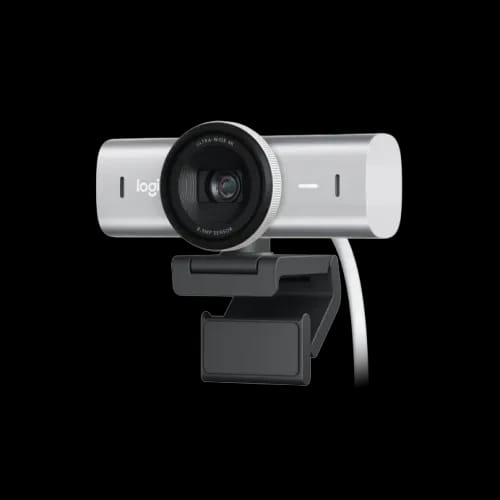
Logitech MX Brio Ultra HD 4K Webcam
Key Features
- MX Brio webcam
- Ultra HD 4K
- 1080p 60fps
- STARVIS image sensor
- Noise-reducing microphones
- Adjustable field-of-view
- USB-C 3.0
Out Of Stock
Share:
Any Questions? Ask On
Technical Specifications
General Information
Physical Specifications
Video & Optics
Audio
Connectivity & Mounting
Warranty
Product Description
Elite LOGITECH MX Brio Ultra HD 4K Webcam for Best Features
Ever joined a meeting or stream and thought, why does my camera still look so dull and blurry? The LOGITECH MX Brio Ultra HD 4K Webcam is built to fix exactly that problem for professional streamers. It belongs to the premium 4K conferencing category, made for remote workers and creators who need a sharp presence. You can find a competitive Logitech Webcam Price in Bangladesh for this unit, ensuring your video quality matches your professional skills. Checking the overall Webcam Price in Bangladesh reveals this as a top-tier investment for clarity and reliable output.
Performance & Features of the LOGITECH MX Brio Ultra HD 4K Webcam
This hardware captures every detail with its 8.5MP sensor, delivering 4K at 30fps or smooth 1080p at 60fps. By exploring Computer Accessories Best Deals, you can find the MX Brio along with high-quality mounts to perfect your angle. It utilizes RightLight 5 technology to ensure your face remains clear, regardless of whether you are in a dim room or harsh sunlight.
Ultra HD 4K and Advanced Image Processing
The 4K resolution provides incredible detail for product demos, while the 1080p/60fps mode keeps motion fluid during live streams.
- Autofocus Accuracy: The sensor tracks your face quickly, even when moving naturally or leaning toward the lens.
- Field of View: Choose between 90°, 78°, or 65° views to control how much background is visible to your audience.
- Dual Microphones: Beamforming mics with a 1.2m range focus on your voice while reducing distracting background noise.
Smart Lighting and Digital Zoom
HDR and auto-exposure adjust in real time based on your face, ensuring you look natural under mixed tube lights or sunlight. With 4x digital zoom, you can crop your frame without losing professional quality, keeping your presentation focused and clean.
Why You’ll Love Using LOGITECH MX Brio Ultra HD 4K Webcam
Remote workers in shared rooms will appreciate the built-in privacy shutter that physically blocks the lens when off camera. If you are looking for Logitech brand Deals, this model offers unique utility like Show Mode for desk-based demonstrations.
Show Mode and Desk Demos
The camera tilts down to show notebooks or sketches, auto-rotating the image so your viewers see it the right way up.
- Software Control: Use Logi Options+ to fine-tune brightness, contrast, and saturation for a personalized look.
- Privacy Shutter: A simple rotation ensures you are truly off-camera, providing peace of mind during sensitive tasks.
- Mounting Flexibility: The detachable clip fits monitors and laptops, while the tripod thread supports custom arms.
Professional Build and Connectivity
The MX Brio uses a 1.5m detachable USB-C to USB-C cable, ensuring high-speed data transfer and easy replacement if needed. Its minimal, modern design blends into any workspace, from corporate cabins to home offices, without cluttering your setup.
Connectivity and Pricing at PCB Store In BD
The MX Brio works seamlessly across Windows, macOS, ChromeOS, and Linux, supporting all major platforms like Zoom and Microsoft Teams. You can find the latest PCB Store Deals to secure this webcam with official warranty coverage and fast local shipping. We provide reliable after-sales service across Bangladesh, handling warranty claims, technical issues, and product support directly through PCB Store In BD. This local support ensures your conferencing hardware remains operational, backed by a team that understands the specific needs of the Bangladeshi professional market.
Delivery Charge Info
Inside Dhaka: ৳80
Outside Dhaka: ৳130
FAQs
Does this webcam really make a big difference over my laptop camera?
Yes. Laptop cameras are usually low-resolution with small sensors. MX Brio offers 4K resolution, better low-light handling, and dual mics. The difference is very noticeable in sharpness and brightness.
Can I use this webcam for live streaming games?
Yes. It supports 1080p at 60fps, which is ideal for smooth face-cam video in game streams. Pair it with OBS or Streamlabs and you get clean, responsive footage.
Is it plug-and-play, or do I need drivers?
For basic use, it is plug-and-play on modern Windows, macOS, and ChromeOS systems. For advanced control and tuning, you can install the recommended webcam software.
Will it work with my office apps like Zoom and Teams?
Yes. It works with Zoom, Microsoft Teams, Google Meet, WebEx, and many other platforms commonly used in offices and schools.
How far can I sit from the webcam and still sound clear?
The dual microphones are optimized for a range up to about 1.2 meters. For best clarity, sit within normal desk distance from your monitor.
Can I mount the webcam on a tripod?
Yes. There is a standard ¼” tripod thread. You can mount it on most tripods or desktop stands for more flexible angles.
Is the privacy shutter easy to use?
Very. You can simply move it to cover the lens when you are not on camera. It gives a quick visual confirmation that the camera is blocked.
Does MX Brio support Linux?
Yes, it can work on Linux with UVC-compatible apps. Features may depend on the software you use, but basic video functionality works well in most modern distributions.
Is this webcam good for online teaching and coaching?
Absolutely. The clear 4K sensor, Show Mode for desk demos, and strong mic performance make it ideal for online classes, coaching, and training sessions.
Why should I buy from PCB Store instead of importing?
Buying from PCB Store gives you local warranty handling, pricing in Bangladeshi Taka, support in local context, and a reliable, best price in Bangladesh offer—without customs hassle or long international returns.
Popular Products