Lenovo t460s Touchpad
Key Features
- Lenovo t460s Touchpad
- Buttonless Mylar Surface
- Multi-touch Gesture Support
- Integrated TrackPoint Buttons
Share:
Any Questions? Ask On
Technical Specifications
Physical Attributes
Input & Gestures
System Compatibility
Service & Reliability
Product Description
Lenovo t460s Touchpad
Does a freezing cursor on your Lenovo t460s Touchpad stop your work? A faulty input surface halts productivity instantly. This genuine replacement part restores fluid navigation. It solves erratic tracking and physical click failures immediately.
Precision Control with the Lenovo t460s Touchpad Clickpad
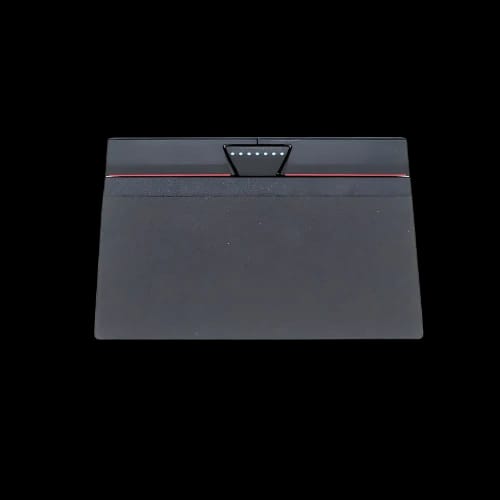
The Lenovo t460s Touchpad features a buttonless Mylar surface. This material offers a smooth texture for finger gliding. It is a dedicated Clickpad design. This means the entire surface acts as a button. It responds to your touch with accuracy. You can navigate complex spreadsheets or creative software easily.
The surface area measures 3.9 x 2.2 inches. This provides ample room for wide swipes. It fits perfectly into the magnesium alloy chassis of your laptop. The Mylar coating resists oils and wear over time. It maintains a consistent feel even after years of heavy professional use.
Gesture Support for Windows Productivity
Modern workflows require more than just moving a pointer. The Lenovo t460s Touchpad supports full multi-touch gestures. You can use two-finger scrolling to read long documents. Pinch-to-zoom works perfectly for detailed photo editing or map viewing.
It is fully compatible with Windows 10 and Windows 11 precision drivers. This allows for three-finger and four-finger swipes. You can switch between open apps or show the desktop in a single motion. This hardware upgrade brings back the tactile response of a brand-new machine.
Integrated TrackPoint Support and Buttons
ThinkPad users often rely on the iconic red TrackPoint. The Lenovo t460s Touchpad includes three dedicated physical buttons at the top. These buttons serve the TrackPoint system specifically. They provide left, right, and center click functions.
The center button is ideal for rapid scrolling. Having these physical buttons separate from the Clickpad surface is vital. It allows for a dual-input method that many professionals prefer. The integration is tight and rattle-free. It ensures your Laptop Accessories function as a unified system.
Performance Compatibility and System Requirements
The Lenovo t460s Touchpad works within a high-performance ecosystem. This laptop series typically runs on 6th Gen Intel Core i5 or i7 processors. Whether you have the 6300U or the 6600U, this input device stays responsive. It does not lag under heavy system loads.
System memory also impacts how Windows processes input data. The T460s supports up to 24GB of DDR4 RAM. With a fast CPU and high memory, the touchpad response remains instantaneous. It is an essential component for maintaining the "workhorse" status of your device.
Reliable Replacement for Laptop Touchpad Issues
Choosing a high-quality Laptop Touchpad is about longevity. Cheap third-party parts often suffer from "ghost clicking." This genuine-spec Mylar surface prevents such errors. It handles the daily friction of professional use without losing sensitivity.
Installation is straightforward for those familiar with laptop repair. It aligns perfectly with the internal ribbon cables. Once connected, the BIOS recognizes the hardware immediately. There is no need for complex software workarounds. It is a direct fit for the T460s chassis.
Why Choose PCB Store for Your Laptop Accessories
Finding authentic parts in Bangladesh can be difficult. PCB Store sources components that meet strict performance standards. We understand that your laptop is your primary tool for income and education. We provide parts that keep you operational.
Our stock includes various Laptop Accessories for the ThinkPad lineup. Each item undergoes quality checks. We ensure the click mechanism is crisp and the surface is flawless. You can trust our local expertise to provide the right part for your specific model.
Warranty and Support in Bangladesh
Every Lenovo t460s Touchpad comes with a 1-year standard warranty. This protects you against manufacturing defects or sudden hardware failure. If the sensors stop tracking or the buttons fail, you are covered.
Buying locally from a reputable Store means faster support. You do not have to wait weeks for international shipping. Our team helps verify compatibility before you buy. This ensures you get back to work as quickly as possible.
Upgrade Your Navigation Today
Don't let a worn-out clicker slow your progress. A fresh Lenovo t460s Touchpad makes your laptop feel new again. It is a cost-effective way to extend the life of your 6th Gen Intel machine. The tactile feedback and gesture accuracy are worth the investment.
Visit PCB Store in Bangladesh to secure your replacement part. We offer competitive pricing and genuine quality. Click the "Add to Cart" button or visit our physical location to upgrade your hardware today. Restore your productivity with a simple, high-quality component change.
Delivery Charge Info
Inside Dhaka: ৳80
Outside Dhaka: ৳130
FAQs
Is the Lenovo t460s Touchpad compatible with the T460?
The T460 and T460s use different internal layouts. The T460s version is thinner and specifically designed for the "s" slim model. Always check your specific laptop sub-model before purchasing to ensure a perfect fit.
Does this touchpad support Windows 11 gestures?
Yes, it fully supports Windows 11 multi-finger gestures. This includes three-finger swipes for multitasking and four-finger taps. It uses standard precision drivers to deliver a smooth experience on the latest operating systems.
What is the Mylar surface on the Lenovo t460s Touchpad?
Mylar is a durable polyester film. It provides a smooth, low-friction surface for your fingers. It is highly resistant to moisture and skin oils, preventing the "shiny" worn-out look common on older plastic pads.
Can I replace the touchpad myself?
Replacement is possible if you have basic tools. You must remove the internal battery and several screws. We recommend professional installation at our service center if you are not comfortable handling delicate internal ribbon cables.
How does the Lenovo t460s Touchpad compare to the T470s version?
The T460s and T470s touchpads are very similar in size and feel. However, the connector pinouts can differ. It is best to use the exact part number intended for the T460s to avoid hardware conflicts.
What is the Lenovo t460s Touchpad price in Bangladesh at PCB Store?
The price typically ranges from 1,500 to 2,500 BDT depending on current stock and sourcing. Please check the top of this page or contact our live support for the most accurate daily price at PCB Store.
Does it include the TrackPoint buttons?
Yes, this assembly includes the three physical buttons located above the touch area. These are essential for using the red TrackPoint nub located in the center of your keyboard.
Will this fix a jumping mouse cursor?
If your cursor moves on its own, it is often a hardware sensor failure or a damaged surface. Replacing the entire unit usually solves these tracking issues instantly, assuming your drivers are updated.
Popular Products