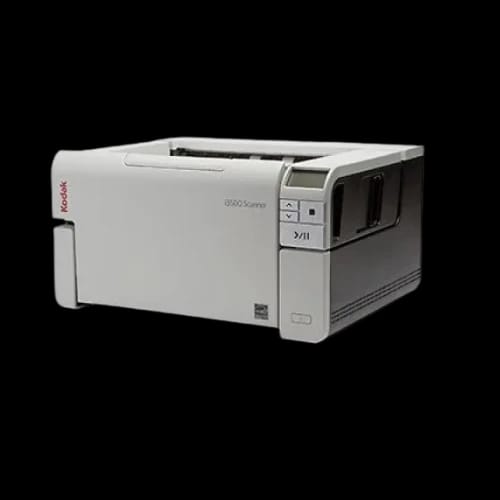
Kodak i3500 Document Scanner
Key Features
- Kodak i3500
- 110 ppm Speed
- 600 dpi Resolution
- ADF Scanning
- USB 3 Interface
Out Of Stock
Share:
Any Questions? Ask On
Technical Specifications
Basic Information
Physical Specifications
Product Description
Kodak i3500 Document Scanner — Slow batch scanning killing office productivity?
The Kodak i3500 Document Scanner targets offices facing constant document backlogs. Paper-heavy workflows stall teams. Delays stack up. Missed deadlines follow. This scanner focuses on speed, control, and consistency for demanding office environments handling large volumes daily.
Built for the Office Equipment category and positioned as a high-performance Scanner, the Kodak i3500 fits structured workplaces using centralized scanning stations. At PCB Store in Bangladesh, it serves businesses that value throughput, accuracy, and predictable operation.
Kodak i3500 Document Scanner Overview and Core Purpose
The Kodak i3500 Document Scanner uses an ADF-based workflow. Automatic feeding supports continuous scanning without manual interruptions. High daily volumes move faster. Operators spend less time babysitting the machine.
A 600 dpi optical resolution supports document clarity suitable for archiving, compliance, and data capture tasks. USB 3 connectivity handles fast data transfer without choking system resources.
This model fits offices scanning invoices, contracts, forms, and reports at scale.
Kodak i3500 Document Scanner Specifications and Performance Profile
The Kodak i3500 Document Scanner runs at 110 pages per minute. That speed changes throughput math quickly. Bulk scanning projects shrink from days to hours.
Resolution reaches 600 dpi, supporting sharp text capture and legible fine print. USB 3 interface reduces latency during high-speed transfers. No bottlenecks during sustained workloads.
The scanner’s physical footprint supports stability during fast operation. Weight and structure reduce vibration. Feed consistency stays reliable across long sessions.
Key performance indicators matter here:
- High-speed output without constant operator input
- Clear image capture for digital archiving
- Stable ADF handling during long batch runs
Kodak i3500 Document Scanner Key Features and Practical Benefits
Automatic Document Feeder Workflow
The ADF design handles stacks efficiently. Operators load once, then step back. Productivity rises. Human error drops.
High-Speed Scanning for Large Offices
At 110 ppm, document queues clear fast. Departments stop waiting. Digital filing keeps pace with incoming paperwork.
600 dpi Resolution for Professional Records
Clear scans support OCR processes, audits, and record retention. Text stays readable even after compression or storage.
USB 3 Interface Stability
Fast transfer speeds support continuous scanning. Systems remain responsive during extended sessions.
Power, Efficiency, and Operational Characteristics
The Kodak i3500 Document Scanner focuses on sustained performance rather than burst tasks. It handles repetitive scanning cycles without frequent cooldown breaks.
The heavy chassis helps maintain alignment. Feed paths stay consistent. Mechanical stress stays controlled during extended runs.
This design suits back-office teams scanning daily rather than occasional users.
Kodak i3500 Document Scanner Compatibility and Use Cases
This scanner integrates into offices already running structured document workflows. USB 3 interface connects directly to modern PCs without special adapters.
Common use cases include:
- Accounting departments digitizing invoices
- Legal offices archiving contracts
- HR teams scanning employee records
- Government or education offices processing forms
In Bangladesh, many businesses prefer centralized scanning stations. The Kodak i3500 supports that model well when deployed through PCB Store.
Physical Design, Dimensions, and Workspace Planning
The Kodak i3500 Document Scanner measures 431.8mm wide, 371mm deep, and 238mm high. It requires a dedicated desk or scanning counter.
At 15.8 kg, the unit stays planted during operation. Movement during scanning remains minimal. This stability protects feed accuracy and internal components.
Workspace planning matters. Allow clearance for document loading and output trays.
Reliability, Warranty, and Long-Term Use
The Kodak i3500 Document Scanner includes a 180-day warranty. This period covers early operational issues and initial deployment risks.
For offices running daily scanning jobs, predictable behavior matters more than flashy extras. This model focuses on consistent throughput and controlled mechanics.
Routine cleaning and proper paper handling extend service life significantly.
Why the Kodak i3500 Document Scanner Fits PCB Store Customers
At PCB Store in Bangladesh, buyers often seek dependable office equipment rather than consumer-grade devices. The Kodak i3500 aligns with that expectation.
It suits organizations prioritizing speed, document integrity, and workflow discipline. The scanner fits environments where scanning delays translate directly into operational costs.
Ready to Reduce Paper Backlogs?
Paper delays cost time. Time costs money. The Kodak i3500 Document Scanner clears document queues fast and keeps teams moving.
Available at PCB Store in Bangladesh, this scanner fits offices ready to upgrade serious document workflows. Limited local availability often moves quickly. Early procurement avoids downtime and project delays.
Delivery Charge Info
Inside Dhaka: ৳600
Outside Dhaka: ৳800
FAQs
Is the Kodak i3500 Document Scanner suitable for high-volume office use?
Yes. Its 110 ppm speed and ADF design support continuous scanning in busy offices handling large document batches daily without frequent operator intervention or slowdowns.
What operating systems work with the Kodak i3500 Document Scanner?
The scanner connects through USB 3, making it compatible with modern office PCs that support standard USB interfaces and professional scanning software environments.
Does the Kodak i3500 Document Scanner handle mixed paper sizes?
It works best with properly aligned document stacks. Consistent paper sizes improve feed accuracy during long batch scanning sessions.
How much power does the Kodak i3500 Document Scanner consume?
Power usage stays within typical office scanner ranges. It suits dedicated scanning stations without requiring special electrical setups.
Does the Kodak i3500 Document Scanner overheat during long sessions?
The heavy chassis and stable design support extended operation. Proper ventilation and regular maintenance help manage thermal performance effectively.
Kodak i3500 Document Scanner vs lower-speed office scanners — what’s the difference?
The i3500 focuses on sustained 110 ppm throughput. Lower-speed scanners suit occasional use but struggle with daily high-volume workloads.
What warranty comes with the Kodak i3500 Document Scanner?
It includes a 180-day warranty covering early operational issues during deployment and initial usage phases.
Is the Kodak i3500 Document Scanner available at PCB Store in Bangladesh?
Yes. PCB Store offers the Kodak i3500 Document Scanner in Bangladesh, subject to stock availability and regional distribution schedules.
What is the price of the Kodak i3500 Document Scanner in Bangladesh?
Pricing varies based on supply and demand. PCB Store provides current pricing and availability details directly within Bangladesh
Popular Products