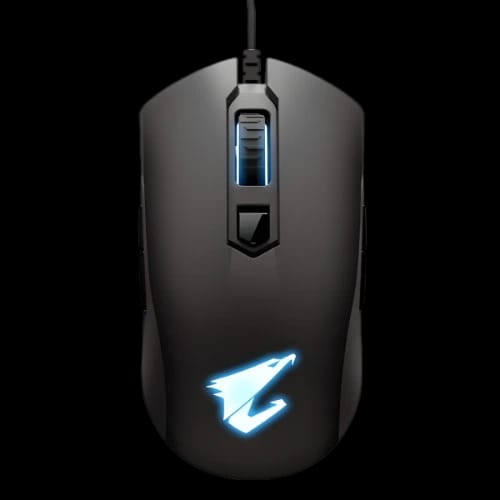
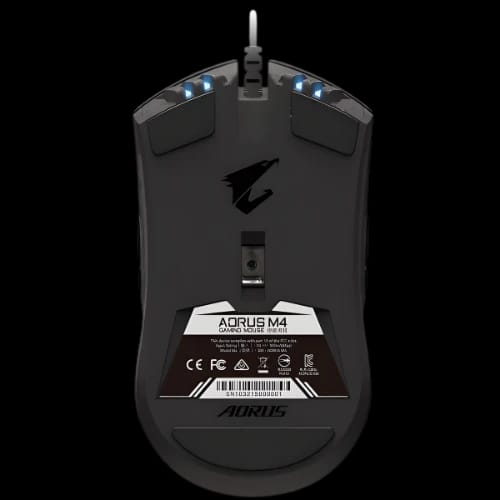
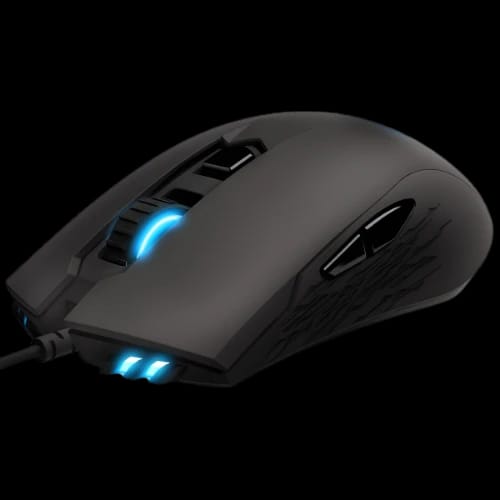
GIGABYTE Aorus M4 RGB Gaming Mouse
Key Features
- Aorus M4 Gaming Mouse
- 6400 DPI Optical Sensor
- 50M Click Omron Switches
- Ambidextrous Ergonomic Shape
- RGB Fusion 2.0 Lighting
- Eight Programmable Buttons
Out Of Stock
Share:
Any Questions? Ask On
Technical Specifications
Sensor & Performance
Switch & Buttons
Physical Specs
Connectivity
Warranty
Product Description
GIGABYTE Aorus M4 RGB Gaming Mouse
Is your current gear holding back your killstreak? The GIGABYTE Aorus M4 RGB Gaming Mouse solves tracking lag and hardware fatigue instantly. Many gamers struggle with sensors that skip during intense firefights. This peripheral utilizes a high-tier optical engine to maintain precision. It eliminates the frustration of missed clicks.
The design caters to competitive play. It fits naturally in your hand. You gain a tactile advantage in every match.
Pro-Grade Tracking with Pixart 3988 Sensor
Performance starts with the sensor. The GIGABYTE Aorus M4 RGB Gaming Mouse features the Pixart 3988 optical sensor. This hardware is famous for accuracy. It provides a native 6400 DPI. You can adjust sensitivity in 50 DPI increments. This level of control allows for pixel-perfect aiming.
Speed matters in fast-paced titles. This mouse handles 50G acceleration. It tracks your fastest hand movements without jitter. Whether you play shooters or MOBAs, the response remains consistent.
Ambidextrous Design for All Gamers
Comfort often dictates how long you can play. The GIGABYTE Aorus M4 RGB Gaming Mouse uses a symmetrical shape. It works for both right and left-handed users. The side buttons are available on both flanks. This layout ensures full functionality regardless of your dominant hand.
The weight sits at a balanced 98 grams. It provides enough heft for stability. It remains light enough for quick flicks. The matte black finish offers a secure grip during sweaty sessions.
Reliable Omron Switches for Longevity
Hardware failure is a gamer's nightmare. The GIGABYTE Aorus M4 RGB Gaming Mouse uses Japanese Omron switches. These are rated for 50 million clicks. You get a crisp, tactile feel every time you press. This durability ensures the mouse lasts through years of heavy use.
The 1.8-meter PVC cable is flexible. It reduces drag on your desk. This setup keeps your movements fluid and unrestricted.
Fully Customizable RGB Fusion 2.0
Personalize your setup at PCB Store. The GIGABYTE Aorus M4 RGB Gaming Mouse supports RGB Fusion 2.0. You can choose from 16.7 million colors. Sync the lighting with other Aorus components. This creates a unified aesthetic for your gaming rig in Bangladesh.
The lighting isn't just for looks. It can indicate your current DPI profile. You always know your settings at a glance.
Programmable Buttons for Tactical Edge
This mouse features eight programmable buttons. Use the Aorus Engine software to remap them. You can set macros for complex combos. Save your configurations directly to the onboard memory. Your settings travel with you to any PC.
The polling rate is also adjustable. Choose between 125Hz, 500Hz, or 1000Hz. Higher rates reduce input lag to 1ms. This speed is vital for professional-grade gaming.
Reliability and Warranty at PCB Store
Quality assurance is a priority for Gigabyte. This gaming mouse undergoes rigorous testing. It handles extreme clicking and rapid movement. You receive a 1-year warranty with your purchase. This protection offers peace of mind for your investment.
PCB Store ensures genuine products for the Bangladesh market. Buying from a trusted source guarantees support. You get a reliable peripheral that performs as advertised.
Elevate Your Gameplay Today
Ready to upgrade your Gaming Mouse? The GIGABYTE Aorus M4 RGB Gaming Mouse is available now. Experience true tracking and ergonomic comfort. Visit PCB Store in Bangladesh to grab yours. Don't let inferior hardware limit your potential. Secure this competitive edge and dominate your next session. High demand often affects stock, so act quickly.
Delivery Charge Info
Inside Dhaka: ৳80
Outside Dhaka: ৳130
FAQs
Is the GIGABYTE Aorus M4 suitable for left-handed players?
Yes, it features a true ambidextrous design. There are functional side buttons on both the left and right sides. This ensures full control and comfort for southpaw gamers during intense matches.
What is the maximum DPI of the GIGABYTE Aorus M4?
The mouse offers a range from 50 to 6400 DPI. You can adjust it in precise 50 DPI increments. This allows you to find the exact sensitivity for your specific gaming style.
Does the GIGABYTE Aorus M4 require special software for RGB?
You use the RGB Fusion 2.0 software to customize effects. It allows synchronization with other Gigabyte devices. This creates a cohesive look across your entire desktop setup and gaming environment.
How durable are the clicks on this gaming mouse?
It uses high-quality Omron switches. These switches are rated for 50 million clicks. This ensures the mouse remains responsive and clicky even after years of daily competitive gaming sessions.
What sensor does the GIGABYTE Aorus M4 use?
It utilizes the Pixart 3988 gaming optical sensor. This sensor is known for its 50G acceleration and reliable tracking. It prevents skipping and jitter during fast-motion movements in high-stakes games.
GIGABYTE Aorus M4 vs Logitech G403: which is better?
The Aorus M4 offers a symmetrical, ambidextrous shape, whereas the G403 is right-handed. The M4 is better for users needing a neutral grip or left-handed support without sacrificing professional-grade sensor performance.
What is the price of the GIGABYTE Aorus M4 at PCB Store in Bangladesh?
Please check the PCB Store website for the latest pricing. Costs may vary based on current promotions and stock. They offer competitive rates and authentic products with official warranty support in Bangladesh.
Popular Products