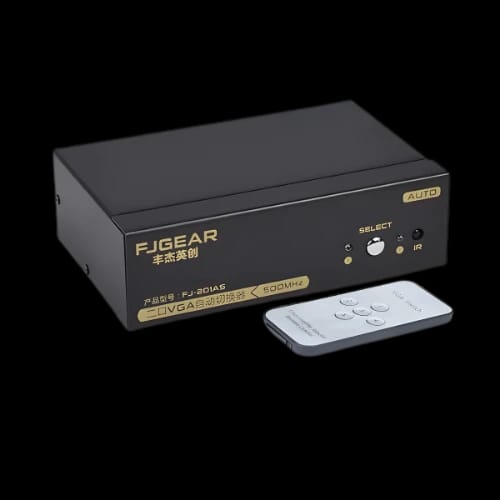
FJGEAR FJ-201AS 2 Port VGA Switch
Key Features
- FJGEAR FJ-201AS
- 2 Port Switching
- 2048×1536 Resolution
- Button Control
- Metal Housing
- DC 5V Power
Out Of Stock
Share:
Any Questions? Ask On
Technical Specifications
Model Information
Display Support
Power Details
Physical Details
Warranty
Product Description
FJGEAR FJ-201AS 2 Port VGA Switch
Struggling to share one monitor between multiple PCs without unplugging cables? The FJGEAR FJ-201AS 2 Port VGA Switch solves that daily frustration with a simple, reliable hardware solution. This compact VGA switch lets users toggle between two devices connected to a single display, eliminating constant cable swapping.
For offices, small businesses, technicians, and PC enthusiasts in Bangladesh, managing multiple systems on a single monitor can become messy and time-consuming. The FJGEAR FJ-201AS 2 Port VGA Switch provides a clean solution for workstation management, testing environments, and multi-PC setups.
Professionals visiting PCB Store often choose this device for stable signal switching without software configuration or driver dependency.
FJGEAR FJ-201AS 2 Port VGA Switch Performance and Display Support
The FJGEAR FJ-201AS 2 Port VGA Switch supports display resolutions up to 2048 × 1536, which makes it suitable for high-quality VGA monitors and professional displays. Image integrity remains stable while switching between devices.
This capability matters in environments where clarity and visual accuracy matter.
Examples include:
- IT diagnostic workstations
- CCTV monitoring desks
- POS terminal management
- engineering or CAD workstations using VGA displays
Switching between sources happens instantly using a dedicated hardware button. No signal delay, no complicated software layer.
Why the FJGEAR FJ-201AS 2 Port VGA Switch Is Practical for Multi-PC Workstations
Many technicians and office administrators in Bangladesh maintain multiple computers connected to one display during troubleshooting or monitoring tasks. Manually swapping VGA cables slows down the workflow.
The FJGEAR FJ-201AS 2 Port VGA Switch solves that problem with direct source switching.
Practical advantages include:
- One monitor shared between two computers
- Instant switching via hardware button
- No driver installation required
- Stable VGA signal handling
- Compact metal enclosure for durability
This simple device becomes particularly useful in service centers, small labs, and education environments.
At PCB Store Dhaka, technicians frequently recommend VGA switches for diagnostic desks where two machines must be checked quickly.
Durable Metal Construction of the FJGEAR FJ-201AS VGA Switch
Durability matters for hardware that stays connected to multiple systems every day. The FJGEAR FJ-201AS 2 Port VGA Switch uses a metal enclosure, helping it handle regular cable movement and desk handling.
Metal housing offers a few practical advantages:
- Better physical durability than plastic units
- Reduced electromagnetic interference risks
- Stable placement on workstations
- Longer operational lifespan in busy environments
Technicians in networking or computer servicing environments often prefer metal-built accessories because they tolerate heavy usage.
Power Requirements and Operational Simplicity
The device operates using DC 5V power through a dedicated button-based switching mechanism. The design prioritizes simplicity and reliability rather than complex electronics.
This straightforward architecture benefits users who want a dependable switching solution without firmware or software complications.
Key operational benefits:
- Stable VGA signal switching
- Simple push-button control
- No software configuration
- Minimal setup time
Plug in two VGA sources, connect a monitor, and switching becomes immediate.
Ideal Use Cases for the FJGEAR FJ-201AS VGA Switch
The FJGEAR FJ-201AS 2 Port VGA Switch fits many real-world computing environments in Bangladesh.
Office Workstations
Small offices often run two systems—an accounting PC and an admin PC—on the same desk. A VGA switch keeps the workspace clean while allowing instant screen access.
Computer Service Centers
Technicians testing hardware can connect a repair machine and a diagnostic PC to the same display.
Gaming Café Maintenance Desks
Gaming cafés frequently maintain spare machines or testing rigs. Switching between PCs becomes simple without unplugging cables.
Student and Freelancer Setups
Students working with old desktops and backup systems can manage both using a single monitor, especially where VGA displays are still common.
The device fits naturally in the Network Switch category under Network And Router accessories, especially where simple hardware control matters more than advanced networking features.
Availability and Buying Confidence at PCB Store Bangladesh
The FJGEAR FJ-201AS 2 Port VGA Switch is available through PCB Store, a trusted destination for PC accessories and networking equipment in Bangladesh.
Customers purchasing through PCB Store receive:
- Authentic hardware products
- Local technical guidance
- Direct customer support
- Reliable after-sales assistance
Even accessories like VGA switches benefit from professional store support, especially for compatibility advice or setup assistance.
For buyers searching online for FJGEAR FJ-201AS price in Bangladesh, PCB Store provides competitive pricing and dependable service nationwide.
Stock availability may vary due to demand, particularly among service technicians and IT maintenance teams.
Delivery Charge Info
Inside Dhaka: ৳80
Outside Dhaka: ৳130
FAQs
What does the FJGEAR FJ-201AS 2 Port VGA Switch do?
It allows two VGA-based computers to share one monitor. Users can switch between devices instantly using a hardware button instead of unplugging VGA cables repeatedly.
What maximum resolution does the FJGEAR FJ-201AS VGA Switch support?
The device supports display resolutions up to 2048 × 1536, which works well with high-quality VGA monitors used in offices, diagnostics setups, and older workstation environments.
Does the FJGEAR FJ-201AS VGA Switch require software installation?
No software installation is required. The device operates purely through hardware switching, making setup fast and simple.
Can I use this VGA switch for CCTV monitoring systems?
Yes. Many monitoring desks connect two DVR systems to a single monitor. The VGA switch allows quick viewing between them without reconnecting cables.
Does the FJGEAR FJ-201AS VGA Switch need external power?
The device operates using DC 5V power and a button-based switching system to control the display source.
Is the FJGEAR FJ-201AS suitable for gaming setups?
It can be used in gaming café maintenance desks or test environments where multiple PCs share one monitor. It is not designed for high-refresh modern gaming displays.
FJGEAR FJ-201AS vs HDMI switch — which is better?
HDMI switches support modern digital displays, while the FJGEAR FJ-201AS is designed for VGA systems. It works best with legacy desktops, industrial machines, or older monitors still using VGA connections.
Is the FJGEAR FJ-201AS compatible with laptops?
Yes, if the laptop has a VGA output or uses a VGA adapter. Many technicians connect laptops to diagnostic displays through VGA switches.
What is the FJGEAR FJ-201AS price in Bangladesh?
Pricing may vary depending on availability. Customers can check the latest FJGEAR FJ-201AS price in Bangladesh directly at PCB Store Dhaka or through the official PCB Store website.
Does the FJGEAR FJ-201AS come with warranty?
This device is sold without warranty, which is common for simple switching accessories in the network switch category
Popular Products