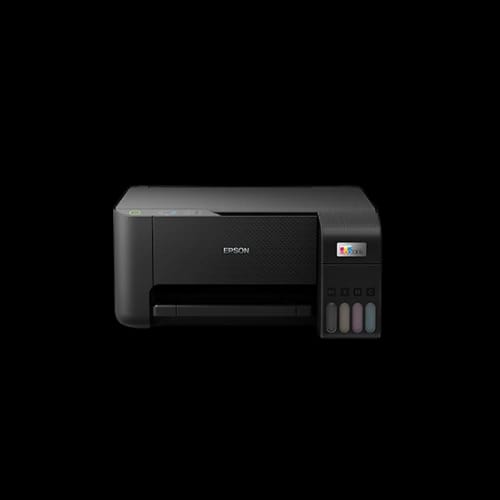
Epson EcoTank L3210 A4 All-in-One Ink Tank Printer
Key Features
- Epson EcoTank L3210
- Ultra-low print cost
- Print Scan Copy
- High-resolution output
- Borderless photo printing
- Energy efficient design
Share:
Any Questions? Ask On
Technical Specifications
General Information
Printing Technology
Print Speed
Copy Function
Copy Function
Scanning System
Paper Handling
Connectivity & OS
Power & Physical
Consumables & Duty
Warranty information
Product Description
Epson EcoTank L3210 A4 All-in-One Ink Tank Printer solves high printing costs fast
Are rising ink bills slowing your office workflow? The Epson EcoTank L3210 A4 All-in-One Ink Tank Printer targets that exact problem. This model focuses on low running cost, stable output, and daily reliability for home and small offices.
The Epson EcoTank L3210 belongs to the office equipment category, under the printer sub-category. Epson, a globally trusted brand from Japan, positions this EcoTank series for cost-aware users who print often. PCB Store in Bangladesh lists it as a practical choice for print, scan, and copy tasks.
Epson EcoTank L3210 Printer overview and core specifications
The Epson EcoTank L3210 is an ink tank printer built for volume printing. It uses Epson’s on-demand inkjet technology with piezo electric control. This method controls ink droplets accurately, even at high resolutions.
Print, scan, and copy functions sit in one compact body. The black color suits office desks and study rooms. The design stays minimal, focusing on function over decoration.
Key technical highlights include a minimum droplet size of 3 picoliters. Variable-sized droplet technology helps balance speed and clarity. The nozzle system uses 180 nozzles for black and 59 per color.
Printing resolution reaches up to 5,760 x 1,440 dpi. That level supports sharp text and clean images. The printer language uses ESC/P-R and ESC/P Raster, common across Epson drivers.
Epson EcoTank L3210 print performance and speed analysis
Speed matters in daily work. The Epson EcoTank L3210 handles regular documents without delays. Black print speed reaches 10 ISO images per minute on A4. Draft mode pushes it up to 33 pages per minute.
Color printing runs at 5 ISO images per minute. Draft color speed goes up to 15 pages per minute. These numbers suit invoices, assignments, and reports.
First page out time stays reasonable. Black pages appear in about 10 seconds. Color pages take roughly 16 seconds. Photo printing on 4 x 6-inch paper takes around 69 seconds with borders.
Borderless photo printing takes longer, about 90 seconds per photo. This timing suits casual photo needs rather than bulk photo labs.
Epson EcoTank L3210 scanning and copying capabilities
Scanning uses a flatbed color image scanner with CIS sensor. Optical scan resolution reaches 600 x 1200 dpi. This suits document archiving and basic image scanning.
Scan area supports up to A4 size. Color scan depth reaches 48-bit input and 24-bit output. Grayscale and black-and-white modes are also supported.
Scan speed stays practical. Monochrome scanning at 200 dpi takes up to 11 seconds. Color scanning at the same resolution takes up to 32 seconds.
Copy speed follows ISO 29183 standards. Black copies reach up to 7.0 images per minute. Color copies reach 1.7 images per minute. Maximum standalone copies are limited to 20 pages.
Epson EcoTank L3210 ink efficiency and running cost advantage
Ink efficiency defines the EcoTank series. The Epson EcoTank L3210 uses refillable ink tanks instead of cartridges. This design lowers long-term printing cost.
Epson black ink yields up to 4,500 pages. Color inks offer a combined yield of up to 7,500 pages. These figures suit offices with regular printing demand.
Per-page printing cost stays extremely low. Black prints cost around Tk. 0.12 per page in draft mode. Color prints cost around Tk. 0.27 per page in draft mode. This matters for budget planning.
Consumables include Epson original ink bottles. Using genuine ink helps maintain print head life and output quality.
Paper handling and media flexibility of Epson EcoTank L3210
Paper handling remains simple yet flexible. The input tray holds up to 100 sheets of plain paper. Premium glossy photo paper support goes up to 20 sheets.
Output tray supports up to 30 sheets of plain paper. Photo paper output supports up to 20 sheets. The printer uses a single paper tray system.
Supported paper sizes include A4, Letter, Legal, B5, A5, A6, envelopes, and photo sizes. Maximum custom paper length reaches 1200 mm. This supports banners and long documents.
Borderless printing is available up to 4R size. Print margins can be set to zero using custom driver settings.
Connectivity, OS support, and daily usability
The Epson EcoTank L3210 connects via USB 2.0. This wired connection suits stable office setups. Wireless features are not included.
Operating system support covers a wide range. Windows XP through Windows 10 are supported. Several Windows Server versions are also compatible. Mac OS X 10.6.8 and later versions work as well.
Driver availability remains stable across Epson’s official support channels. Installation remains straightforward for both Windows and macOS users.
The control panel stays basic, reducing learning time. This suits users who prefer direct operation without complex menus.
Power consumption and efficiency profile
Power usage stays low, supporting energy-conscious offices. Operating power consumption is about 14 watts. Standby mode uses around 4 watts.
Sleep mode drops usage to 0.4 watts. Power-off mode uses about 0.2 watts. Rated voltage supports AC 220–240V at 50–60Hz.
These values help reduce electricity cost over long periods. This matters in shared office environments.
Build quality, dimensions, and placement
The Epson EcoTank L3210 weighs about 3.9 kg. Dimensions measure 375 mm wide, 347 mm deep, and 179 mm high. The compact footprint fits desks and shelves.
Build quality feels solid for its class. The tank placement allows easy ink level monitoring. Refilling remains simple with minimal mess.
Country of origin is Japan. Manufacturing may vary between China, Indonesia, Philippines, or Thailand depending on shipment.
Reliability, duty cycle, and warranty coverage
Monthly duty cycle reaches up to 3,000 pages. This suits home offices, schools, and small businesses. Regular maintenance supports consistent output.
Warranty coverage includes one year or 30,000 pages, whichever comes first. Epson’s service network in Bangladesh supports warranty claims.
Using original consumables helps maintain warranty validity. Proper usage reduces print head issues over time.
Who should buy the Epson EcoTank L3210 Printer
This printer suits users with frequent printing needs. Students, teachers, and small offices benefit most. Low running cost matters more than wireless features here.
Users who value print clarity and predictable expenses will find it practical. It handles documents, assignments, and light photo work comfortably.
Buy Epson EcoTank L3210 A4 All-in-One Printer from PCB Store Bangladesh
PCB Store in Bangladesh lists the Epson EcoTank L3210 for users seeking long-term value. Stock availability may vary due to demand. Purchasing from an authorized retailer supports warranty claims and after-sales support.
For buyers focused on cost control and daily reliability, this model stands as a logical choice. Secure your unit early to avoid stock delays.
Delivery Charge Info
Inside Dhaka: ৳350
Outside Dhaka: ৳400
FAQs
Is the Epson EcoTank L3210 suitable for home office use?
Yes. It supports print, scan, and copy in one device. Low ink cost suits frequent home printing. USB connectivity fits stable desk setups without network complexity.
Does the Epson EcoTank L3210 support wireless or Wi-Fi printing?
No. This model uses USB 2.0 connectivity only. Users needing wireless printing should consider other Epson EcoTank models with built-in Wi-Fi support.
How much power does the Epson EcoTank L3210 consume during operation?
Operating power consumption is about 14 watts. Standby mode uses around 4 watts. Sleep mode drops to 0.4 watts, helping reduce electricity usage.
Can the Epson EcoTank L3210 handle photo printing?
Yes. It supports photo printing up to 4 x 6 inches. Borderless photo printing is available. Print time suits casual photo needs rather than bulk photo jobs.
What type of ink does the Epson EcoTank L3210 use?
It uses Epson original ink bottles. Black ink yields up to 4,500 pages. Color inks offer up to 7,500 pages combined yield under draft conditions.
What is the monthly duty cycle of the Epson EcoTank L3210?
The maximum duty cycle reaches 3,000 pages per month. This suits home offices and small businesses with regular document printing needs.
Related Products
৳43,000
৳43,999
Popular Products