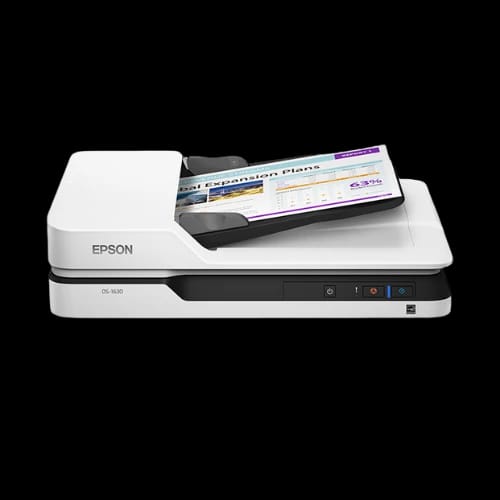
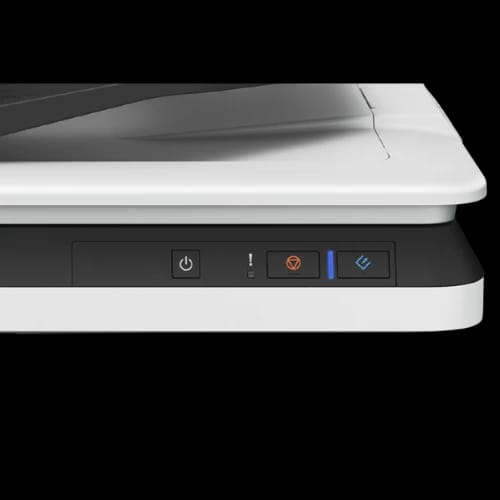
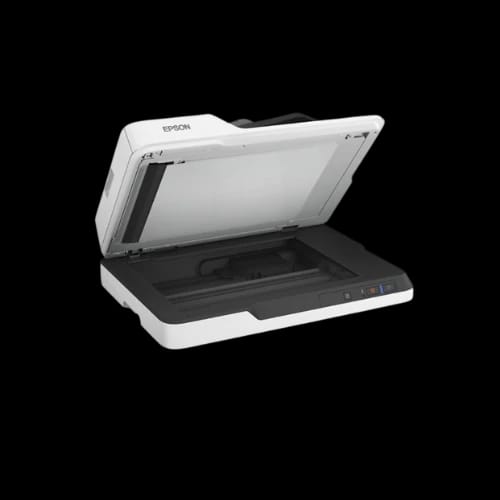
Epson DS-1630 Flatbed and Sheet Scanner with ADF
Key Features
- Epson DS-1630
- Flatbed + ADF
- 1200 dpi optical
- 50-sheet ADF
- OCR-ready scanning
Share:
Any Questions? Ask On
Technical Specifications
General Information
Scanner Type
Resolution & Color
ADF Specifications
Scanning Speed
Connectivity & Power
Physical
Warranty
Product Description
Epson DS-1630 Flatbed and Sheet Scanner with ADF
Paper-heavy workflows waste time, reduce focus, and create backlogs. The Epson DS-1630 Flatbed and Sheet Scanner with ADF targets offices that demand speed, clarity, and control. This A4 flatbed colour image scanner balances accuracy with volume handling. It suits accounting teams, front desks, education offices, and SMBs across Bangladesh.
Designed by Epson, a trusted Japanese brand in office equipment, the DS-1630 blends flatbed precision with ADF productivity. It fits naturally into the Office Equipment > Scanner category and supports mixed document workflows without compromise.
Epson DS-1630 Scanner Overview for Office and Business Use
The Epson DS-1630 works as both a flatbed scanner and an ADF scanner. This dual approach solves a common office pain point. Bound pages, IDs, and fragile papers scan safely on the flatbed. Loose stacks move fast through the ADF.
It uses a Contact Image Sensor (CIS) with RGB LED light. This combination produces consistent color accuracy and sharp text. The scanner handles daily workloads up to 1,500 pages, suitable for shared office use.
The body remains compact and lightweight. At 4.1 kg, it fits desks and counters without layout changes.
Flatbed and ADF Scanning Performance Explained
Optical Resolution and Output Control
The Epson DS-1630 offers 1200 x 1200 dpi optical resolution. This level suits document archiving, OCR tasks, and image-based records. Output resolution ranges from 50 to 1,200 dpi with 1 dpi control. That flexibility helps balance quality and file size.
Bit depth stays practical. Input supports 10 bits per pixel, while output delivers 8 bits per pixel. Text stays readable. Graphics remain clean.
Scanning Speed for Real Office Scenarios
Flatbed scanning stays consistent across resolutions. At 200–300 dpi, color pages scan in about 7 seconds. Mono pages finish faster. Higher resolution flatbed scans at 600 dpi remain usable for detail-heavy tasks.
The 3-pass duplex ADF handles speed-critical jobs:
- Up to 25 ppm / 10 ipm at 200–300 dpi
- Around 9 ppm / 6 ipm at 600 dpi
These speeds fit invoice processing, student records, and form digitization.
Automatic Document Feeder Capacity and Handling
The ADF supports 50 sheets (80 g/m²). Paper weight tolerance ranges from 50 to 120 g/m². This range covers standard office paper, reports, and forms.
Document size support stays flexible:
- Flatbed up to A4 (216 x 297 mm)
- ADF simplex up to 3,048 mm long
- ADF duplex supports standard A4 ranges
This capability supports contracts, long receipts, and mixed document batches.
File Formats and OCR Workflow Support
The Epson DS-1630 integrates well into digital workflows. It supports major file formats through Epson Scan 2 and Document Capture Pro.
Common output formats include:
- PDF and searchable PDF
- JPEG, TIFF, Multi-TIFF
- PNG, BMP
- DOCX, XLSX, PPTX (Windows)
The bundled OCR component converts scanned text into editable files. This helps legal teams, HR departments, and archives reduce manual typing.
Driver Compatibility and Operating System Support
The scanner supports a wide OS range. This matters for mixed-device offices and legacy systems.
Supported platforms include:
- Windows XP through Windows 10
- Windows Server 2003, 2008, 2012
- macOS 10.6.8 or later
Driver standards cover TWAIN, SANE, WIA, ICA, and ISIS. That ensures compatibility with third-party document management systems.
Connectivity Options for Office Networks
The Epson DS-1630 connects through USB 3.0 for stable, fast transfers. Offices requiring shared access can add Ethernet connectivity using an optional Network Interface Unit.
This modular approach keeps costs controlled. Small offices start with USB. Larger teams expand later.
Power Consumption and Energy Efficiency
Power efficiency matters for devices that stay plugged in all day. The DS-1630 manages energy use carefully:
- Operating: 11.0W
- Standby: 5.8W
- Sleep: 0.8W
- Power off: 0.15W
These figures suit offices aiming to reduce electricity costs without sacrificing availability.
Physical Design, Size, and Workspace Fit
The scanner measures 318 x 450 x 121 mm. Its white finish matches most office setups. Controls remain simple, reducing training time for staff.
The fixed document carriage design improves reliability. Fewer moving parts mean stable scans over long periods.
Environmental Operating Conditions
The Epson DS-1630 operates between 10°C and 35°C. Storage tolerance extends from -20°C to 60°C. Humidity support stays between 20% and 80%, non-condensing.
These limits suit typical Bangladeshi office environments, including air-conditioned and non-air-conditioned spaces.
Reliability, Build Quality, and Warranty
Epson scanners carry a reputation for long-term stability. The DS-1630 includes a 1-year warranty, backed by Epson’s regional support structure.
Country of origin remains Japan. Assembly varies by shipment and may include China, Indonesia, the Philippines, or Thailand. Quality control standards remain consistent across locations.
Who Should Buy the Epson DS-1630 Scanner?
This scanner fits offices that handle mixed document types daily:
- Accounting and finance departments
- Schools and universities
- Government offices
- Clinics and diagnostic centers
- Small to mid-sized businesses
It works best where flatbed accuracy and ADF volume both matter.
Buying the Epson DS-1630 in Bangladesh from PCB Store
The PCB Store offers the Epson DS-1630 for customers in Bangladesh. Buying locally improves warranty support and delivery timelines. Stock availability may vary, so early purchase helps avoid delays.
Businesses upgrading document workflows gain long-term value from this model. The balance of speed, resolution, and software support supports growth without frequent replacement.
Delivery Charge Info
Inside Dhaka: ৳130
Outside Dhaka: ৳170
FAQs
Is the Epson DS-1630 compatible with Windows 10 and macOS?
Yes. It supports Windows XP through Windows 10 and macOS 10.6.8 or later. Driver standards include TWAIN, WIA, ICA, ISIS, and SANE for wide software compatibility.
How much power does the Epson DS-1630 consume during daily use?
The scanner uses about 11.0W while operating. Standby and sleep modes reduce consumption significantly, making it suitable for offices focused on energy control.
Can the Epson DS-1630 handle duplex scanning automatically?
Yes. It features a 3-pass duplex ADF. This allows scanning both sides of documents automatically, reducing manual handling during high-volume tasks.
Does the scanner overheat during long scanning sessions?
No. It operates within standard office temperature ranges. Power consumption stays low, and the design supports continuous scanning up to 1,500 pages per day.
What document sizes work best with the ADF?
The ADF supports standard A4 documents, long pages up to 3,048 mm in simplex mode, and common office paper weights between 50 and 120 g/m².
Is OCR software included with the Epson DS-1630?
Yes. Epson Scan OCR Component comes bundled. It helps convert scanned documents into searchable and editable formats for digital archiving.
How does Epson DS-1630 compare with Epson DS-530?
The DS-1630 includes a flatbed, which the DS-530 lacks. The DS-530 focuses on higher ADF speed, while the DS-1630 suits mixed document types.
What is the price of Epson DS-1630 at PCB Store in Bangladesh?
Pricing varies based on stock and shipment. PCB Store provides current pricing and local warranty support. Checking availability directly ensures accurate purchase decisions.
Does the Epson DS-1630 support network scanning?
Yes, with an optional Network Interface Unit. This allows Ethernet connectivity for shared office environments without replacing the scanner.
Popular Products