Elgato Stream Deck Plus
Key Features
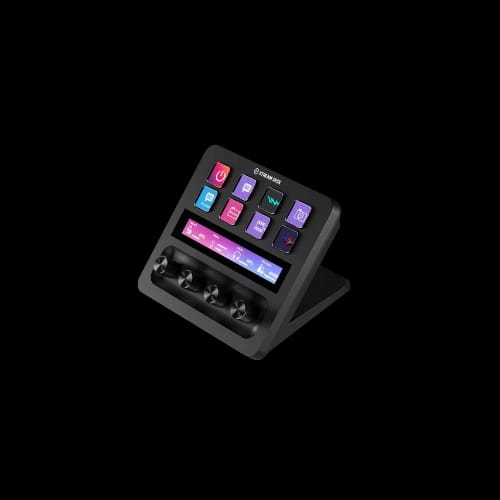
- Stream Deck Plus
- 8 LCD keys
- 4 control dials
- Dynamic touch strip
- 2000+ plugin support
- USB-C connectivity
- Auto-switch profiles
Out Of Stock
Share:
Any Questions? Ask On
Technical Specifications
General
Display & Input Controls
Connectivity
Software
Warranty
Product Description
Meet the Elgato Stream Deck Plus – The Creator Console Built to Transform Your Workflow
In modern content creation, speed and control define success. Creators no longer want to jump between windows, menus, and shortcuts while live or deep into a project. They want instant access, precise control, and a setup that adapts to how they work. That is exactly where the Elgato Stream Deck Plus earns its place.
As creative setups evolve beyond simple PCs, many users already familiar with Steam Deck ecosystems begin looking for smarter control surfaces that integrate seamlessly into their desks. At a higher level, this demand fits naturally inside the broader Gaming Console space, where hardware is designed to simplify complex interactions. For creators and professionals operating inside the wider Gaming environment, the Stream Deck Plus represents a productivity upgrade rather than a luxury.
Performance & Features – How the Elgato Stream Deck Plus Works
The Stream Deck Plus is not just a button pad. It is a hybrid control console built to reduce friction across creative workflows. Every element is designed for real-time interaction without breaking focus.
Instant Input Control with 8 LCD Keys
Each of the eight LCD keys is fully customizable and displays live, dynamic icons. Instead of memorizing shortcuts, users see exactly what each key does in real time. These keys can trigger apps, switch scenes, launch files, or activate complex multi-step commands with a single press.
This design dramatically reduces cognitive load during live streams and editing sessions. You spend less time thinking about what to click and more time creating.
Multifunction Rotary Dials for Precision Control
The four rotary encoders are the defining upgrade in the Stream Deck Plus. Each dial supports rotation and press actions, making them ideal for granular adjustments that keyboards and mice struggle to handle.
They are commonly mapped to:
- Volume balancing, mic gain, and audio routing
- Timeline scrubbing, zoom control, and effect fine-tuning
- Lighting intensity, camera exposure, and color grading
This tactile control gives creators the feel of professional studio hardware without the complexity.
Dynamic Touch Strip for Fast Navigation
The full-width touch strip adds swipe and tap functionality. It can display audio meters, track progress, or app-specific data while allowing fast navigation between profiles. Instead of opening multiple panels, users interact directly from the console.
Next-Level Customization with Stream Deck Software
What truly unlocks the Stream Deck Plus is the Elgato Stream Deck App. The software allows deep customization without technical barriers. Profiles can automatically switch based on the active application, ensuring the right controls appear at the right time.
Key capabilities include:
- Drag-and-drop action setup with visual feedback
- Folder-based layouts for clean organization
- Multi-action sequences that execute complex workflows instantly
- Access to thousands of plugins supporting major creative platforms
This level of control transforms the device into a personal command center tailored to individual habits.
Why Creators and Professionals Rely on the Stream Deck Plus
The Stream Deck Plus is often associated with streaming, but its value extends far beyond live broadcasts. In professional environments, efficiency compounds over time.
It helps users by:
- Reducing repetitive mouse and keyboard actions
- Speeding up editing, design, and production workflows
- Centralizing control for audio, video, and lighting
- Minimizing mistakes during live or high-pressure tasks
These benefits make it equally valuable for editors, designers, musicians, and productivity-focused professionals.
Seamless Streaming and Studio Integration
Streamers appreciate how easily the console integrates with popular platforms and hardware. Scene switching, sound effects, chat interaction, and recording controls can all be handled without leaving the live view. Studio creators can also manage lighting, cameras, and audio routing from one surface, creating a smoother and more professional production environment.
Design, Connectivity, and Daily Usability
The Stream Deck Plus features a premium build with a fixed ergonomic stand that keeps controls within easy reach. The angled design reduces strain during long sessions, while the glass touch surface and matte finish blend naturally into modern desks.
Connectivity is simple and reliable through USB-C, with bus-powered operation eliminating the need for external adapters. Compatibility with Windows and macOS ensures it fits into most creative setups without friction. Setup is straightforward: plug in the device, install the software, and start assigning actions.
Conclusion: A Smart Upgrade for Serious Workflows
The Elgato Stream Deck Plus is not about adding more gear to your desk. It is about removing friction from how you work. By combining tactile dials, responsive keys, and a dynamic touch interface, it replaces countless clicks with confident, intentional actions.
For creators looking to streamline production, enhance live performance, or simply work faster with fewer interruptions, this console delivers measurable value. It adapts as your workflow evolves, making it a long-term investment rather than a temporary accessory.
Ready to Buy
If you are ready to upgrade your creative setup, choose the trusted brand Elgato and purchase from PCB Store for genuine products, competitive pricing, and reliable support in Bangladesh.
Delivery Charge Info
Inside Dhaka: ৳100
Outside Dhaka: ৳150
FAQs
What is the price of Elgato Stream Deck Plus in Bangladesh?
The price of Elgato Stream Deck Plus in Bangladesh depends on availability and import stock. Check PCB Store for the latest price, official warranty, and current deals.
What makes Elgato Stream Deck Plus ideal for creators?
It offers customizable LCD keys, rotary dials, and a touch strip for real-time control. This reduces workflow friction and boosts productivity during streaming, editing, and production tasks.
Where can I buy Elgato Stream Deck Plus in Bangladesh?
You can buy it from PCB Store in Bangladesh with genuine warranty support, competitive pricing, and professional after-sales service.
How many keys does the Stream Deck Plus have?
It includes 8 customizable LCD keys with dynamic icons. These keys allow instant access to apps, shortcuts, and multi-step actions.
What are the rotary dials used for?
The 4 rotary encoders control audio, lighting, zoom, and effects. They allow precise adjustments with rotation and press actions for better control.
Does it support custom workflows and automation?
Yes, it supports multi-action sequences and app-based profiles. Users can automate complex tasks and switch controls based on active software.
Is Elgato Stream Deck Plus good for video editing?
Yes, it speeds up editing workflows by controlling timeline scrubbing, zoom, and effects. This reduces reliance on mouse and keyboard shortcuts.
Does it work with streaming software?
Yes, it integrates with major platforms and tools. You can control scenes, audio, and streaming functions without leaving your main screen.
Is it compatible with Windows and macOS?
Yes, it supports both Windows and macOS systems. It connects via USB-C and works without complex setup.
Does it require external power?
No, it is USB-powered and energy efficient. This makes it easy to use without additional adapters or power supplies.
Elgato Stream Deck Plus vs standard Stream Deck: which is better?
Stream Deck Plus is better for advanced workflows due to rotary dials and touch strip. Standard models suit basic shortcut control, while Plus offers deeper customization.
Popular Products