Elgato Facecam Neo Webcam
Key Features
- Model: Facecam Neo
- Resolution: Full HD 1920 x 1080p
- Sensor: CMOS sensor 1/2.9"Fixed Focus
- Connection: USB Type C
- Compatible apps: Teams, Zoom, Skype,
- TikTok, Instagram, FaceTime
Out Of Stock
Share:
Any Questions? Ask On
Technical Specifications
Camera Features
Video Performance
Physical Specifications
Other Details
Warranty Information
Product Description
Elgato Facecam Neo 1080p Webcam: Pro Video, Easy Setup
Introduction: A New Baseline for Professional Video
In today’s creator economy, video quality is no longer a luxury—it’s an expectation. Whether you stream, host virtual meetings, or record content, your camera defines how professional you appear. The Elgato Facecam Neo is designed to raise that baseline with dependable, studio-grade output that works straight out of the box.
For shoppers comparing options within the Corsair Webcam ecosystem, this model stands out for its balance of simplicity and performance. It sits naturally within a broader video hardware lineup, making it easy for buyers to evaluate upgrades without getting lost in overly complex specifications.
At its core, the Facecam Neo delivers a focused promise: smooth, clear 1080p video that looks professional in real-world conditions. This article breaks down why it performs so consistently, how it fits into modern PC setups, and who benefits most from choosing it.
Performance Fundamentals That Matter
The Facecam Neo is built around uncompressed 1080p video at 60 frames per second. That combination is critical for anyone who wants motion to look natural rather than jittery. Hand movements, product demos, and gameplay all appear fluid, which immediately improves perceived quality.
What sets it apart within the Webcam category is how that performance remains stable across lighting conditions. The high-quality CMOS sensor captures more detail without aggressively smoothing the image. Autofocus operates continuously, keeping the subject sharp even when posture or distance changes slightly.
From an optimization standpoint, this consistency reduces friction for users. You spend less time adjusting settings and more time producing content that looks polished.
Why 60FPS Is a Practical Advantage
Many buyers underestimate frame rate when comparing cameras. In real use, the jump from 30FPS to 60FPS is one of the most noticeable upgrades you can make.
- Motion appears smoother and more lifelike during presentations and streams
- Fast gestures and transitions show less blur and ghosting
- Viewer fatigue is reduced during long sessions
These advantages directly impact engagement, which is why high-frame-rate webcams are becoming the preferred standard rather than a niche feature.
Designed for Real Setups, Not Just Spec Sheets
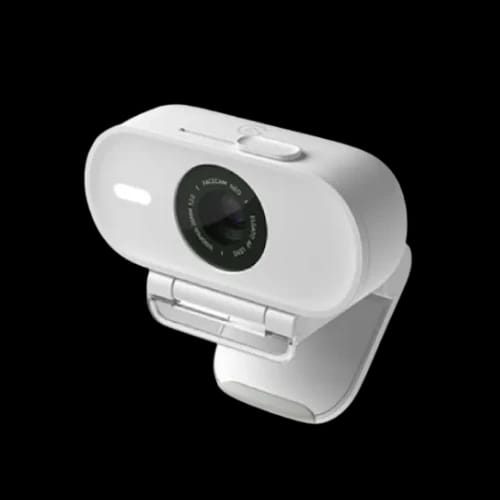
Beyond raw image quality, the Facecam Neo succeeds because it fits cleanly into existing desks and workflows. Its compact housing doesn’t dominate your monitor, and the included mount keeps the camera stable without complicated adjustments.
This design approach aligns well with buyers browsing broader Computer Accessories selections, where compatibility and desk space matter just as much as specs. The standard 1/4-inch mounting thread also gives users flexibility to expand later with tripods or multi-mount systems.
Connectivity is handled through USB-C, ensuring reliable bandwidth for uncompressed video. There’s no driver installation required, which lowers setup time and minimizes technical friction—especially important for professionals who need hardware to “just work.”
Practical Benefits That Improve Daily Use
Small design decisions add up when you use a camera every day. The Facecam Neo includes several features that directly address common pain points.
- A physical privacy shutter that guarantees control over when the camera is active
- No built-in microphone, encouraging use of higher-quality dedicated audio gear
- Support for Elgato Camera Hub software to fine-tune exposure and color
Together, these elements reinforce trust and usability, which are key decision factors for business users and creators alike.
Who Should Choose the Facecam Neo
This webcam is best suited for users who value reliability and image clarity over novelty features. Streamers benefit from the smooth frame rate, while remote professionals gain confidence from consistent focus and color accuracy.
Because it integrates easily into existing setups, it’s also an efficient upgrade path. Users moving up from entry-level webcams experience an immediate quality boost without needing to rethink their entire workflow.
From an e-commerce perspective, products like this perform well when positioned as dependable solutions rather than experimental tech. The Facecam Neo fits that role cleanly.
A Smart Upgrade With Long-Term Value
The Elgato Facecam Neo delivers exactly what modern users need: sharp 1080p60 video, dependable autofocus, and thoughtful design choices that improve daily use. It doesn’t overpromise, and it doesn’t require advanced technical knowledge to get professional results.
For buyers narrowing down options in specialized webcam ranges, this model offers a clear next step toward higher-quality output. Its balance of performance and simplicity makes it a practical investment for anyone serious about how they appear on camera.
As part of a refined video hardware lineup, the Facecam Neo proves that meaningful upgrades don’t need to be complicated—they just need to work consistently.
Ready to Buy
If you’re ready to upgrade your setup, choose the Elgato Facecam Neo from PCB Store and experience the quality trusted by creators worldwide. Backed by the innovation standards of Corsair, this webcam is a confident choice for professional video at home or work.
Delivery Charge Info
Inside Dhaka: ৳80
Outside Dhaka: ৳130
FAQs
What is the price of Elgato Facecam Neo in Bangladesh?
The price of Elgato Facecam Neo in Bangladesh varies depending on stock and availability. Check PCB Store for the latest official pricing, warranty support, and ongoing offers.
What makes Elgato Facecam Neo ideal for professionals?
It delivers uncompressed 1080p at 60FPS with consistent autofocus. This ensures smooth motion and sharp visuals, making it ideal for streamers, remote workers, and business users.
Where can I buy Elgato Facecam Neo in Bangladesh?
You can purchase it from PCB Store in Bangladesh with authentic warranty, after-sales service, and reliable customer support.
Does Elgato Facecam Neo support 1080p60 video?
Yes, it supports uncompressed 1080p video at 60FPS. This provides smooth, lifelike motion and improved clarity during streaming and video calls.
Why is 60FPS important for webcams?
60FPS delivers smoother motion and reduces blur during movement. It improves viewer experience, especially for streaming, presentations, and long video sessions.
Does Facecam Neo work in low-light conditions?
Yes, its CMOS sensor maintains detail and clarity in varying lighting. It avoids heavy image smoothing, resulting in more natural and balanced visuals.
Is Elgato Facecam Neo plug-and-play?
Yes, it requires no driver installation. It connects via USB-C and works instantly with most systems, reducing setup time and technical hassle.
Does it have a built-in microphone?
No, it does not include a microphone. This encourages users to use dedicated audio equipment for better sound quality.
Is autofocus reliable on Facecam Neo?
Yes, it features continuous autofocus that keeps subjects sharp. It adjusts automatically when you move or change position.
Elgato Facecam Neo vs standard webcam: which is better?
Facecam Neo is better due to uncompressed video and higher frame rate. It delivers sharper images, smoother motion, and more professional output than typical webcams.
Does it support mounting options?
Yes, it includes a standard monitor mount and a 1/4-inch thread. This allows use with tripods and multi-mount setups for flexible positioning.
Popular Products