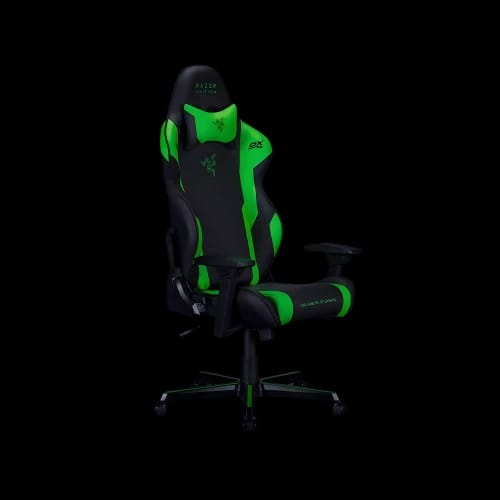
DXRacer RAZER Special Edition Gaming Chair
Key Features
- DXRacer RAZER Special Edition
- PU material
- Adjustable recline
- Height armrests
- 100kg load
- Black green
Out Of Stock
Share:
Any Questions? Ask On
Technical Specifications
General Information
Build and Materials
Adjustability and Support
Warranty
Product Description
DXRacer RAZER Special Edition Gaming Chair
If you’re building a gaming setup that actually supports long sessions, your chair is either your biggest upgrade or your biggest regret. The DXRacer RAZER Special Edition Gaming Chair is designed for players who want a stable, adjustable seat that fits a modern RGB-and-black theme without turning the room into a neon billboard.
Within the wider Gaming collection, this chair sits in a spot that’s practical first and flashy second. It’s made to keep you comfortable while you focus, and it’s a clean match for black-and-green setups you see across competitive and streaming rooms.
When you compare it against the broader gaming chair lineup, the RAZER Special Edition stands out by pairing a recognizable colorway with simple, user-friendly adjustments. That balance matters when you want a chair that feels “premium” in daily use, not just in photos.
Built for real sessions, not short sits
A gaming chair can look aggressive, but the real test is how it feels after hours. This model uses PU material that’s easy to wipe down and holds its look in daily rotation. It’s a sensible choice for anyone who snacks at their desk or deals with humid weather where fabric can feel less forgiving.
The backrest reclines, which helps you switch positions between matches, classes, or work blocks. Instead of forcing one posture all day, you can change your angle and reset your comfort without getting up every time.
Comfort tuning that keeps your setup consistent
Arm support is one of the fastest ways to reduce fatigue at a desk. Here, the armrests adjust in height, letting you align your elbows with your desk surface and mouse hand position. That’s especially helpful when your desk height is fixed and you’re trying to fine-tune ergonomics without buying a whole new table.
To keep the rest of your space working together, many shoppers pair a chair like this with a desk that matches their posture goals, and it makes sense to browse gaming desks mid-setup so your chair height and monitor level land in the right zone. A chair can only do so much if the desk forces awkward shoulder angles.
The conventional tilt lock is another practical win. It gives you a controlled rocking feel when unlocked, then a stable seat when you need to lock in for focused aiming, editing, or study.
Materials and adjustability that fit everyday use
This chair’s PU surface is chosen for maintenance and consistency. It’s also visually aligned with the black-and-green theme, so it won’t clash with Razer-inspired setups and peripherals. If you like your room to feel coordinated, the colorway does a lot of heavy lifting without needing extra décor.
To help you compare options without jumping into individual product pages, it’s useful to scan PU gaming chairs while you’re still deciding. You’ll get a clearer sense of how this material stacks up against other finishes across the category, especially for cleaning and daily wear.
Inside the gaming chair category, small differences in adjustment ranges can be the difference between “good enough” and “perfect fit.” This model focuses on the essentials: adjustable recline, height-adjustable armrests, and a stable tilt system.
- Recline support
- Height arm adjustment
- Conventional tilt lock
- PU surface build
- Black green style
Max load is rated at 100kg, which is a key checkpoint for safety and long-term stability. If you’re shopping for a household with multiple users, this spec helps you shortlist chairs that match your needs without guesswork.
Matching the chair to how you play
Not everyone uses a gaming chair the same way. Some people sit upright for competitive play, others lean back between rounds, and many switch between gaming, homework, and content creation. The best move is choosing a chair that supports those transitions without making you feel like you’re constantly “fixing” your posture.
If you like to fine-tune comfort beyond the chair itself, consider exploring gaming chair accessories during your setup planning. Accessories can help you personalize how a chair feels over time, especially as your routine changes across seasons or school schedules.
- Session comfort focus
- Easy-clean PU
- Setup color match
- Stable daily seating
- Desk alignment friendly
A practical path to purchase-ready choices
When you’re close to buying, narrow your decision based on what you’ll feel every day: arm position, recline range, and how stable the seat feels when you’re focused. The DXRacer RAZER Special Edition Gaming Chair is a clean pick for players who want reliable adjustments, a bold but controlled design, and a material that’s easy to maintain.
If you’re budget-conscious while still aiming for a strong upgrade, checking gaming chair deals can help you spot value options in the same style lane. Take a moment to compare specs and load ratings so you’re not paying extra for features you won’t use.
For a more targeted finish, shoppers who like rare colorways often browse special edition chairs once they’ve confirmed the basics. That’s where you can stay within a focused niche and buy with confidence.
Ready to buy
To complete your setup with a streamlined checkout experience, explore the PCB Store catalog while your size, color, and adjustment preferences are still fresh. This helps you keep your shopping path simple and category-focused.
Once you’ve decided on the look and core features, you can also browse the DXRacer collection to compare compatible chair styles in the same brand family. A quick category-level comparison is an easy way to confirm you’re choosing the best match for your desk and daily routine.
Delivery Charge Info
Inside Dhaka: ৳600
Outside Dhaka: ৳700
FAQs
Is this chair a gaming chair category product?
Yes, it sits within the Gaming category and the Gaming Chair sub-category.
What material is used on the chair surface?
It uses PU material, chosen for easy cleaning and consistent daily use.
Are the armrests adjustable on this model?
Yes, the armrests are adjustable in height for better desk alignment.
Does the backrest recline for relaxed seating?
Yes, the backrest recline is adjustable so you can change positions during long sessions.
What is the maximum supported load?
The chair supports a maximum load of 100kg.
What color is the DXRacer RAZER Special Edition Gaming Chair?
It comes in a black and green colorway designed to match gaming setups.
What type of tilt lock does it use?
It uses a conventional tilt lock system for controlled movement and stability.
Is this chair suitable for long gaming or study sessions?
Yes, it’s positioned as a practical option with key adjustments that support longer sitting periods.
Does this product include a manufacturer warranty?
No, the warranty is listed as no warranty.
Who is this chair best for?
It’s best for users who want essential adjustability, easy-maintenance PU material, and a coordinated black-green setup look.
Related Products
৳28,500
Popular Products