Blackmagic Design ATEM Mini Pro HDMI Live Stream Switcher
Key Features
- Blackmagic ATEM Mini Pro
- Four HDMI Inputs
- USB Webcam Output
- Fairlight Audio Mixer
- Direct Stream Control
- Built-in Recording
Out Of Stock
Share:
Any Questions? Ask On
Technical Specifications
General Information
Video Inputs & Outputs
Streaming & Recording
Audio Features
Video Effects & Media
Control & Software
Warranty
Product Description
Blackmagic Design ATEM Mini Pro HDMI Live Stream Switcher
The Blackmagic Design ATEM Mini Pro HDMI Live Stream Switcher changes how you produce live content. If your stream feels basic or hard to manage, this compact switcher brings structure and control.
Built under Studio Equipment for professional workflows, this Switcher delivers four HDMI inputs, live transitions, recording, and streaming control in one device. At PCB Store in Bangladesh, it serves creators, corporate teams, and event producers who need reliable live switching.
Blackmagic Design ATEM Mini Pro HDMI Live Stream Switcher Overview
The ATEM Mini Pro is a four-input live production switcher for HD streaming and broadcast use. It supports gaming consoles, corporate computer streams, and HD cameras.
It includes standards converted HDMI inputs. You can mix multiple HDMI sources without external converters.
The compact body combines a hardware control surface and connection ports. That design reduces setup complexity and keeps your workspace organized.
This model also supports ATEM Software Control through Ethernet. Hardware and software work together for deeper configuration.
Multi-Camera Switching with Four HDMI Inputs
Four HDMI inputs allow real-time switching between cameras and other sources. Each input is standards converted, which helps reduce compatibility issues between devices.
Switch between a presenter and slides. Show gameplay with a face cam. Move from wide shot to close-up instantly.
For streamers in Bangladesh upgrading from single-camera setups, this is a serious step forward. It supports structured, broadcast-style production without adding extra switching hardware.
Physical Control Panel for Live Production Accuracy
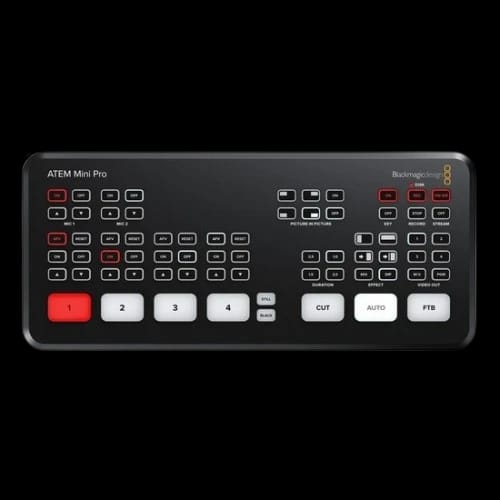
The integrated control panel features large, backlit buttons. You can switch sources by touch. That is critical during live broadcasts.
The control surface allows:
- Camera input selection
- Transition control
- Keyer activation
- DVE operation
- Settings adjustments
Presenters stay focused. Operators respond fast. No complex menu diving during critical moments.
This layout suits studios, training rooms, houses of worship, and event halls.
USB Webcam Output for Easy Streaming Setup
The USB output allows the ATEM Mini Pro to appear as a webcam on your computer.
Once connected, most streaming or conferencing software can detect it as a video source. No additional capture card is required.
This simplifies live production workflows. Connect the switcher to your PC. Select it as a webcam. Start streaming.
For corporate environments in Bangladesh, this reduces hardware layers and setup time.
HDMI Output and Program Monitoring
The HDMI output supports a minimum resolution of 1366 x 768 for monitoring your stream.
Video Out buttons let you preview each source before putting it on air. That helps prevent mistakes during live switching.
Monitor transitions. Check framing. Confirm readiness. Then go live with confidence.
This level of monitoring control separates casual streaming from structured production.
Stream and On Air Buttons for Instant Control
The ATEM Mini Pro includes dedicated Stream and On Air buttons.
Once configured through ATEM Software Control, you can start or stop your stream directly from the hardware. No software switching is required mid-session.
This direct access reduces delay and improves reliability during important broadcasts.
Direct Recording with Quick Record Button
The quick record button allows direct recording to a connected USB storage device.
Press once to start recording. Hold to hot-swap drives when using Blackmagic MultiDock.
This supports long events and live sessions where backup recordings matter. After recording, files can move directly into editing workflows.
For training centers and production studios in Bangladesh, that saves time.
Fairlight Audio Mixer with EQ and Dynamics
The built-in Fairlight audio mixer gives control over sound quality during live streams.
It includes EQ and dynamics processing. Adjust audio levels between microphones and HDMI sources. Balance voice and background content in real time.
Clear sound builds viewer trust. Poor sound damages credibility.
The ATEM Mini Pro addresses that without external audio hardware.
Picture-in-Picture and Green Screen Capabilities
The integrated DVE supports picture-in-picture layouts.
Display a presenter over slides. Combine gameplay with a reaction camera. Show product and host together.
Green screen chroma key support allows background replacement. This supports branded virtual sets and creative broadcast environments.
These tools help content stand out without complex post-production.
Media Pool for Titles and Graphics
The ATEM Mini Pro includes a 20 stills media pool.
Store logos, lower thirds, title cards, and background graphics. Access them during live sessions.
This supports consistent branding across streams. Marketing teams and content creators can maintain visual identity without external graphics systems.
ATEM Software Control via Ethernet
Through Ethernet, the ATEM Mini Pro connects to ATEM Software Control.
From the software panel, users can configure streaming settings, adjust audio parameters, manage keyers, and fine-tune production details.
The hardware provides speed. The software provides depth.
Together, they form a complete live switching system.
Compatibility and Use Case Scenarios
The Blackmagic Design ATEM Mini Pro works with HD cameras, gaming consoles, and corporate computer outputs via HDMI.
It fits multiple production scenarios:
- Gaming live streams
- Corporate webinars
- Religious services
- Online classes
- Product demonstrations
Its compact size supports both fixed studio setups and portable event use.
At PCB Store in Bangladesh, it is positioned for creators and businesses upgrading their production quality.
Reliability and Ownership Consideration
The Blackmagic Design ATEM Mini Pro comes with no warranty.
Buyers should consider installation planning and workflow testing before live deployment.
Despite that, Blackmagic Design products are widely used in professional production environments. Many studios rely on their switching systems for consistent operation.
Understanding your use case before purchase is essential.
Upgrade Your Live Production Setup Today
If your stream lacks camera variety or live control, this switcher addresses those gaps.
Four HDMI inputs. Built-in recording. Direct streaming control. Integrated audio mixing.
For professionals seeking structured live production in Bangladesh, the Blackmagic Design ATEM Mini Pro at PCB Store delivers a compact yet powerful solution.
Availability can fluctuate during peak streaming periods. Secure your unit before your next scheduled broadcast.
Delivery Charge Info
Inside Dhaka: ৳80
Outside Dhaka: ৳130
FAQs
Is the Blackmagic Design ATEM Mini Pro compatible with all HDMI cameras?
It supports four standards converted HDMI inputs. Most HD HDMI cameras and devices are compatible. Confirm your camera’s output format before connecting.
Does the ATEM Mini Pro require a capture card for streaming?
No. The USB output works as a webcam source. Most streaming and conferencing software can detect it directly.
Can I record directly from the Blackmagic Design ATEM Mini Pro?
Yes. Use the quick record button to record to a connected USB storage device. It also supports drive hot-swapping with Blackmagic MultiDock.
Does it support picture-in-picture effects?
Yes. The built-in DVE allows picture-in-picture layouts. You can combine multiple video sources in a single frame.
Does the ATEM Mini Pro support green screen?
Yes. It includes chroma key support for green screen backgrounds. This helps create virtual studio environments during live production.
Is overheating an issue during long streaming sessions?
Thermal performance details are not specified here. It is designed for live production use. Proper ventilation and stable placement are recommended for long sessions.
Blackmagic Design ATEM Mini Pro vs ATEM Mini – which is better?
The Pro version adds quick recording, Stream and On Air buttons, and enhanced monitoring controls. It offers more direct hardware-based live management.
What is the Blackmagic Design ATEM Mini Pro price in Bangladesh at PCB Store?
Pricing may vary based on availability and market demand. Contact PCB Store in Bangladesh directly for the latest price and stock information.
Popular Products