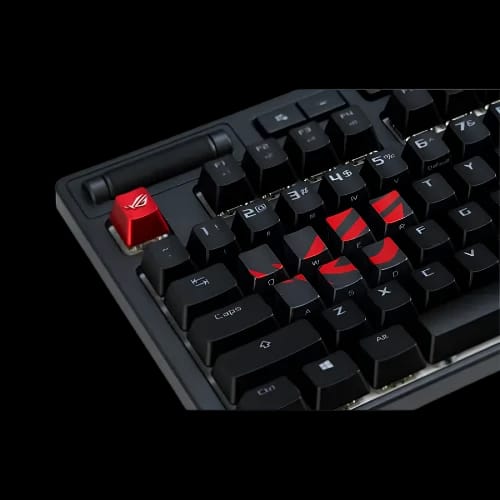
ASUS ROG AC02 Gaming Keycap Set
Key Features
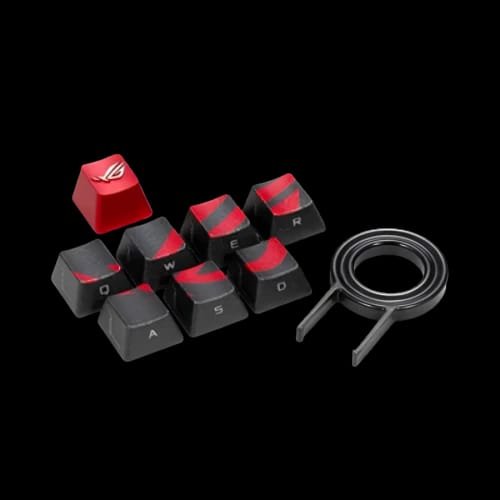
- Asus ROG AC02
- Cherry MX Compatible
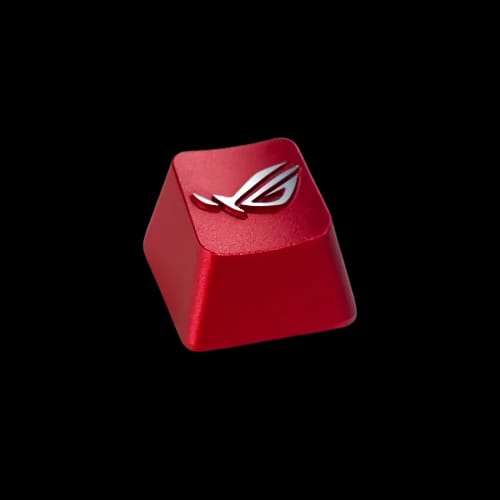
- Metallic ROG Keycaps
- Side-Lit Key Design
- FPS MOBA Controls
- Keycap Puller Included
Out Of Stock
Share:
Any Questions? Ask On
Technical Specifications
General
Compatibility
Design
Physical Information
Accessories
Warranty
Product Description
ASUS ROG AC02 Gaming Keycap Set In Bangladesh
Struggling to locate critical gaming keys during intense matches? The Asus ROG AC02 Gaming Keycap Set highlights vital controls with distinctive metallic ROG styling.
Designed for Cherry MX mechanical keyboards, this compact Accessories Keyboard upgrade targets FPS and MOBA players. Its ROG-red and gun-metal grey finish also adds a premium visual identity without replacing the entire keyboard.
Why Choose the Asus ROG AC02 Gaming Keycap Set?
The Asus ROG AC02 combines practical key identification with recognizable Republic of Gamers aesthetics. Its specially styled keycaps help players identify important gaming controls faster during demanding sessions.
Side-lit legends remain visible when paired with compatible keyboard lighting. The metallic ROG-red design creates a bold contrast against standard black or grey keyboard layouts.
This Asus Keycap Set includes a dedicated keycap-puller tool. Users can remove existing caps and install the new set without relying on improvised tools that may scratch nearby keys.
Key Benefits
- Luxury metallic ROG-red finish
- Cherry MX switch compatibility
- FPS and MOBA key identification
- Stylish side-lit keycaps
- Keycap-puller tool included
- Lightweight 13 g design
Asus ROG AC02 Specifications and Design Overview
The ROG AC02 measures 131 x 90 x 25 mm and weighs only 13 g. Its small physical footprint makes storage simple when the keycaps are not installed.
The colour combination includes ROG red and gun-metal grey. This contrast suits gaming desktops, ROG-themed builds, and mechanical keyboard setups with dark chassis designs.
Its Cherry MX compatibility is the most important technical consideration. Users should confirm their keyboard uses Cherry MX mechanical keys or compatible cross-shaped stems before purchasing.
AURA Sync support is not available. The set does not contain electronic lighting hardware, software controls, or programmable functions.
Instead, the side-lit construction works visually with compatible backlit keyboards. Actual illumination depends on the lighting system already built into the keyboard.
How Does This Asus Keycap Set Improve Gaming Control?
Fast input depends on muscle memory, but visual positioning still matters. Distinctive keycaps can help users reorient their hands after reaching for a mouse, controller, phone, or nearby control.
FPS players frequently depend on movement and command keys. MOBA players rely heavily on ability inputs and repeated command sequences. The ROG-red design makes selected keys easier to separate visually from surrounding caps.
This product does not change switch speed, polling rate, actuation force, or keyboard latency. Its benefit comes from identification, appearance, and tactile familiarity rather than electronic performance.
That distinction matters. Buyers receive a focused keyboard accessory, not a switch or keyboard performance upgrade.
Which Keyboards Support the ROG AC02 Keycaps?
The Asus ROG AC02 supports Cherry MX mechanical keyboards. It should not be treated as a universal solution for membrane keyboards, laptop keyboards, or switches with different stem designs.
Before ordering, remove one existing keycap carefully and inspect the switch stem. A Cherry MX-style stem usually has a cross-shaped mounting point.
Users should also check the size and layout of the intended keys. Mechanical keyboards may use different keycap profiles, row shapes, and spacing arrangements.
The set works best as a selective gaming-key replacement. It is not presented as a complete keyboard keycap kit.
Who Should Buy This Accessories Keyboard Upgrade?
Competitive and casual gamers can use the AC02 to make important controls stand out. It is particularly relevant for FPS and MOBA users who repeatedly return to the same command keys.
Tech hobbyists may choose it for a small ROG-themed keyboard modification. Existing Asus Brands users can also match the keycap colours with compatible ROG peripherals and gaming components.
Office executives, students, freelancers, and home users may appreciate the visual upgrade, although its design mainly targets gaming setups. Streamers and content producers can use the ROG styling to create a more distinctive desk appearance.
The set is also useful for buyers who like mechanical keyboard customization but do not need a full keycap replacement.
Does the Asus ROG AC02 Need Power or Software?
No separate power connection is required. The keycaps are passive mechanical accessories without batteries, cables, wireless connections, or onboard electronics.
AURA Sync is not supported. Users cannot control the keycaps through Armoury Crate or lighting software.
Any visible side lighting comes from the keyboard’s existing backlight. Lighting colour, brightness, and effects remain dependent on the connected keyboard.
Reliability and Product Support in Bangladesh
Metallic styling gives the keycaps a premium appearance, but careful handling still matters during installation and removal. Excessive sideways pressure may stress the switch stem or keycap mounting point.
Warranty information was not supplied for this product. Buyers should confirm current warranty or replacement terms with PCB Store before completing an order.
PCB Store provides reliable after-sales service across Bangladesh. Our team handles warranty claims, technical issues, compatibility questions, and product support directly through PCB Store.
How Should You Maintain the Asus ROG AC02 Keycaps?
Disconnect the keyboard before cleaning or removing keycaps. Use the included keycap puller and lift each cap vertically rather than twisting it from side to side.
Clean loose dust with a soft brush or low-pressure air. For surface marks, use a lightly dampened microfiber cloth, then dry the keycap completely before reinstalling it.
Avoid soaking metallic-finish keycaps or using strong cleaners. Alcohol-heavy liquids, abrasive pads, and household chemicals may affect the outer finish.
Bangladesh’s humid climate can leave moisture around frequently used peripherals. Keep the keyboard in a dry, ventilated room and avoid placing drinks beside the key area.
No keycap software optimization is required. For better visibility, adjust the supported keyboard’s backlight brightness and effects through its own controls or software.
Buy Asus ROG AC02 Gaming Keycap Set in Bangladesh
The ROG AC02 is a focused upgrade for Cherry MX keyboard users who value faster key recognition and premium ROG styling. Its metallic colour scheme, side-lit design, and included puller make installation practical.
Check the latest Asus ROG AC02 Gaming Keycap Set price in Bangladesh and current stock at PCB Store. Availability may change, so confirming switch compatibility and ordering while stock remains available is recommended.
PCB Store supports customers in Dhaka and across Bangladesh with product guidance, technical assistance, and dependable after-sales service.
Delivery Charge Info
Inside Dhaka: ৳80
Outside Dhaka: ৳130
FAQs
What is the price of Asus ROG AC02 Gaming Keycap Set in Bangladesh?
The current price depends on PCB Store stock and market availability. Check the latest listed price or contact PCB Store before ordering.
What makes Asus ROG AC02 Gaming Keycap Set ideal for gamers?
Its metallic ROG-red design highlights important FPS and MOBA controls. Side-lit keycaps also improve visual identification on compatible backlit mechanical keyboards.
Where can I buy an Asus Keycap Set in Bangladesh?
You can buy the set from PCB Store in Bangladesh. PCB Store provides compatibility guidance, direct product support, and nationwide after-sales assistance.
Does the ROG AC02 support Cherry MX keyboards?
Yes, it is designed for Cherry MX mechanical keys. Confirm the keyboard’s switch stem and intended key sizes before installation.
Does this keycap set support AURA Sync?
No, AURA Sync is not supported. The keycaps contain no electronic lighting controls and depend on the keyboard’s existing backlight.
Does the ROG AC02 consume keyboard power?
No, the keycaps consume no power. They contain no batteries, LEDs, wireless hardware, or electronic components.
Can these keycaps reduce keyboard temperature?
No, keycaps do not control keyboard temperature. Keep the keyboard clean, dry, and ventilated to limit dust and moisture buildup.
ROG AC02 versus standard keycaps: which is better?
The ROG AC02 suits users seeking metallic gaming styling and easier key identification. Standard keycaps remain suitable for general typing and uniform keyboard layouts.
Is a keycap puller included?
Yes, a keycap-puller tool is included. It supports safer vertical removal and helps reduce pressure on surrounding keys.
Is the ROG AC02 suitable for membrane keyboards?
No, compatibility is listed for Cherry MX mechanical keyboards. Membrane and laptop keyboard mechanisms generally use different mounting systems.
Popular Products