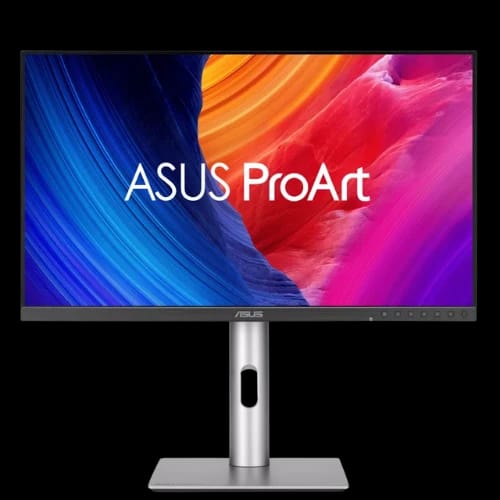
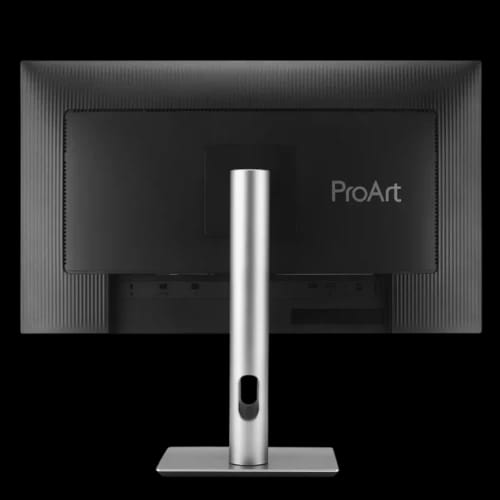
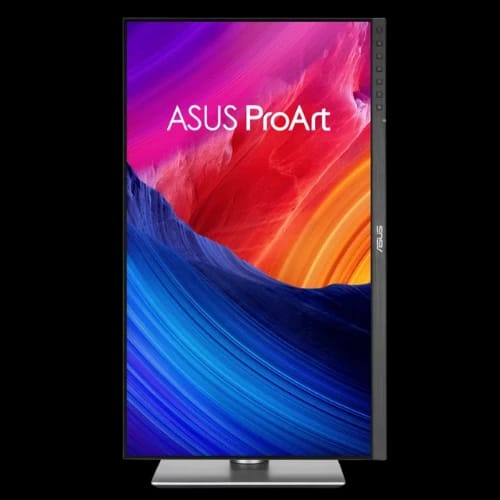
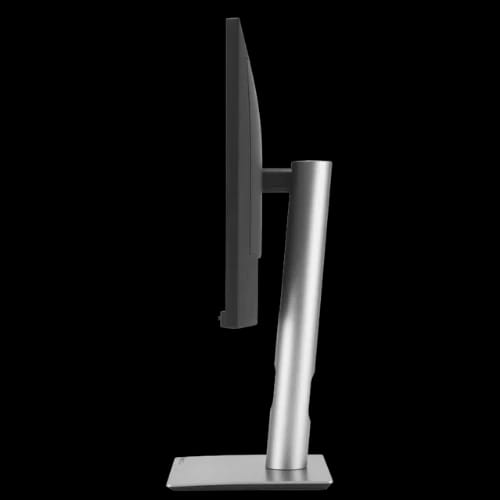
ASUS ProArt Display PA278QV Gen2 (PA278QGV) 27" 120Hz Professional Monitor
Key Features
- ASUS ProArt PA278QGV
- 27-inch QHD IPS
- 120Hz Adaptive-Sync
- 95% DCI-P3 Color
- Calman Verified Accuracy
- USB Hub Connectivity
Out Of Stock
Share:
Any Questions? Ask On
Technical Specifications
Display
Color Performance
Features
Audio
Connectivity
Power
Ergonomics
Dimensions & Weight
Package Contents
Certifications
Warranty
Product Description
ASUS ProArt Display PA278QV Gen2 (PA278QGV) 27" Professional Monitor
Struggling with inaccurate colors? ASUS ProArt Display PA278QV Gen2 (PA278QGV) delivers factory-calibrated precision for demanding creative workflows. Whether you edit photos, grade videos, create digital artwork, or manage professional design projects, color accuracy directly affects your final output. This 27-inch QHD professional monitor combines a high-quality IPS panel, Calman Verified calibration, 95% DCI-P3 coverage, and a smooth 120Hz refresh rate to deliver dependable performance for creative professionals.
Built for modern creators, this ASUS professional monitor balances accurate color reproduction, ergonomic comfort, extensive connectivity, and energy-efficient operation. If you're searching for a professional monitor with an excellent price in Bangladesh, the ASUS ProArt Display PA278QV Gen2 (PA278QGV) deserves serious consideration.
Why Choose the ASUS ProArt Display PA278QV Gen2 (PA278QGV)?
Professional creators demand consistency. A display that shifts colors or struggles with gradients wastes valuable editing time. The ASUS ProArt Display PA278QV Gen2 (PA278QGV) addresses those challenges with factory calibration and Delta E < 2 color accuracy.
Its 27-inch QHD (2560 × 1440) IPS panel provides excellent workspace without overwhelming your desk. The anti-glare surface and 178° viewing angles keep colors consistent from almost any position, making collaborative work easier.
The monitor also supports HDR10 and displays 1.073 billion colors (10-bit), helping photographers, video editors, and graphic designers review content with greater confidence.
ASUS ProArt Display PA278QV Gen2 Performance Overview
Image quality remains the biggest strength of this ProArt monitor.
The IPS panel covers 100% sRGB and 95% DCI-P3, making it suitable for photography, illustration, digital publishing, video production, and web content creation. Factory calibration and Calman Verified certification reduce the need for immediate manual color adjustment.
A maximum 120Hz refresh rate with Variable Refresh Rate (Adaptive-Sync) also benefits creators. Timeline scrolling becomes smoother, interface navigation feels more responsive, and fast-moving content appears more comfortable during editing sessions.
Key display highlights include:
- 27-inch QHD IPS display
- 2560 × 1440 resolution
- 120Hz Variable Refresh Rate
- 95% DCI-P3 coverage
- 100% sRGB color gamut
- Calman Verified calibration
- Delta E < 2 color accuracy
- HDR10 support
- 350 nits brightness
- Anti-glare screen
Professional Features That Matter
Creative professionals often switch between multiple color spaces depending on project requirements. ASUS includes several ProArt Presets including:
- Adobe RGB
- DCI-P3
- Rec.709
- sRGB
- HDR
- Native
- DICOM
- User Modes
The built-in ProArt Palette offers RGB tuning and gamma adjustment, giving professionals additional control over display behavior without relying entirely on software calibration.
QuickFit Plus also simplifies layout previews during content creation, while Picture-in-Picture (PIP) and Picture-by-Picture (PBP) improve multitasking across multiple devices.
Auto Rotation support through DisplayWidget Center adds convenience for portrait-oriented workflows such as coding, publishing, and document editing.
Smart Lighting and Comfortable Viewing
Long editing sessions place significant strain on the eyes.
The ASUS Light Sync solution includes an Ambient Light Sensor that automatically adjusts the monitor's color gamut according to surrounding lighting conditions. This helps maintain more consistent color perception throughout the day.
Comfort-focused technologies include:
- Flicker-Free technology
- TÜV Low Blue Light certification
- Anti-glare display surface
- Wide 178° viewing angles
The ergonomic stand also supports:
- Height adjustment (0–130mm)
- Tilt adjustment
- Swivel adjustment
- Full pivot rotation
Users can quickly position the display for editing, programming, document review, or collaborative presentations.
The monitor also supports 100 × 100mm VESA wall mounting for flexible workspace planning.
Connectivity for Professional Workstations
A professional monitor should integrate easily into modern desktops and creative workstations.
The ASUS ProArt Display PA278QV Gen2 (PA278QGV) includes:
- 1 × DisplayPort 1.4
- 1 × HDMI 2.1 (TMDS)
- 4 × USB 3.2 Gen 1 Type-A ports
- Earphone jack
The integrated USB hub keeps frequently used peripherals within easy reach, reducing cable clutter around your editing workstation.
Built-in 2W stereo speakers provide convenient audio monitoring for casual playback, presentations, and conference calls.
Power Efficiency and Sustainability
Performance doesn't have to come with excessive power usage.
The ASUS ProArt Display PA278QV Gen2 consumes less than 16.94W during normal operation while offering a dedicated power-saving mode below 0.5W. The hard-switch power-off mode consumes 0W.
ASUS also emphasizes environmental responsibility through:
- FSC MIX paper packaging
- Energy Star certification
- EPEAT Gold certification
- TCO Certified compliance
These certifications reflect reduced environmental impact while maintaining professional-grade performance.
Who Should Buy This Professional Monitor?
The ASUS ProArt Display PA278QV Gen2 (PA278QGV) fits a wide range of professional users across Bangladesh.
It works particularly well for:
- Graphic designers
- Professional photographers
- Video editors
- Content producers
- UI/UX designers
- Software developers
- CAD professionals
- Architecture firms
- Creative agencies
- Print production studios
- Freelancers
- Marketing teams
Its accurate color reproduction, ergonomic flexibility, and professional connectivity make it suitable for both home studios and commercial creative environments.
Warranty, Availability and Why Buy from PCB Store Bangladesh
A professional monitor is a long-term investment, so dependable after-sales support matters.
The ASUS ProArt Display PA278QV Gen2 (PA278QGV) comes with a 3 Years Warranty, including LCD Zero Bright Dot (ZBD) coverage. PCB Store provides genuine ASUS products, technical guidance, warranty claim assistance, and reliable after-sales service across Bangladesh.
If you're looking for the latest ASUS professional monitor at a competitive price in Bangladesh, check availability at PCB Store Dhaka or order online for nationwide support.
Delivery Charge Info
Inside Dhaka: ৳270
Outside Dhaka: ৳320
FAQs
What is the price of ASUS ProArt Display PA278QV Gen2 (PA278QGV) 27" Professional Monitor in Bangladesh?
Pricing varies by stock and promotions. Visit PCB Store for the latest price in Bangladesh and current availability.
What makes ASUS ProArt Display PA278QV Gen2 (PA278QGV) 27" Professional Monitor ideal for graphic designers?
Its factory calibration, Delta E < 2 accuracy, 95% DCI-P3, and 100% sRGB deliver dependable color precision for professional creative work.
Where can I buy this ASUS ProArt monitor in Bangladesh?
PCB Store is a reliable source for genuine ASUS monitors with warranty support and nationwide after-sales service across Bangladesh.
Does it support HDR content?
Yes. It supports HDR10 for compatible content and workflows requiring improved dynamic range.
Is this monitor suitable for video editing?
Yes. The QHD IPS panel, wide color gamut, factory calibration, and 120Hz refresh rate suit professional video editing.
Does it include USB ports?
Yes. It includes four USB 3.2 Gen 1 Type-A ports through the integrated USB hub.
Can it be wall mounted?
Yes. The monitor supports standard 100 × 100mm VESA wall mounting.
Is Adaptive-Sync available?
Yes. Variable Refresh Rate (Adaptive-Sync) provides smoother motion during creative work and compatible applications.
How much power does it consume?
Normal power consumption is below 16.94W, with less than 0.5W in power-saving mode.
ASUS ProArt PA278QGV vs standard office monitor?
The ProArt model focuses on professional color accuracy, factory calibration, wider color gamut, HDR support, and creator-focused features unavailable on most office displays.
Related Products

Popular Products