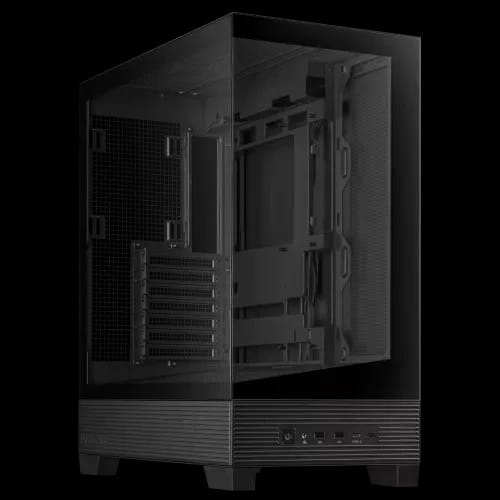
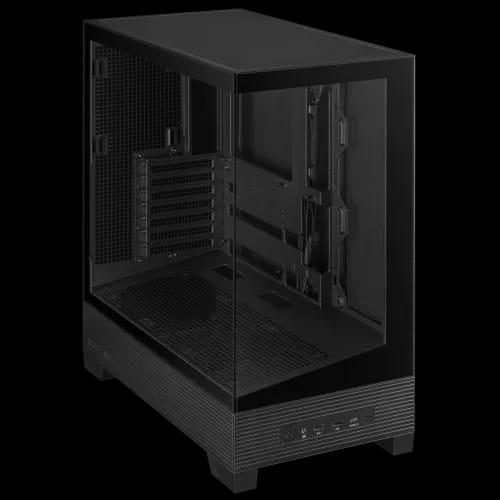
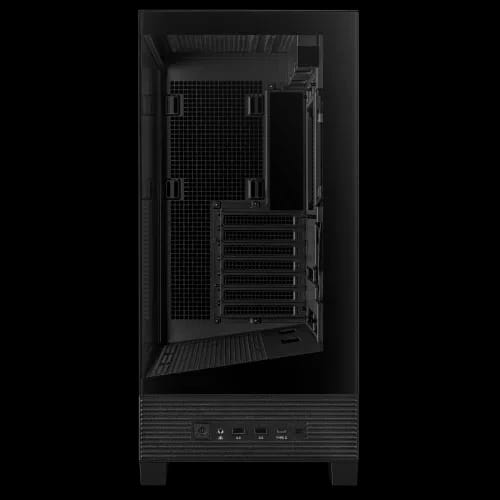
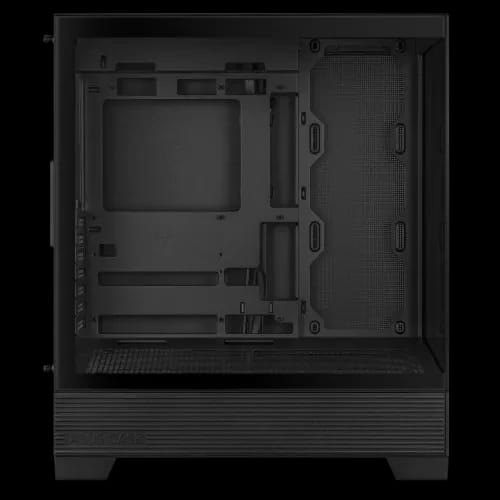
ASUS A31 ATX Mid-Tower Gaming Casing (Black)
Key Features
- ASUS A31 Casing
- BTF board support
- 360 mm cooling
- Tempered glass design
- Spacious interior
- USB-C high speed
- 8° Angled Base
Share:
Any Questions? Ask On
Technical Specifications
Case Type
External Features
Fan Support
Radiator Support
Pre-Installed Fans
Drive Bays
I/O Panel
Clearance Space
Warranty Information
Product Description
ASUS A31 ATX Mid-Tower Gaming Casing (Black) – Complete Buyer's Guide
Are high temperatures limiting your gaming performance? If you're building a custom gaming PC or upgrading your desktop computer components in Bangladesh, the ASUS A31 ATX Mid-Tower Gaming Casing (Black) is engineered to solve your airflow, cable management, and component spacing challenges in one smart design. Built for serious PC enthusiasts and available at PCB Store, this Desktop Gaming Casing delivers BTF-ready cooling flexibility, future-proof motherboard support, and a stunning tempered glass aesthetic.
Whether you're sourcing desktop computer components, comparing motherboard prices in BD, or planning a full custom gaming PC builder project, the ASUS A31 sits at the intersection of performance and style. Let's break down everything this casing offers.
ASUS A31 ATX Mid-Tower Gaming Casing (Black) – Performance Overview
The ASUS A31 focuses on three core priorities: airflow architecture, component clearance, and clean cable routing. It's designed for builders who refuse to compromise between aesthetics and thermal performance.
Key Supported Specifications
- Supports ATX, Micro-ATX, and Mini-ITX Motherboards
- Native BTF Motherboard Compatibility
- 360 mm Radiator Support (Top)
- 165 mm CPU Cooler Clearance
- 380 mm GPU Clearance
- 200 mm PSU Support
- 34 mm Cable Management Space
- Dual Tempered Glass Panels (Front and Left Side)
- 2 x 2.5"/3.5" Combo Drive Bays
- Dimensions: 238 x 511 x 435 mm
For an ASUS mid-tower Desktop Gaming Casing in this price range in Bangladesh, these clearances support high-end gaming systems comfortably.
Advanced Cooling Architecture of the ASUS A31 Desktop Gaming Casing
Thermal control is critical during extended gaming sessions. Poor airflow causes thermal throttling and performance instability — two issues no custom gaming PC builder wants. The ASUS A31 addresses this with a well-planned ventilation layout that supports both air and liquid cooling configurations.
Radiator Support
The top panel accommodates up to a 360 mm radiator, giving you full AIO liquid cooling support for high-TDP CPUs. If you're pairing this casing with a high-end motherboard (check the latest motherboard price in BD at PCB Store), your cooling loop will fit without modification.
Fan Layout Options
Top panel supports:
- 3 x 120 mm fans
- 2 x 140 mm fans
Rear panel supports:
- 1 x 120 mm fan
- 1 x 140 mm fan
The ASUS A31 does not include pre-installed fans. This gives you the freedom to choose airflow-focused or silent fans — or upgrade to RGB casing fan options for a glowing interior display. The internal airflow path remains direct. Fresh air enters efficiently. Hot air exits quickly.
BTF Support – Clutter-Free Interior for a Premium Build
One of the standout features of this Desktop Gaming Casing is its native BTF (Back-to-Front) motherboard compatibility. Traditional builds expose a mesh of visible power cables inside the case. BTF motherboards route all connectors behind the board, hiding them from view — and the ASUS A31 supports this layout natively.
Benefits of BTF support in the ASUS A31:
- Cleaner, clutter-free interior
- Significantly improved airflow paths
- Easier cable routing behind the motherboard tray
- Better visibility of RGB components through tempered glass panels
If you're planning a build with an ASUS BTF Motherboard, this casing supports both traditional and hidden-connector designs seamlessly.
Strong Component Clearance for Current and Future Desktop Computer Components
When investing in premium desktop computer components, upgrade flexibility matters. The ASUS A31 is designed for today's hardware and built to accommodate tomorrow's.
GPU Support – Up to 380 mm
Modern flagship GPUs are large. With 380 mm graphics card clearance, this Desktop Gaming Casing handles even the most powerful three-slot cards without struggle. If you're part of a PCB Featured PC build or custom gaming PC builder project, this clearance gives you maximum flexibility.
CPU Air Coolers Up to 165 mm in Height
CPU air coolers up to 165 mm in height fit comfortably within the ASUS A31. Most high-performance tower coolers — including premium models from Noctua, DeepCool, and be quiet! — fall under this limit.
PSU Clearance – 200 mm
With 200 mm PSU clearance, you can install larger power supply units suited for high-wattage builds. Whether you're running a high-TDP workstation setup or a fully loaded gaming rig, this casing provides the room you need.
Airflow and Dust Protection for Long-Term Reliability
Dust accumulation reduces airflow efficiency and raises component temperatures over time. The ASUS A31 includes:
- Removable dust filter on the top panel
- Removable dust filter on the bottom panel
Maintenance is simple. Slide out, clean, and reinstall. This protects your internal components and maintains peak cooling performance across months of intensive use.
Cable Management – 34 mm of Dedicated Routing Space
Cable routing directly impacts both airflow and appearance. The ASUS A31 offers:
- 34 mm cable management space behind the motherboard tray
- Dedicated routing paths for power and data cables
- Clean separation between front and rear cable zones
For builders in Bangladesh using PCB Store who value clean, clutter-free setups, this dedicated routing space makes a real difference — especially when your RGB casing fan setup and lighting are on full display through the glass panels.
Dual Tempered Glass Panels – Showcase Your Hardware
The ASUS A31 ATX Mid-Tower Gaming Casing (Black) features dual tempered glass panels:
- Front tempered glass panel
- Left-side tempered glass panel
Whether you've installed RGB RAM, an illuminated GPU, or a liquid cooling loop with RGB fans, this casing displays them beautifully. The sleek black exterior gives a premium look that suits both gaming desks and professional workstations.
Front I/O Connectivity for Modern Devices
The front panel of the ASUS A31 includes:
- 2 x USB 3.2 Gen1 ports
- 1 x USB 3.2 Gen 2x2 Type-C port
- 1 x Headphone/Microphone combo jack
The USB 3.2 Gen 2x2 Type-C port delivers speeds up to 20 Gbps — ideal for modern external SSDs, smartphones, and peripherals. For anyone comparing desktop computer components and I/O standards in Bangladesh, this front panel setup keeps you ahead of the curve.
Storage Flexibility with Combo Drive Bays
The ASUS A31 includes two 2.5"/3.5" combo drive bays. You can install:
- SSDs for fast boot times and game loading
- HDDs for bulk media and work storage
- A mix of both for a complete storage solution
This flexibility makes it equally suitable for gaming PCs, video editing systems, or hybrid workstations. Whether you're running a PCB Featured PC build or a content creation rig, storage options are fully covered.
Real-World Use Cases – Who Should Choose the ASUS A31?
The ASUS A31 is not just for one type of builder. Here are the most common real-world scenarios where this Desktop Gaming Casing delivers maximum value.
The Competitive Gamer
You need maximum cooling for long gaming marathons. With 360 mm radiator support, top and rear fan positions, and a clean internal airflow path, the ASUS A31 keeps your CPU and GPU temperatures in check — maintaining peak frame rates without throttling.
The BTF Motherboard Builder
You've invested in a BTF motherboard and want a casing that supports the hidden-connector design natively. The ASUS A31 is one of the few mid-tower options in Bangladesh with native BTF compatibility — letting your tempered glass panels showcase a truly clutter-free, cable-hidden build.
The RGB Enthusiast
You want a showpiece build with RGB RAM Memory, GPU lighting, and RGB casing fan setups. The dual tempered glass panels on the front and left give you a full 180-degree display window. Pair it with ARGB fans and sync them to your ASUS AURA ecosystem for a stunning effect.
The Performance Upgrader
You're upgrading from an older case and want a casing that supports modern GPUs up to 380 mm, CPU air coolers up to 165 mm in height, and large PSUs up to 200 mm. The ASUS A31 gives you room to grow — install a mid-range GPU now and upgrade to a flagship card later without changing your case.
The Content Creator and Workstation Builder
You need storage flexibility with SSDs and HDDs, solid thermals for sustained workloads, and a professional-looking setup. The combo drive bays, 200 mm PSU support, and black tempered glass finish make the ASUS A31 equally at home in a professional studio.
The Budget-Conscious Enthusiast
You want enterprise-level features at a mid-tower price. Available at PCB Store Bangladesh, the ASUS A31 delivers BTF support, dual glass, and high component clearances at a price point that competes with far less capable cases.
The First-Time PC Builder
You're building your first custom gaming PC and need a forgiving, roomy case. The ASUS A31's 34 mm cable management space, large component clearances, and easy-to-remove dust filters make the building process less stressful — and the result more professional-looking.
Why Buy Desktop Computer Components from PCB Store Bangladesh?
PCB Store is a trusted destination for desktop computer components in Bangladesh, offering a curated selection of ASUS Brand - Casings, motherboards, GPUs, and more. Whether you're comparing motherboard prices in BD, exploring PCB Featured PC bundles, or building a full custom gaming PC builder setup from scratch, PCB Store provides genuine products, competitive pricing, and knowledgeable support.
Stock for BTF-compatible cases like the ASUS A31 moves quickly. If you're planning your next gaming upgrade, securing your casing early ensures your build timeline stays on track.
Build with Confidence Using the ASUS A31 ATX Mid-Tower Gaming Casing (Black)
The ASUS A31 ATX Mid-Tower Gaming Casing (Black) is a well-engineered, feature-rich mid-tower that punches above its weight class. With 360 mm radiator support, BTF motherboard compatibility, 380 mm GPU clearance, CPU air coolers up to 165 mm in height, dual tempered glass panels, and a USB 3.2 Gen 2x2 Type-C front port, it delivers everything a serious builder needs — whether you're assembling desktop computer components for gaming, streaming, or professional work.
Available at PCB Store Bangladesh, the ASUS A31 is competitively priced for the value it provides. If you're comparing Desktop Gaming Casing options, checking the latest PC Component price in BD, or planning a full PCB Featured PC build, this casing belongs at the top of your shortlist.
Build smarter. Build cleaner. Build with ASUS.
Delivery Charge Info
Inside Dhaka: ৳200
Outside Dhaka: ৳250
FAQs
What motherboard sizes does the ASUS A31 support?
The ASUS A31 supports ATX, Micro-ATX, and Mini-ITX motherboards. Whether you're installing a full-size ATX board or a compact Micro-ATX build, this Desktop Gaming Casing accommodates all standard form factors. It also supports BTF motherboards natively for hidden-connector builds.
Does the ASUS A31 come with pre-installed fans?
No, the ASUS A31 does not include pre-installed fans. This gives you full control to choose the best RGB casing fan setup or high-airflow options based on your cooling and aesthetic preferences. You can install up to three 120 mm or two 140 mm fans on top, and one 120 mm or 140 mm fan at the rear.
Is the ASUS A31 compatible with 360 mm AIO liquid coolers?
Yes. The top panel supports up to a 360 mm radiator, making the ASUS A31 fully compatible with high-end AIO liquid coolers. This is ideal for custom gaming PC builder setups that prioritize low CPU temperatures under heavy loads.
How long of a GPU will fit inside the ASUS A31?
The ASUS A31 supports graphics cards up to 380 mm in length. This covers virtually every flagship GPU available today, including the latest NVIDIA RTX and AMD Radeon series cards. You won't need to worry about GPU fitment when upgrading your desktop computer components.
What CPU air coolers fit inside the ASUS A31?
Supports CPU air coolers up to 165 mm tall, including most high-performance tower models from popular brands.
Does the ASUS A31 support BTF motherboards?
Yes. BTF motherboard compatibility is one of the standout features of the ASUS A31. The case is designed to support hidden-connector BTF layouts natively, allowing for a truly clutter-free build visible through the dual tempered glass panels.
What are the front I/O ports on the ASUS A31?
The front panel includes 2 x USB 3.2 Gen1 ports, 1 x USB 3.2 Gen 2x2 Type-C port, and a combined headphone/microphone jack. The USB 3.2 Gen 2x2 Type-C port supports up to 20 Gbps — making it one of the fastest front-panel connections available on any Desktop Gaming Casing in this price range.
How many storage drives can I install in the ASUS A31?
The ASUS A31 includes two 2.5/3.5 combo drive bays, allowing you to install both SSDs and HDDs simultaneously. This storage flexibility suits gaming PCs, video editing systems, and hybrid setups equally well.
Does the ASUS A31 have dust filters?
Yes. The ASUS A31 features removable dust filters on the top and bottom panels. Dust filters are critical for maintaining airflow and protecting internal desktop computer components over long-term use. Cleaning them is simple — slide out, clean, and reinstall.
Where can I buy the ASUS A31 in Bangladesh?
The ASUS A31 ATX Mid-Tower Gaming Casing (Black) is available at PCB Store in Bangladesh. PCB Store carries a full range of desktop computer components including ASUS Casings, motherboards (check the latest motherboard price in BD), GPUs, and complete PCB Featured PC bundles. Visit PCB Store to place your order and start your custom gaming PC builder journey today.
Related Products
Popular Products