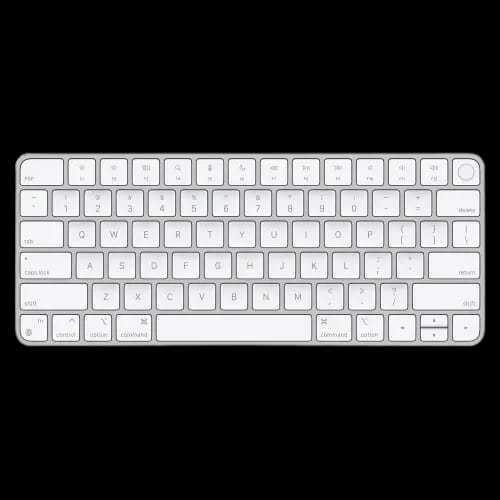
APPLE Magic Keyboard (MK293LL/A) with Touch ID
Key Features
- Model: Apple Magic Keyboard
- Wireless Bluetooth Connectivity
- Built-In Rechargeable Battery
- Touch ID Sensor
- Numeric Keypad
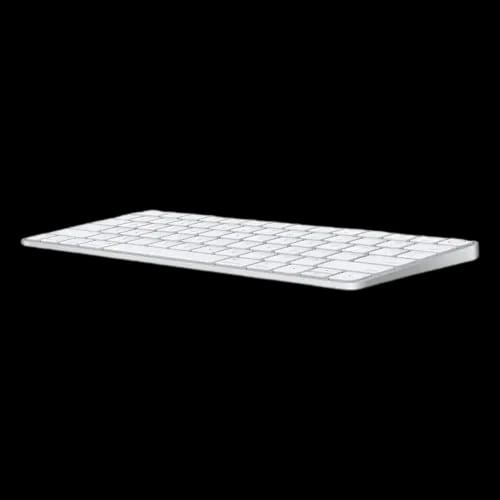
- Low-Profile, Compact Design
- Lightning to USB-C Cable Included
- Mac Compatible
Out Of Stock
Share:
Any Questions? Ask On
Technical Specifications
Main Features
Physical Specifications
Technical Specifications
Product Description
Effortless Apple Magic Keyboard with Touch ID for Secure Mac Typing
For dedicated Mac users, accessories are not optional extras. They are extensions of the ecosystem that define speed, security, and daily comfort. Choosing the wrong keyboard can quietly break that experience, adding friction to an otherwise seamless workflow.
The Apple Magic Keyboard with Touch ID is designed to live perfectly inside the broader Computer Accessories ecosystem, delivering native macOS integration without compromise. It combines biometric security, refined typing comfort, and Apple's signature minimalism into a single, professional-grade input device. For Mac users in Bangladesh, this keyboard represents reliability, trust, and long-term value.
Built for the Mac Ecosystem: Apple Magic Keyboard with Touch ID Performance
The Apple Magic Keyboard with Touch ID stands in a category of its own among input devices available today. Understanding the Keyboard Price in Bangladesh helps buyers make confident, informed decisions before committing to this level of investment.
Seamless Hardware-Level Integration
Unlike generic wireless keyboards, the Apple Magic Keyboard with Touch ID is engineered specifically for macOS. As part of the wider keyboard lineup optimized for modern desktops, it communicates directly with Apple silicon through a secure channel that enables Touch ID to function safely and instantly.
This integration allows users to unlock their Mac, approve system-level changes, and authorize Apple Pay transactions with a single touch. The fingerprint data never leaves the Secure Enclave, ensuring enterprise-grade protection without slowing down daily tasks.
Typing comfort is equally intentional. The low-profile scissor mechanism mirrors the feel of modern MacBooks, making transitions between laptop and desktop effortless. This consistency is a major reason professionals prefer solutions within the Apple keyboard ecosystem rather than third-party alternatives.
Productivity and Security Advantages
When you buy Apple Keyboard hardware directly from an authorized source, you get the full macOS-native experience that third-party alternatives simply cannot replicate. The real-world benefits of Touch ID extend well beyond simple convenience.
Touch ID That Works Harder Than You Expect
It reduces password fatigue, speeds up multi-user switching, and encourages better security habits by making strong authentication effortless. Combined with macOS shortcuts and system controls, the keyboard becomes a productivity multiplier rather than a passive accessory.
Key advantages include:
- Fast biometric authentication for logins, purchases, and system permissions
- Consistent typing feel across MacBook and desktop setups
- Native multimedia keys for brightness, volume, and playback control
These features explain why professionals who already trust Apple hardware tend to stay within the ecosystem when upgrading peripherals.
Wireless Design That Works All Day
Battery, Connectivity, and Portability
Wireless accessories often trade convenience for reliability, but the Magic Keyboard avoids that compromise. Bluetooth pairing is automatic and stable, with virtually no input latency during daily use. This makes it a strong alternative for users considering broader desk setups like a keyboard-mouse combo, while still keeping Apple's clean, single-device focus.
Battery performance is another standout. A single charge can power the keyboard for a month or more, reducing interruptions and cable clutter. Charging is handled via USB-C, aligning with modern Mac ports and simplifying cable management.
From a design perspective, the slim aluminum chassis keeps desks uncluttered and travel bags light. The keyboard is easy to move between home, office, and shared workspaces without sacrificing durability.
Notable design and connectivity highlights:
- Ultra-slim, lightweight aluminum body suitable for mobile setups
- Long-lasting rechargeable battery with USB-C charging
- Stable Bluetooth connection optimized for macOS
Together, these elements create a keyboard that fits naturally into modern, wireless-first work environments.
Who Should Choose This Keyboard?
The Apple Magic Keyboard with Touch ID is not aimed at casual users who frequently switch between operating systems. It is purpose-built for Mac owners who value security, consistency, and long-term usability. Developers, writers, designers, and students benefit most from its precise input and frictionless authentication.
If your workflow already depends on macOS shortcuts, Apple Pay, and secure user profiles, this keyboard enhances those systems instead of working around them. Browsing all Apple Products together reveals how naturally this keyboard slots into a unified, high-performance desk environment. Over time, the efficiency gains easily outweigh the initial investment.
A Focused Upgrade That Pays Off
Choosing the right keyboard is about more than typing. It shapes how securely and efficiently you interact with your Mac every day. The Apple Magic Keyboard with Touch ID delivers a rare balance of biometric security, comfort, and minimalist design without introducing compatibility risks.
For users refining their desk setup or pairing peripherals alongside a precision mouse, this keyboard anchors the experience with reliability and native integration. Buyers across Dhaka and wider Bangladesh trust PCB Store in BD for genuine Apple accessories, reliable warranty support, and honest after-sales service. It is not just an accessory; it is a core part of the Mac workflow.
Anyone serious about building their dream pc build around Apple silicon will find this keyboard an essential, non-negotiable starting point rather than an afterthought.
Where to Get Genuine Apple Magic Keyboard with Touch ID in Bangladesh?
Get the Apple Magic Keyboard with Touch ID today from PCB Store — your trusted destination for genuine Apple accessories in Bangladesh.
Delivery Charge Info
Inside Dhaka: ৳90
Outside Dhaka: ৳130
FAQs
What is the price of Apple Magic Keyboard with Touch ID in Bangladesh?
The price of Apple Magic Keyboard with Touch ID in Bangladesh typically ranges from mid to premium tiers depending on layout and availability. At PCB Store, it is sold as an official Apple accessory with warranty support.
Where can I buy Apple Magic Keyboard with Touch ID in Bangladesh?
You can buy Apple Magic Keyboard with Touch ID from PCB Store in Bangladesh for genuine products and warranty assurance. It is available both online and in-store with verified Apple authenticity.
What makes Apple Magic Keyboard with Touch ID ideal for Mac users?
It is ideal because it offers native macOS integration and secure Touch ID authentication. Mac users benefit from seamless Apple silicon support, consistent typing feel, and faster secure logins without compatibility issues.
Is Apple Magic Keyboard with Touch ID compatible with Windows?
No, it is not fully compatible with Windows systems. While basic typing works via Bluetooth, Touch ID, macOS shortcuts, and Secure Enclave features are exclusive to macOS devices.
How does Touch ID improve keyboard security?
Touch ID improves security by enabling biometric authentication through Apple’s Secure Enclave. It allows instant login, Apple Pay authorization, and system access without exposing fingerprint data externally.
Does the keyboard support USB-C charging?
Yes, it supports USB-C charging for modern convenience. This aligns with Apple’s latest Mac devices, reducing cable clutter and ensuring faster, universal charging compatibility.
How long does the battery last on this keyboard?
The battery lasts over a month on a single charge with regular use. Its efficient power management ensures uninterrupted productivity without frequent recharging.
Is the typing experience similar to MacBook keyboards?
Yes, the typing experience closely matches MacBook keyboards. It uses a low-profile scissor mechanism that delivers consistent key travel, making transitions between devices smooth.
Does Bluetooth cause input delay or latency?
No, Bluetooth connectivity is optimized for macOS with minimal latency. It provides stable wireless performance suitable for typing, coding, and professional workloads.
Does the keyboard have overheating or thermal issues?
No, the keyboard does not face thermal issues due to its low power consumption. Its aluminum body efficiently dissipates heat, ensuring stable performance during extended use.
Who should buy this keyboard for best value?
Mac professionals and students should buy it for best value. It is optimized for developers, writers, and designers needing secure authentication, macOS shortcuts, and long-term reliability within the Apple ecosystem.
Popular Products