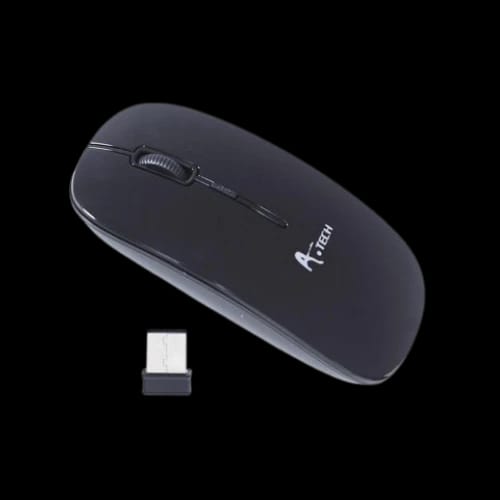
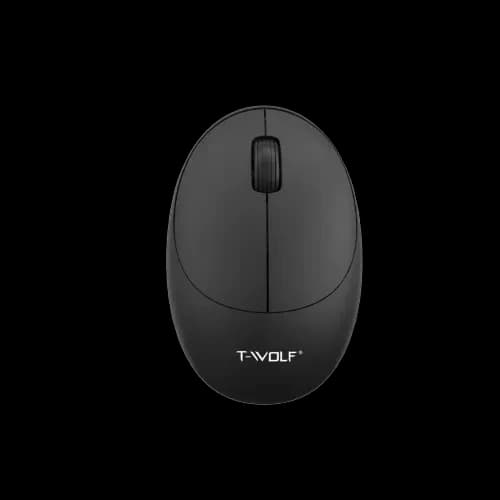
A.Tech Ergonomic Wireless Mouse
Key Features
- A.Tech Ergonomic Wireless Mouse
- Wireless connectivity
- Ergonomic design
- 3-button control
- Optical tracking
- Internet multimedia keys
Out Of Stock
Share:
Any Questions? Ask On
Technical Specifications
General
Design & Control
Shortcut Functions
Connectivity
Warranty
Product Description
Tired of cable drag slowing your workflow? The A.Tech Ergonomic Wireless Mouse fixes that fast.
A bad mouse can ruin the rhythm of a workday. Missed clicks, awkward grip, and messy desk cables add friction you feel every hour. The A.Tech Ergonomic Wireless Mouse is built for users who want a cleaner setup, easier control, and everyday comfort from a trusted A4Tech wireless mouse in the Accessories range at PCB Store Bangladesh.
This Mouse fits the kind of real-world use most buyers actually care about. It is wireless, easy to place on a busy desk, and practical for office work, study sessions, browsing, and general home computing. For buyers searching for an ergonomic wireless mouse price in Bangladesh, this model speaks to value, convenience, and day-to-day usability rather than empty hype.
A.Tech Ergonomic Wireless Mouse for Everyday Comfort and Clean Desk Setups
A wireless mouse makes a noticeable difference the moment you remove one more cable from your desk. That matters in compact workspaces, student rooms, front-desk counters, and home offices where every inch counts. The A.Tech Ergonomic Wireless Mouse targets that exact need.
Its design focus is clear. You get a shape aimed at more natural hand use, backed by the freedom of wireless connectivity. That mix suits people who spend long hours clicking through documents, browser tabs, spreadsheets, playlists, or online classes.
In the Mouse segment under Accessories, this kind of product appeals to buyers who want practical comfort without moving into complicated or flashy hardware. It keeps the setup simple. That alone is a selling point for many users in Bangladesh.
A.Tech Ergonomic Wireless Mouse Performance for Daily Work, Browsing, and Media Control
This model uses wireless connectivity, which helps reduce clutter and gives more flexibility in how you position your workstation. If you work from a laptop stand, compact keyboard tray, or shared desk, that freedom feels useful right away.
The A.Tech Ergonomic Wireless Mouse also includes optical tracking support and a scroll function, making it suitable for normal desktop movement, document navigation, and routine online tasks. It is not overloaded with extra buttons, which many buyers actually prefer for easy learning and hassle-free use.
You also get:
- 3 mouse buttons for familiar day-to-day control
- Internet keys for faster browsing-related actions
- Multimedia keys for easier media access and convenience
- Wireless operation for a cleaner, more flexible desk layout
That combination makes sense for users who want a simple wireless mouse with useful shortcuts, not a bulky learning curve.
Why the A.Tech Ergonomic Wireless Mouse Makes Sense for Bangladesh Buyers
In Bangladesh, buyers often want one accessory to handle multiple roles. A single Mouse may be used for office tasks in the morning, classes in the afternoon, and entertainment at night. That is where this A4Tech option lands well.
It is easy to imagine it in common local setups:
- Student builds: Good for assignments, research, browsing, and everyday laptop use
- Freelancer workstations: Useful for long desk hours with less cable clutter
- Cash counters and office desks: Practical where quick movement matters
- Family PCs: Straightforward enough for shared use across age groups
- Gaming café support systems: Better suited for admin stations and browsing terminals than complicated gaming-only setups
Not every user needs a high-button, heavy-profile device. Many just want responsive basic control and a comfortable hand feel. This product lines up with that search intent.
A.Tech Ergonomic Wireless Mouse Features That Matter in Real Use
The strongest part of this product is not gimmicks. It is function. A lot of buyers in PCB Store Dhaka ask for a wireless mouse that feels easy to use from day one. This is exactly that sort of choice.
The 3-button layout keeps operation intuitive. People moving from a standard office mouse will not need time to adjust. The scroll support helps with documents, long web pages, and day-to-day navigation, while the Internet and multimedia keys add convenience where many users actually notice it.
That matters for:
- Office staff opening browsers and web tools all day
- Remote workers switching between calls, tabs, and media
- Students watching lectures and reading PDF materials
- Home users who want less cable mess around their PC
There is a practical confidence in simpler hardware. Less clutter. Fewer distractions. More direct use.
A4Tech Wireless Mouse Value for Office, Study, and Home Use
Brand matters in this category because buyers want a Mouse that feels dependable for regular use. The A.Tech Ergonomic Wireless Mouse carries the A4Tech name, which gives buyers extra confidence when choosing a daily-use PC accessory from PCB Store.
For many shoppers, the buying decision is not only about design. It is also about support after the sale. PCB Store handles after-sales service across Bangladesh, including direct help for warranty claims, technical issues, and product support. That local backup matters far more than marketing language.
If you are buying Accessories online in Bangladesh, trust is part of the product. A retailer that stands behind the item can save time, money, and frustration later.
A.Tech Ergonomic Wireless Mouse at PCB Store Bangladesh
A lot of wireless mouse listings look similar at first glance. The difference usually appears after purchase. Support quality, seller reliability, and how smoothly issues get handled can change the entire experience.
PCB Store gives this product a stronger retail case because buyers are not left on their own after checkout. Whether you are shopping from Dhaka or outside the capital, local service support across Bangladesh adds real value.
If you need a practical Mouse for work, study, browsing, and regular desktop use, the A.Tech Ergonomic Wireless Mouse is a smart fit. It keeps your setup cleaner, gives you familiar control, and comes from a recognized brand in a category where reliability still matters. Stock can move quickly on high-demand daily-use accessories, so checking availability at PCB Store Bangladesh now is the sensible move.
Delivery Charge Info
Inside Dhaka: ৳80
Outside Dhaka: ৳130
FAQs
Is the A.Tech Ergonomic Wireless Mouse good for office work?
Yes, it suits office work well. The wireless design reduces desk clutter, while the scroll function and 3-button layout keep everyday tasks simple and comfortable.
Can I use the A.Tech Ergonomic Wireless Mouse for student use?
Yes, it works well for students. It is suitable for browsing, online classes, assignments, and general laptop or desktop use without the annoyance of a wired setup.
Does the A.Tech Ergonomic Wireless Mouse have extra shortcut controls?
Yes, it includes Internet keys and multimedia keys. That makes browsing and media use more convenient for users who want quick access during daily tasks.
Is this mouse wired or wireless?
This is a wireless mouse. It is a strong choice for users who want more freedom of movement and a cleaner desk layout at home or work.
Does the A.Tech Ergonomic Wireless Mouse have scroll support?
Yes, it includes scroll functionality. That helps during document reading, web browsing, and regular navigation through long pages or menus.
Is the A.Tech Ergonomic Wireless Mouse suitable for long use sessions?
It is designed with ergonomic use in mind, so it aims to feel more natural in hand during daily work. Comfort still depends on your grip style and usage pattern.
How much power does the A.Tech Ergonomic Wireless Mouse use?
The provided product details confirm wireless connectivity, but they do not mention exact power consumption. For buyers, the main point is cleaner use without a cable-bound setup.
Does the A.Tech Ergonomic Wireless Mouse have thermal issues?
Mice do not usually face the same thermal concerns as processors or graphics cards. Based on the provided details, there is no stated heat-related issue for this product.
How does the A.Tech Ergonomic Wireless Mouse compare with a standard wired office mouse?
Its biggest advantage is cable-free convenience. Compared with a basic wired office mouse, it offers a tidier setup and added Internet and multimedia key support.
What is the A.Tech Ergonomic Wireless Mouse price in Bangladesh and is it available at PCB Store?
For the latest price in Bangladesh and stock status, check PCB Store. Availability may vary, and PCB Store also provides direct after-sales and support service across Bangladesh.
Related Products

Popular Products