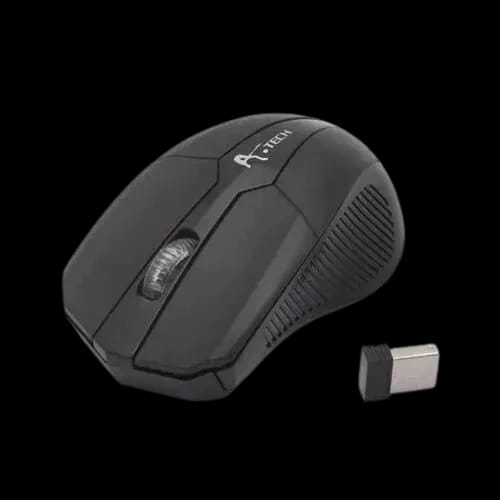
A POINT TECH AT-3W009 2.4G OPTICAL WIRELESS MOUSE
Key Features
- A POINT TECH AT-3W009
- 2.4G wireless
- Adjustable DPI
- Nano receiver
- AA battery support
- 3-button design
Out Of Stock
Share:
Any Questions? Ask On
Technical Specifications
General Information
Mouse & Touch
Networking & Connectivity
Battery & Power
Compatibility
Physical Specification
Product Description
APOINT TECH AT-3W009 2.4G OPTICAL WIRELESS MOUSE
Cursor lag or cable clutter? APOINT TECH AT-3W009 fixes control fast.
A slow, jumpy pointer can ruin a work session. Cable drag can feel worse on small desks. The APOINT TECH AT-3W009 2.4G OPTICAL WIRELESS MOUSE keeps your setup clean and your clicks predictable.
This is the kind of daily-use gear people expect from PC accessories. If you shop for a Mouse that works without drama, this model fits the brief. PCB Store in Bangladesh often gets requests for simple wireless control, and this one targets that exact need.
Why the APOINT TECH AT-3W009 matters for everyday users
Wireless is not only about looks. It’s about freedom of placement and fewer desk snags. With a 2.4G wireless link, the AT-3W009 focuses on stable input for normal computing.
You also avoid pairing steps that confuse many buyers. The included nano receiver keeps setup quick. Plug it in, add AA batteries, and start using it.
APOINT TECH AT-3W009 specifications and performance overview
The APOINT TECH AT-3W009 uses an optical sensor for pointer tracking. It supports two DPI steps: 800 DPI and 1200 DPI. Those values target common screen sizes and typical workloads like documents, browsing, and basic office tools.
For connectivity, it uses a wireless 2.4G connection type. The listed wireless distance is 10 meters, which suits most rooms, desks, and meeting spaces. This range also helps when a PC tower sits under a desk or away from the monitor.
Power comes from standard AA batteries. The mouse supports 1 AA or 2AA, giving flexibility based on what you keep available. Many users in Bangladesh prefer AA support because replacements are easy to find.
Physically, the mouse comes in black and uses a 3-button layout. That layout matches familiar mouse behavior for left click, right click, and middle click. The nano receiver is specified as the receiver type, keeping the USB profile compact.
Key features and benefits of APOINT TECH AT-3W009 wireless mouse
The best accessories remove friction from your day. This model stays focused on the features most people actually use.
- 2.4G wireless connection for cable-free control
- 10m wireless distance for flexible placement
- 800/1200 DPI options for slower or faster pointer feel
- Nano receiver for quick plug-and-play setup
- 1 AA or 2AA support for easy battery replacement
- 3-button design for familiar daily navigation
DPI choice: what 800 and 1200 mean in real work
DPI controls pointer speed. 800 DPI often feels steadier for text work and careful clicking. 1200 DPI can feel quicker on larger displays or when you prefer faster cursor travel.
These two steps keep things simple. You get practical control without chasing extreme sensitivity numbers you may never need.
Nano receiver: small detail, big convenience
A nano receiver sits low in a USB port. That matters for laptops moved between rooms or offices. It also helps on shared PCs where people bump larger adapters.
In many setups, this small part is the difference between “always ready” and “always missing.”
Power and technical highlights of APOINT TECH AT-3W009
Battery behavior shapes daily comfort. The APOINT TECH AT-3W009 supports one or two AA batteries, which is useful if you want flexibility. One battery can keep weight down. Two batteries can be an option when you want longer operation, without relying on charging.
Wireless mice like this do not create meaningful heat. They run at low power and sit in open air. If you ever notice warmth, it usually points to an aging battery, a wrong battery type, or a damaged cell.
Practical power habits for better runtime
Use fresh AA batteries from a trusted source. Remove batteries if the mouse will sit unused for a long period. That avoids leakage risk and keeps the battery bay clean.
These habits matter more than specs when you own accessories long-term.
Compatibility and best use-cases for APOINT TECH AT-3W009
Compatibility is where a mouse proves its value. The APOINT TECH AT-3W009 lists support for Windows XP, 7, 8, 10, plus Mac. That range is useful in mixed-device homes, schools, and offices.
A lot of Bangladesh offices still run older Windows systems. This mouse stays relevant there. It also works for Mac users who want a simple receiver-based mouse.
Who should choose this mouse?
This model fits users who want stable daily control without extra buttons or complex setup.
- Students working on assignments and browsing
- Office users handling spreadsheets and email
- Home users managing everyday PC tasks
- Laptop users who want a clean desk surface
Because it stays in the Accessories space, it pairs well with basic workstation builds. It also suits anyone replacing an older wired Mouse without changing habits.
Reliability, support, and warranty notes
Reliability starts with realistic expectations. The APOINT TECH AT-3W009 keeps a basic 3-button design, which often reduces accidental presses. The nano receiver approach also avoids pairing issues common with some wireless devices.
Warranty information is not specified in the provided details. That means you should confirm the policy at the time of purchase. PCB Store typically provides guidance based on distributor coverage in Bangladesh, so check the product listing or ask support before checkout.
What to confirm before you place the order
Check whether warranty covers the mouse hardware and the receiver. Ask how claims work and what proof of purchase is needed. This takes a minute and can save time later.
Get the APOINT TECH AT-3W009 from PCB Store in Bangladesh
If your desk feels crowded, switching to wireless is a quick win. The APOINT TECH AT-3W009 delivers optical tracking, two useful DPI levels, and a nano receiver that keeps setup simple. It fits common Windows systems and Mac use, which helps in mixed environments.
PCB Store in Bangladesh is a practical place to buy it because accessories move fast and availability can change. If you need a dependable wireless Mouse for daily work, ordering while stock is active is the smart move.
Delivery Charge Info
Inside Dhaka: ৳80
Outside Dhaka: ৳130
FAQs
Is this mouse compatible with both Windows and Mac?
Yes, it works smoothly with Windows XP, 7, 8, 10, and macOS systems.
What type of wireless connection does it use?
It uses a stable 2.4G wireless connection with a nano USB receiver.
What is the wireless operating range?
The mouse supports a wireless distance of up to 10 meters.
Can I adjust the mouse sensitivity (DPI)?
Yes, it supports adjustable DPI levels of 800 and 1200 for flexible cursor control.
What kind of battery does the mouse require?
It runs on either one AA or two AA batteries, making replacements easy.
How many buttons does the mouse have?
The mouse features a simple and reliable 3-button design.
Is the mouse suitable for everyday office or home use?
Absolutely. It’s designed for daily tasks like browsing, office work, and general computer use.
Does it require any software installation?
No software is needed. Just plug in the nano receiver and start using it instantly.
Popular Products